Stripe Financial Automation Database Slack Make.com

Automate Daily Stripe Balance Tracking

Save Stripe transaction data to a database daily and get Slack alerts - no manual work required

Get This Workflow → Make.com · Free Template
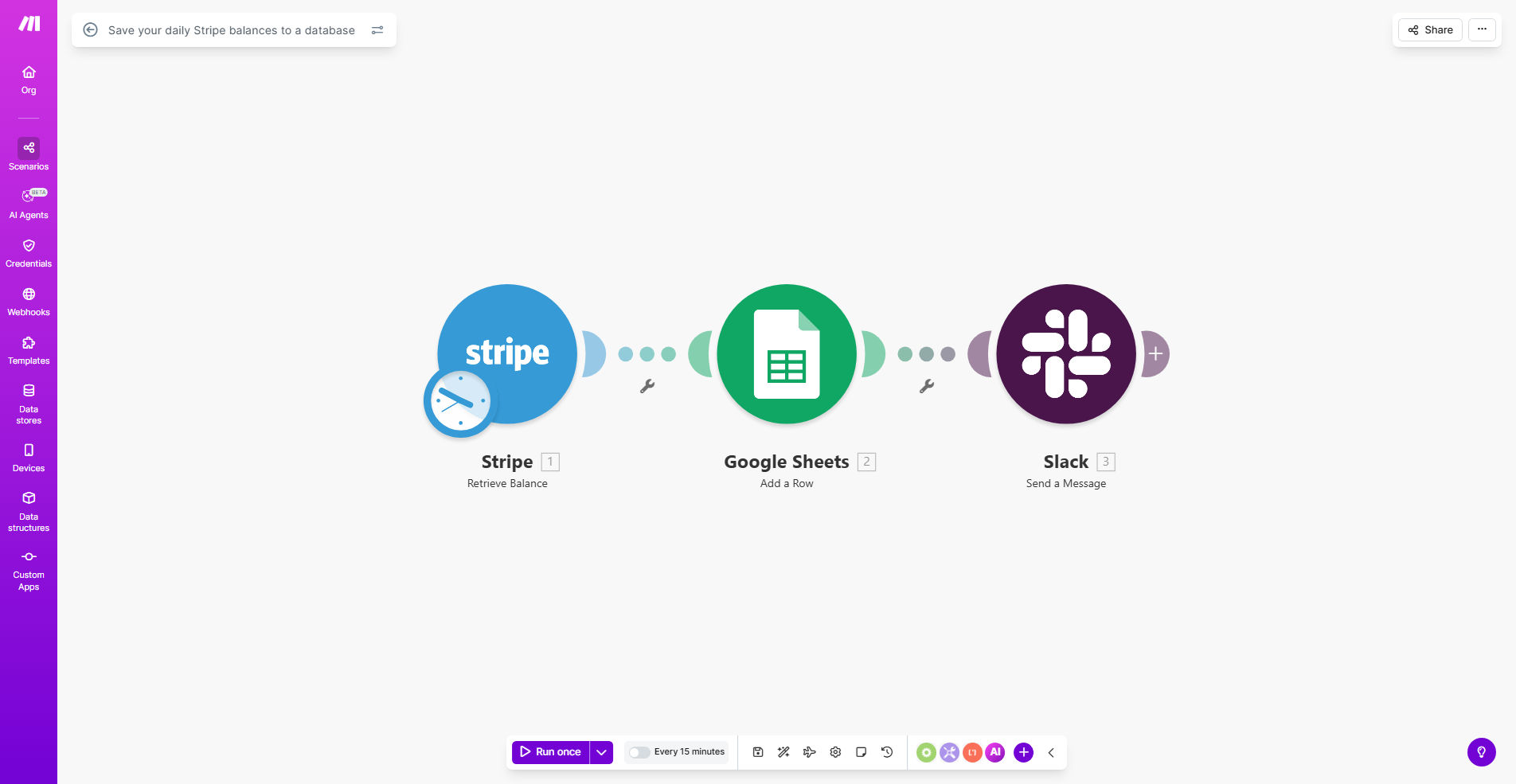
Make.com workflow interface showing Stripe balance automation

What This Workflow Does

This automation solves the tedious manual process of tracking daily Stripe balances across multiple accounts. Instead of requiring accounting staff to log in daily and record balances, the workflow automatically:

  • Pulls complete balance data from Stripe at a scheduled time each day
  • Stores the information in your chosen database (Google Sheets by default)
  • Sends formatted Slack notifications to relevant team members
  • Maintains a complete historical record for reporting and reconciliation

Pro tip: Combine this with monthly accounting workflows to automatically reconcile Stripe data with your general ledger, saving 10+ hours per month in manual reconciliation work.

How It Works

1. Daily Balance Trigger

The workflow runs automatically each morning, pulling complete balance information including available funds, pending amounts, and currency breakdowns from your Stripe account.

2. Data Transformation

Raw Stripe API responses are reformatted into clean, standardized records with proper date stamps and calculated fields like day-over-day changes.

3. Database Storage

Processed data gets appended to your database (Google Sheets or other supported systems), creating an auditable historical record with one row per day.

4. Team Notification

Key stakeholders receive Slack messages highlighting important metrics like total available balance, significant changes, or threshold alerts you configure.

Who This Is For

This automation delivers the most value for:

  • SaaS companies needing accurate daily revenue tracking
  • Ecommerce businesses managing multiple Stripe accounts
  • Finance teams requiring audit-ready payment records
  • Startups that need to share revenue metrics with investors
  • Agencies handling client payment processing

What You'll Need

  1. A Stripe account with transaction history
  2. Make.com account (free tier works)
  3. Google Sheet or other database destination
  4. Slack workspace for notifications (optional)

Quick Setup Guide

  1. Click "Get This Workflow" to copy the template to your Make.com account
  2. Connect your Stripe account in the Make.com settings
  3. Specify your Google Sheet or database destination
  4. Configure Slack notification channels and message format
  5. Set your preferred daily run time (typically early morning)
  6. Test with historical data to verify formatting

Key Benefits

Eliminates manual data entry: Saves 30+ minutes daily that finance teams typically spend checking and recording balances.

Improves financial visibility: Provides executives with always-current revenue data through automated Slack updates.

Creates audit trails: Maintains immutable daily records that simplify month-end closing and financial reporting.

Reduces errors: Automated data transfer eliminates human mistakes in balance transcription.

Enables advanced analysis: Structured historical data allows for trend analysis and custom reporting not possible in Stripe's interface.

Frequently Asked Questions

Common questions about Stripe automation and financial tracking

Automating Stripe balance tracking saves hours of manual work each week while reducing human errors. Daily automated updates ensure your financial records are always current without requiring accounting staff to log in and check balances manually.

For growing businesses, this automation scales effortlessly as transaction volumes increase, unlike manual processes that become more time-consuming. The data also becomes available for real-time dashboards and alerts.

Centralizing Stripe data in a database enables historical trend analysis, custom reporting, and integration with other financial systems. Unlike Stripe's native interface which shows limited history, a database preserves all daily snapshots for compliance and analytics.

Structured database storage allows querying by date ranges, calculating running totals, and joining with other financial data. This supports advanced use cases like cohort analysis, seasonal trend identification, and predictive cash flow modeling.

Make.com workflows have 99.9% uptime with built-in error handling. The system automatically retries failed operations and sends alerts if balances aren't recorded successfully, making it more reliable than manual processes prone to human oversight.

For critical financial data, we recommend implementing redundant checks like secondary notifications if the primary database update fails. The template includes basic error handling that can be extended for enterprise requirements.

Yes, you can configure which teams receive notifications, set custom message formats highlighting key metrics, and include actionable links to your accounting dashboard. Notifications can be tailored for executives, accountants, or department heads with relevant data.

Common customizations include adding threshold alerts for unusual balance changes, including comparison to previous periods, and attaching CSV exports for easy spreadsheet analysis by recipients.

The template supports Google Sheets (for simplicity) but can be modified for SQL databases like PostgreSQL, MySQL, or cloud services like Airtable. Make.com offers connectors for 1000+ apps including most database solutions.

For enterprise use, we often implement this with data warehouses like Snowflake or BigQuery where Stripe data gets combined with other financial systems for comprehensive reporting.

While Stripe provides basic reports, this automation creates structured, queryable data with daily granularity. It combines balance information with transaction details for deeper analysis and can trigger actions based on threshold values that Stripe doesn't natively support.

The key advantage is data ownership - your complete financial history remains accessible even if you change payment processors. Automated reports also surface insights faster than manual report generation.

Absolutely. GrowwStacks specializes in tailored Stripe integrations that connect with your specific accounting software, alert thresholds, and reporting needs. We can build custom solutions that handle complex reconciliation, multi-currency reporting, or department-level cost allocation.

Our typical Stripe automation projects include: connecting to QuickBooks/NetSuite/Xero, creating executive dashboards, implementing approval workflows for large refunds, and building custom fraud detection rules based on your business patterns.

Need a Custom Stripe Automation?

This free template is a starting point. Our team builds fully tailored automation systems for your specific business needs.