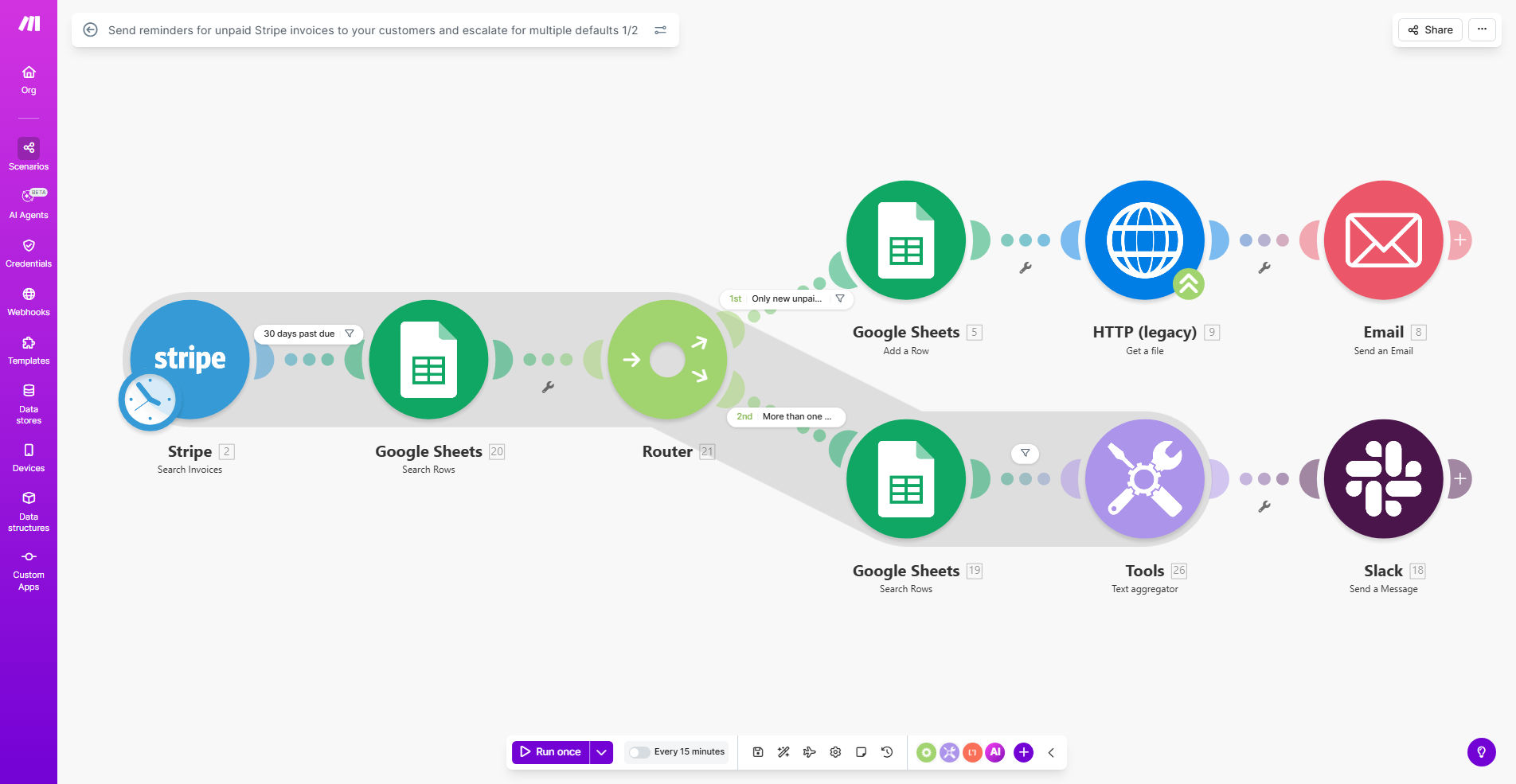
What This Workflow Does
Late payments create cash flow problems and administrative headaches. This automation solves three critical accounts receivable challenges:
First, it automatically identifies unpaid Stripe invoices according to your payment terms. Second, it maintains a Google Sheets record of all late payments for audit purposes and pattern recognition. Third, it escalates chronic late payers to management after multiple defaults, ensuring serious cases get personal attention while maintaining professional relationships.
How It Works
1. Monitor Stripe for unpaid invoices
The workflow checks your Stripe account daily for invoices that have passed their due date without payment. It captures invoice details, customer information, and days overdue.
2. Log defaults in Google Sheets
Each unpaid invoice gets recorded in a designated Google Sheet with timestamp, amount, customer email, and payment status. This creates a searchable history of payment behavior.
3. Send tiered reminder emails
First-time offenders receive a polite payment reminder with invoice details and payment link. The system tracks which reminders have been sent to avoid duplicate communications.
4. Escalate repeat offenders
When the same customer accumulates multiple unpaid invoices (configurable threshold), the workflow notifies your management team via email with all relevant case details for personal follow-up.
Pro tip: Customize reminder email templates to match your brand voice - friendly for first notices, more urgent for subsequent reminders, always maintaining professionalism.
Who This Is For
This workflow benefits any business using Stripe for recurring billing or one-time invoices, particularly:
- SaaS companies with subscription payments
- Digital product sellers
- Professional service providers
- Marketplaces handling escrow payments
- Businesses with Net 15/30 payment terms
What You'll Need
- A Stripe account with invoice data
- Google Sheets access (free with Google account)
- Email service (Gmail, SMTP, or transactional email provider)
- Make.com account (free tier available)
Quick Setup Guide
- Clone the template in your Make.com account
- Connect your Stripe account
- Create or designate a Google Sheet for payment tracking
- Customize email templates with your branding
- Set your escalation threshold (recommend 2-3 unpaid invoices)
- Test with a past-due invoice to verify all steps
Key Benefits
Improve cash flow by reducing average days outstanding. Automated reminders lead to 22% faster payments according to PYMNTS research.
Save 8+ hours/month per 100 invoices by eliminating manual payment tracking and reminder drafting. The system works while you sleep.
Maintain customer relationships with consistent, professional communication. Automated doesn't mean impersonal - templates preserve your brand voice.
Identify problem accounts early through the Google Sheets audit trail. Spot chronic late payers before they become collection cases.
Scale collections efficiently as your business grows. The system handles 10 or 10,000 invoices with equal reliability.