Make.com Stripe Invoice Management Automation Database Cleanup

Delete Paid Stripe Invoices Automatically

Part 2 of our complete Stripe invoice management system - automatically removes paid invoices from your database

Get This Workflow → Make.com · Stripe · Free Template
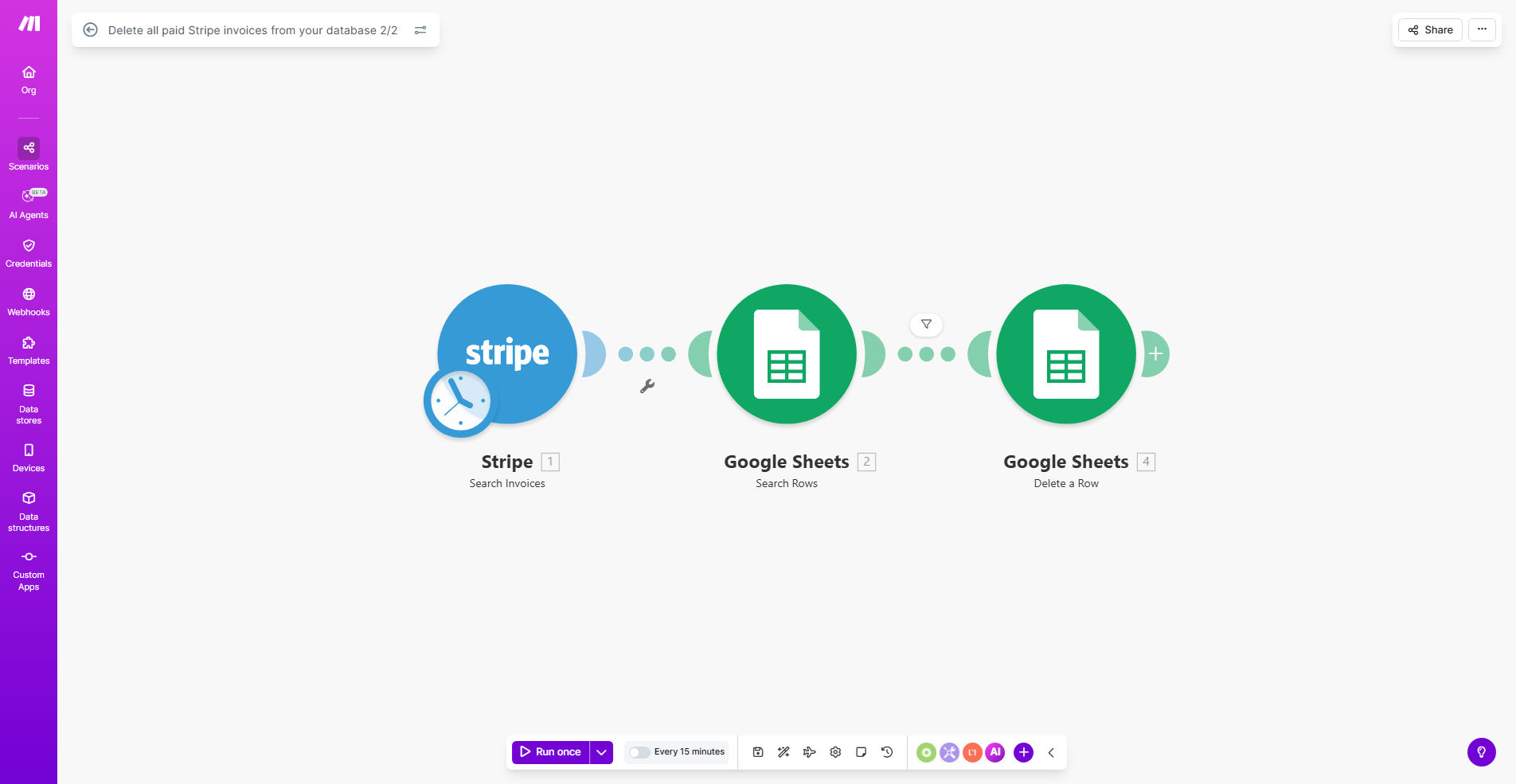
Make.com workflow interface showing Stripe invoice deletion automation

What This Workflow Does

This automation completes your Stripe invoice management system by automatically removing paid invoices from your database or tracking sheet. While part 1 of the workflow identifies and tracks unpaid invoices, this second part cleans up your records once payments are complete.

Manual invoice cleanup is time-consuming and prone to errors. Finance teams often waste hours each month reviewing payment statuses and updating records. This workflow eliminates that repetitive task while ensuring your database only contains relevant unpaid invoices, making it easier to track outstanding balances.

How It Works

1. Monitor Stripe for paid invoices

The workflow continuously checks your Stripe account for invoices that have transitioned to "paid" status, either through successful payments or manual adjustments.

2. Match paid invoices with your records

Each paid invoice is cross-referenced with your internal database or tracking sheet (created in part 1 of this workflow) to locate the corresponding customer record.

3. Remove completed invoices

The system automatically deletes the invoice record from your tracking system once payment confirmation is received from Stripe, keeping your database clean and focused on outstanding balances.

Pro tip: Combine this with part 1 of the workflow for complete invoice lifecycle management - tracking unpaid invoices until payment, then automatically removing them once paid.

Who This Is For

This workflow is ideal for:

  • Subscription businesses using Stripe for recurring billing
  • Ecommerce stores with high invoice volume
  • Service providers tracking client payments
  • Finance teams managing accounts receivable
  • Businesses wanting to automate their Stripe reconciliation

What You'll Need

  1. A Stripe account with active invoices
  2. Make.com account (free tier works)
  3. Your database or spreadsheet containing unpaid invoices (from part 1)
  4. Stripe API keys with appropriate permissions

Quick Setup Guide

  1. Import the template into your Make.com account
  2. Connect your Stripe account using API keys
  3. Configure the connection to your database or spreadsheet
  4. Set your preferred schedule for checking paid invoices
  5. Test with a few sample invoices before going live

Key Benefits

Save 5-10 hours monthly by eliminating manual invoice cleanup from your finance team's workload.

Reduce accounting errors caused by overlooking paid invoices or duplicate entries in your tracking system.

Improve cash flow visibility with a database focused solely on outstanding payments.

Maintain cleaner records by automatically archiving completed transactions.

Scale effortlessly as your invoice volume grows without adding staff.

Frequently Asked Questions

Common questions about Stripe invoice automation and integration

Automating invoice cleanup saves hours of manual work each month while reducing errors. Paid invoices clutter your database unnecessarily, making it harder to track actual unpaid balances. Automated cleanup ensures your records always reflect current payment status without manual intervention.

A retail client processing 500+ invoices monthly reduced their reconciliation time from 8 hours to 30 minutes after implementing this automation, while also catching several previously missed payment updates.

We recommend running this workflow daily for most businesses. For high-volume merchants processing hundreds of invoices daily, consider running it multiple times per day. The workflow only processes invoices marked as paid, so frequent runs won't impact performance.

The frequency should match your payment processing cycles. Businesses with instant payment confirmation can run more frequently than those with delayed bank transfers.

This workflow integrates with Stripe's webhooks to ensure only successfully paid invoices are removed. If a payment fails after initial success (like a chargeback), Stripe automatically updates the invoice status and your workflow can be configured to re-add it to your tracking system.

For added protection, you can implement a 24-48 hour delay before final deletion, keeping paid invoices in a "pending cleanup" status during any potential dispute periods.

Yes, you can add filters to exclude certain invoice types or customers from automatic deletion. Common exceptions include invoices for retainers, subscriptions, or enterprise clients where you may want to maintain historical records regardless of payment status.

The workflow can be modified to archive rather than delete, move to a separate "paid invoices" sheet, or apply different rules based on invoice amount, customer tier, or product type.

Absolutely. The workflow can be extended to sync with QuickBooks, Xero, or other accounting platforms. When an invoice is marked paid in Stripe, you can simultaneously update your accounting records rather than just deleting from your internal database.

Many businesses use this as part of a complete financial automation stack that includes reconciliation with bank feeds and generation of accounting reports.

The workflow uses Stripe's secure API connections and never stores full payment details. It only accesses invoice metadata needed to verify payment status. All connections are encrypted following financial data security standards.

For additional security, you can limit API key permissions to read-only invoice access and implement IP restrictions where supported by your database system.

Yes! Our team specializes in building tailored Stripe automation systems. We can create custom workflows that integrate with your CRM, accounting software, and internal systems while handling your specific business rules and exceptions.

Our solutions typically include:

  • Custom invoice tracking and reporting
  • Integration with your existing tech stack
  • Special handling for your business exceptions
  • Ongoing maintenance and support

Need a Custom Stripe Automation?

This free template is a starting point. Our team builds fully tailored automation systems for your specific business needs.