Make.com Accounting Integration CRM Automation Data Sync Duplicate Prevention

Save New Sage Customers to HubSpot CRM Without Duplicates

Automatically sync your Sage Business Cloud Accounting customers with HubSpot CRM while preventing duplicate entries and maintaining data accuracy.

Get This Workflow → Make.com · Accounting · Free Template
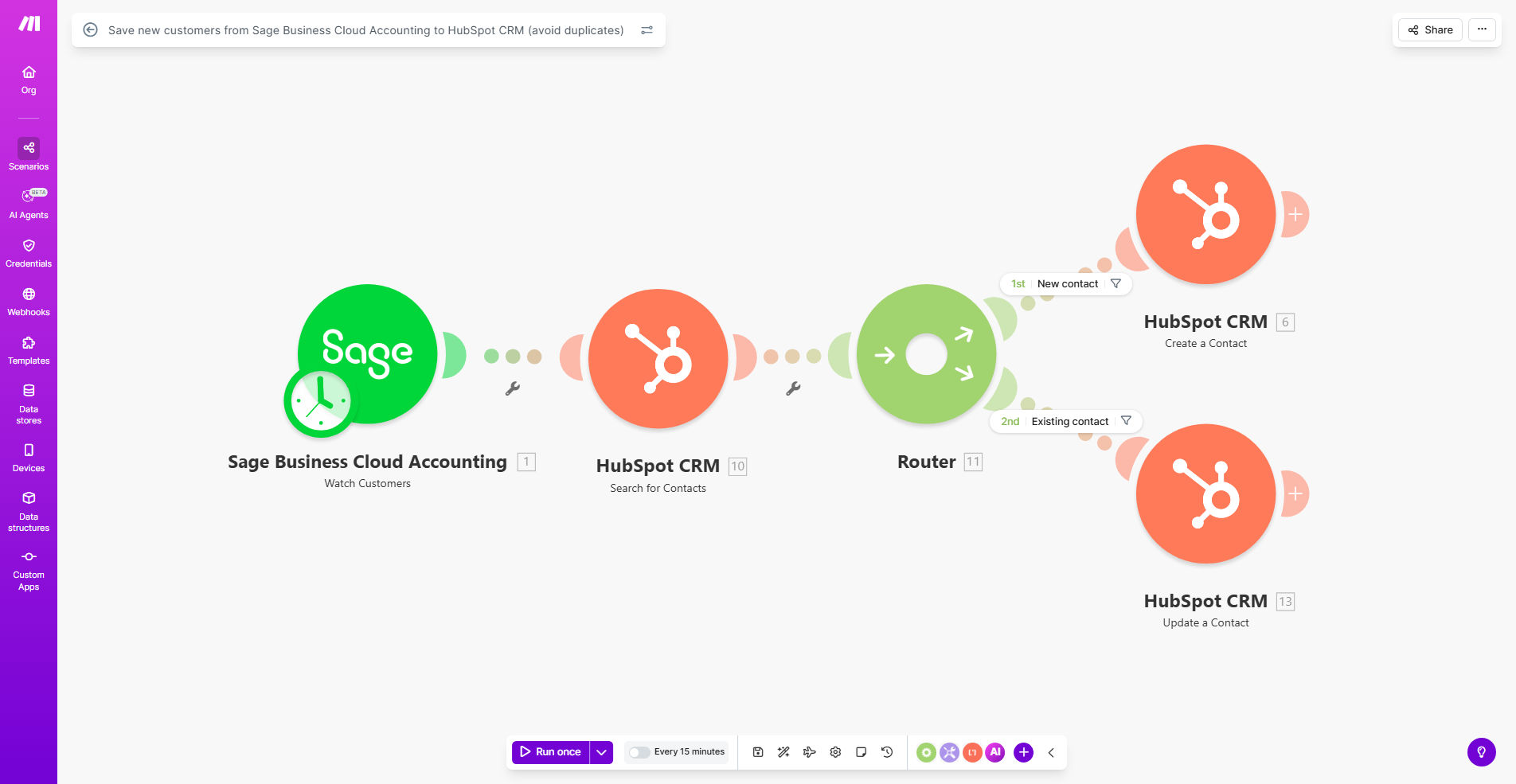
Sage Business Cloud Accounting to HubSpot CRM integration workflow diagram

What This Workflow Does

This automation solves a common challenge for businesses using Sage Business Cloud Accounting alongside HubSpot CRM - keeping customer data synchronized between both systems without creating duplicate records. Manual data entry between accounting and CRM systems is time-consuming and prone to errors, often leading to inconsistent customer information across departments.

The workflow automatically detects new customers added in Sage Accounting, checks HubSpot CRM for existing matches, and either creates a new contact or updates an existing one. This ensures your sales team always has access to accurate customer information while eliminating hours of manual data transfer each week.

How It Works

1. New customer detection in Sage

The workflow monitors Sage Business Cloud Accounting for newly added customers through regular API checks or real-time webhook triggers if available.

2. Data validation and preparation

Customer information is extracted and formatted to match HubSpot's expected data structure, with essential fields like company name, contact details, and billing information standardized.

3. Duplicate check in HubSpot

The system searches HubSpot CRM using unique identifiers (email, company name, or custom ID) to determine if the customer already exists in your database.

4. Conditional record handling

If no match is found, a new HubSpot contact is created. If a match exists, the existing record is updated with any new information from Sage, preventing duplicates while keeping data current.

Pro tip: Configure custom field mappings to ensure critical accounting data like payment terms or credit limits flow to relevant HubSpot contact properties for your sales team.

Who This Is For

This integration is ideal for:

  • Businesses using Sage for accounting and HubSpot for CRM
  • Teams struggling with manual data entry between finance and sales systems
  • Companies experiencing duplicate customer records in HubSpot
  • Organizations needing accurate customer data across departments
  • Businesses scaling operations where manual processes become unsustainable

What You'll Need

  1. Sage Business Cloud Accounting account with API access
  2. HubSpot CRM account with developer permissions
  3. Make.com account (free tier available)
  4. Basic understanding of your customer data structure in both systems
  5. List of key fields you want to sync between systems

Quick Setup Guide

  1. Copy the template to your Make.com account
  2. Connect your Sage Business Cloud Accounting instance
  3. Authenticate with your HubSpot CRM
  4. Map Sage customer fields to corresponding HubSpot properties
  5. Set your preferred sync frequency (daily recommended for most businesses)
  6. Test with a few sample customer records
  7. Activate the workflow for ongoing automation

Key Benefits

Eliminate manual data entry: Save 5-10 hours per week previously spent transferring customer information between systems.

Maintain data accuracy: Automatic synchronization ensures both systems always have the same current customer information.

Prevent duplicate records: Sophisticated matching logic stops duplicate contacts from cluttering your CRM.

Improve sales productivity: Your sales team accesses complete, up-to-date customer information without leaving HubSpot.

Better customer insights: Combine financial and sales data for more comprehensive customer profiles and reporting.

Frequently Asked Questions

Common questions about Sage to HubSpot CRM automation and integration

Syncing Sage Accounting with HubSpot CRM eliminates manual data entry, reduces errors, and ensures your sales team always has updated customer information. This integration provides a single customer view across finance and sales teams, improving collaboration and customer service while saving 5-10 hours per week on administrative tasks.

For example, when your accounting team adds a new corporate client in Sage, the sales team immediately sees this in HubSpot with all relevant financial details, enabling faster follow-up and more informed conversations.

The workflow checks HubSpot for existing contacts before creating new ones, using unique identifiers like email addresses or company names. If a match is found, it updates the existing record rather than creating a duplicate. This maintains data integrity and prevents confusion in your CRM system.

The matching logic can be customized to your business needs - some companies prefer strict email matching, while others combine company name with location for better accuracy with large organizations.

The workflow typically transfers key customer details including company name, contact person, email addresses, phone numbers, billing addresses, and transaction history. You can customize which fields to sync based on your business needs and how you use HubSpot for sales and marketing.

Common additions include credit limits for sales qualification, payment terms for collections planning, and product purchase history for upsell opportunities. Sensitive financial data can be excluded based on your security policies.

The sync frequency is configurable based on your business needs. Most companies set it to run daily or in real-time when new customers are added in Sage. The template includes options to control sync timing to balance data freshness with system performance.

High-volume businesses might schedule hourly syncs during business hours, while smaller operations may find once-daily updates sufficient. The workflow can also be triggered manually for special situations.

The workflow can be configured to detect updates in Sage and automatically push those changes to HubSpot. This ensures your CRM always reflects the most current customer information without requiring manual updates from your team.

Change detection works for critical fields like billing addresses, key contacts, or credit terms. You can specify which updates should trigger syncs to avoid unnecessary CRM modifications for minor changes.

Yes, you can add filters to only sync specific customer segments based on criteria like customer type, location, or purchase history. This helps focus your CRM on the most relevant contacts for your sales and marketing efforts.

Common filtering scenarios include syncing only active customers, excluding certain product lines, or focusing on specific geographic regions. These filters help maintain CRM relevance while reducing clutter.

Absolutely! Our team specializes in building tailored integrations between Sage and HubSpot that match your specific business processes. We can create custom field mappings, add conditional logic, and integrate additional systems to create a perfect workflow for your needs.

Typical customizations include adding approval workflows for new customers, integrating with your ERP system, or creating special segmentation rules based on your sales process. We'll design a solution that fits your exact requirements.

  • Custom field mappings for your unique data structure
  • Additional validation rules and error handling
  • Integration with other business systems

Need a Custom Sage-HubSpot Integration?

This free template is a starting point. Our team builds fully tailored automation systems for your specific business needs.