What This Workflow Does
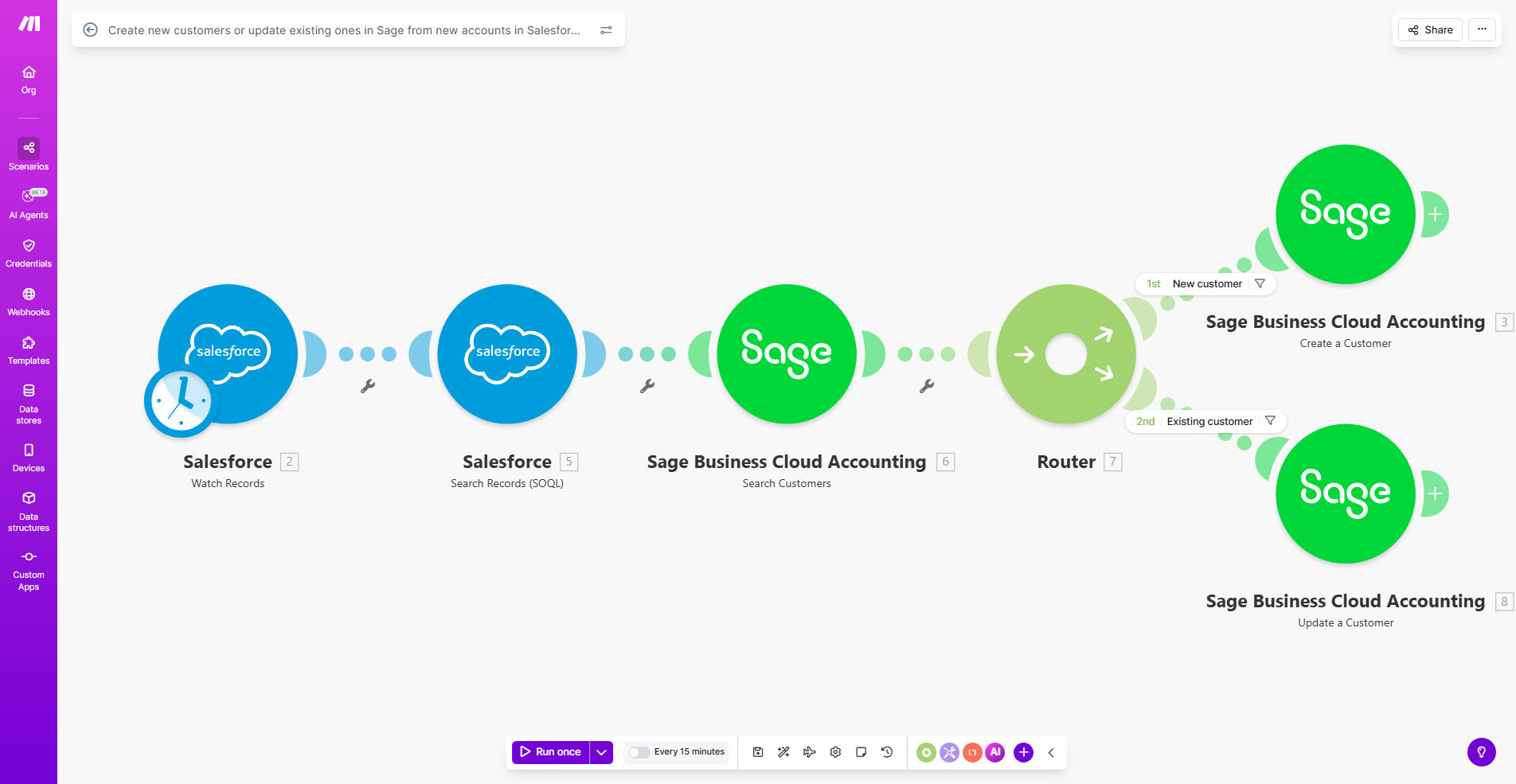
This automation bridges the gap between your Salesforce CRM and Sage accounting system by automatically creating new customer records in Sage when accounts are added to Salesforce, or updating existing Sage customer records when Salesforce account details change. It solves the common problem of maintaining duplicate customer data across sales and accounting systems.
By eliminating manual data entry between systems, businesses reduce errors, improve accounting accuracy, and save significant time. The workflow intelligently checks for existing customers before creating new records, preventing duplicates that can cause billing and reporting issues.
How It Works
1. New Account Detection
The workflow monitors Salesforce for new or updated account records using Make.com's Salesforce trigger. This can be configured to run on a schedule or in real-time based on your business needs.
2. Data Validation
Essential customer fields are validated to ensure they meet Sage's requirements. The system checks for required fields like customer name, billing address, and tax information before proceeding.
3. Duplicate Check
The workflow searches Sage for existing customer records using unique identifiers like tax ID or email address. This prevents creating duplicate customer entries in your accounting system.
4. Record Creation/Update
If no match is found, a new customer record is created in Sage. If a match exists, the existing record is updated with any changed information from Salesforce, keeping your accounting data current.
5. Error Handling
The workflow includes comprehensive error handling to manage API limits, field mapping issues, and data format mismatches between the two systems.
Who This Is For
This automation is ideal for businesses that use Salesforce for CRM and Sage for accounting, particularly those experiencing:
- Time wasted manually transferring customer data between systems
- Errors from inconsistent customer information across departments
- Delays in accounting processes waiting for updated customer records
- Difficulty tracking customer changes across multiple systems
Pro tip: Combine this workflow with our invoice automation template to create a complete quote-to-cash automation system between Salesforce and Sage.
What You'll Need
- A Make.com account (free plan available)
- Salesforce account with API access
- Sage Business Cloud Accounting subscription
- Administrator access to both systems for initial setup
- List of key customer fields to sync between systems
Quick Setup Guide
- Copy this template to your Make.com account
- Connect your Salesforce and Sage accounts in Make.com
- Review and adjust the default field mappings
- Set your preferred sync frequency (real-time, daily, weekly)
- Test with a few sample accounts before full deployment
- Monitor the first few syncs to ensure proper data transfer
Key Benefits
Eliminate duplicate data entry between sales and accounting teams, saving 5-10 hours per week on administrative tasks.
Improve accounting accuracy by ensuring customer records always reflect the latest information from Salesforce, reducing billing errors.
Accelerate financial processes with immediate availability of customer data in Sage for invoicing and reporting.
Maintain data consistency across departments with automated synchronization of customer details.
Scale efficiently as your customer base grows without proportional increases in administrative overhead.