AI Automation Content Generation Google Sheets ChatGPT Make.com

Generate ChatGPT Completions from Google Sheets Rows

Automatically create AI-generated content from your spreadsheet data with this powerful integration

Get This Workflow → Make.com · AI Content · Free Template
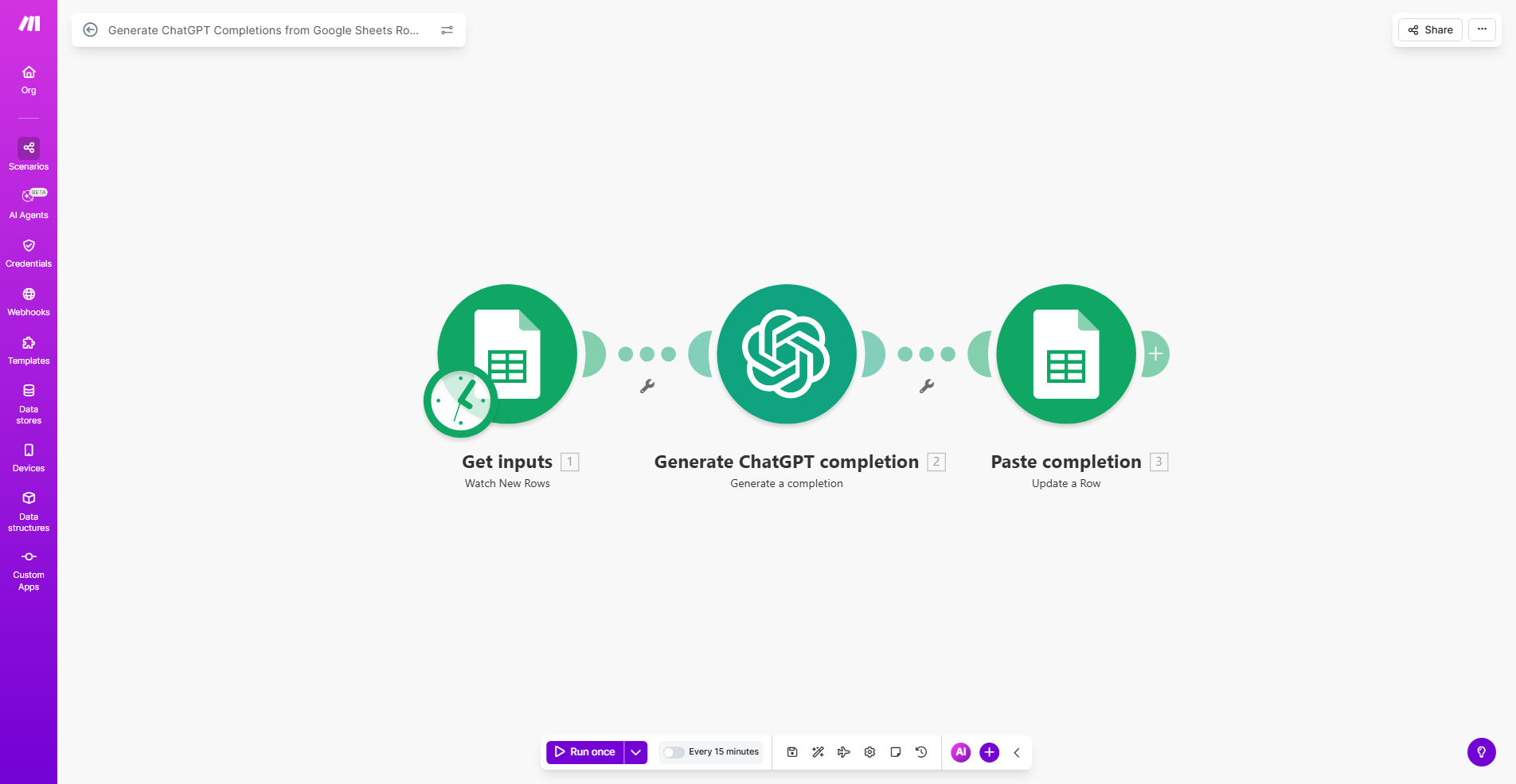
Diagram showing Google Sheets data being processed by ChatGPT through Make.com automation

What This Workflow Does

This automation bridges the gap between your spreadsheet data and AI-powered content creation. Whenever new rows are added to your Google Sheet, the system automatically sends the data to ChatGPT and returns generated completions based on your specified prompts.

The workflow solves the challenge of manually creating repetitive content by leveraging AI to generate high-quality outputs at scale. Whether you need product descriptions, SEO meta content, email responses, or creative copy, this integration transforms raw data into polished content automatically.

How It Works

1. New row detection

The workflow monitors your Google Sheet for new rows or changes to existing data. You can specify which columns trigger the automation and which contain the data to process.

2. Data preparation

The system extracts relevant information from your spreadsheet and formats it according to your predefined ChatGPT prompt templates. This ensures the AI receives properly structured input.

3. AI content generation

Each data set is sent to ChatGPT with your custom instructions. The AI analyzes the input and generates completions that match your requirements, whether that's creative writing, technical descriptions, or structured responses.

4. Results processing

The generated content is returned to your spreadsheet automatically, either in the same row or a designated output column. You can configure the workflow to append results or overwrite existing content.

Pro tip: Create a column in your sheet for prompt variations. This lets you generate different content types from the same data by applying different AI instructions.

Who This Is For

This automation is ideal for marketing teams, ecommerce businesses, content creators, and anyone managing large volumes of standardized content. Specifically:

  • Ecommerce stores needing hundreds of product descriptions
  • SEO specialists generating meta content at scale
  • Customer support teams creating response templates
  • Bloggers and publishers developing content outlines
  • Social media managers producing post captions

What You'll Need

  1. A Make.com account (free plan available)
  2. Google Sheets with your source data
  3. OpenAI API key for ChatGPT access
  4. Basic understanding of spreadsheet structure
  5. Clear content goals and prompt ideas

Quick Setup Guide

  1. Install the template from Make.com
  2. Connect your Google Sheets account
  3. Add your OpenAI API credentials
  4. Specify your source spreadsheet and worksheet
  5. Define which columns contain input data and prompts
  6. Set the output column for AI-generated content
  7. Test with sample data and refine prompts as needed

Key Benefits

Scale content production 10x faster by automating the generation of repetitive copy. What took hours now happens automatically in minutes.

Maintain consistent quality across all your content with standardized AI prompts that apply your brand voice and style guidelines uniformly.

Reduce content creation costs by minimizing manual writing time. The AI handles bulk content generation while your team focuses on strategy.

Easily update content en masse by modifying prompts rather than rewriting individual pieces. Change your approach across hundreds of items instantly.

Integrate with existing workflows since Google Sheets serves as both input and output, fitting seamlessly into your current processes.

Frequently Asked Questions

Common questions about AI content automation and integration

AI content generation can dramatically speed up your marketing content creation while maintaining quality. By automating the generation of SEO keywords, product descriptions, and social media posts from your spreadsheet data, you can focus on strategy while the AI handles repetitive writing tasks.

For example, an ecommerce store could automatically generate 500 product descriptions from basic specs in their inventory spreadsheet, saving dozens of hours of manual writing while ensuring consistent brand voice across all products.

You can generate various content types including SEO meta descriptions, blog post outlines, product descriptions, email responses, social media captions, and more. The system works with any text prompt you define in your spreadsheet.

The flexibility comes from your ability to customize prompts. A real estate agency might generate property descriptions from address and feature data, while a support team could create templated responses to common customer inquiries.

  • Product/service descriptions
  • SEO meta content
  • Email templates
  • Social media posts

ChatGPT produces high-quality content when given clear prompts and context from your spreadsheet. While you should review outputs, the AI maintains good accuracy especially for structured content like product descriptions or standardized responses.

Accuracy improves when you provide examples of desired outputs in your prompts. For instance, including 2-3 sample product descriptions helps the AI understand your preferred style, tone, and level of detail.

Yes, the workflow allows complete customization of prompts. You can create different prompt templates in your spreadsheet and apply them to different data columns, enabling varied content generation from the same automation.

A common approach is to maintain a "prompts" worksheet with templates for each content type. Your main data sheet then references these templates, allowing you to update all generated content by modifying just the master prompts.

This automation can reduce content creation time by 80% or more. Instead of writing each piece manually, you simply manage your spreadsheet data while the AI generates hundreds of content pieces automatically in the background.

Consider a marketing team producing 200 product descriptions monthly. Manual creation might take 50 hours, while this automation could complete the task in about 2 hours of setup and review time, with the AI handling the actual writing.

Organize columns for input data, prompt templates, and AI outputs. Keep prompts consistent, include examples of desired outputs, and use separate sheets for different content types to maintain organization as your automation scales.

We recommend a structure with: raw data columns on the left, prompt reference columns in the middle, and generated content columns on the right. Color-coding these sections helps visual organization.

  • Group related data together
  • Use consistent column headers
  • Maintain a prompts reference sheet

Yes, our team specializes in building custom AI automation solutions tailored to your specific content needs. We can create specialized workflows that integrate with your existing systems and produce content in your brand voice.

Whether you need complex multi-step content generation, integration with your CMS, or specialized output formatting, we design automations that fit your exact requirements. Our solutions go beyond templates to address your unique business challenges.

  • Custom prompt engineering
  • Brand voice tuning
  • Multi-platform integration

Need a Custom AI Content Automation?

This free template is a starting point. Our team builds fully tailored automation systems for your specific business needs.