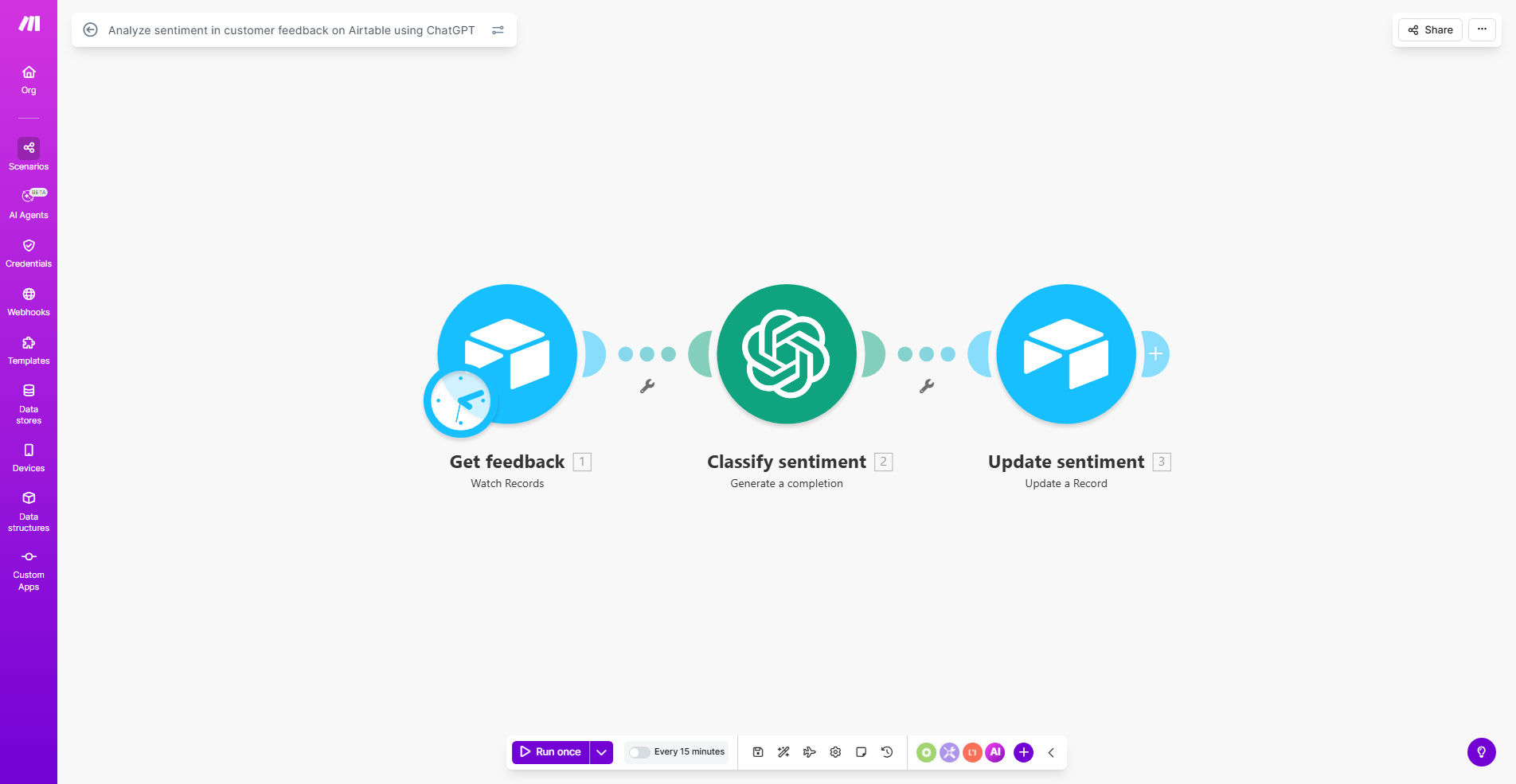
What This Workflow Does
This automation solves the challenge of manually analyzing customer feedback by using ChatGPT's AI capabilities to automatically detect sentiment in text. When new feedback arrives in your Airtable base, the workflow sends it to ChatGPT for analysis, then updates your records with sentiment classification (positive, neutral, negative) and often a confidence score.
Businesses using this solution save dozens of hours previously spent manually reviewing feedback while gaining more consistent, data-driven insights about customer satisfaction. The automated classification enables real-time monitoring of sentiment trends and immediate alerts for negative feedback that requires urgent attention.
How It Works
1. New feedback triggers the workflow
The automation monitors your specified Airtable table for new customer feedback entries. This could be survey responses, product reviews, support tickets, or any other text-based feedback you collect.
2. ChatGPT analyzes the text
Each new feedback item is sent to ChatGPT with a carefully crafted prompt that asks for sentiment classification. The AI evaluates the emotional tone and context of the message.
3. Results return to Airtable
The workflow receives ChatGPT's analysis and updates the original Airtable record with the sentiment classification. Many implementations also store the AI's reasoning or confidence score for additional insights.
4. Optional notifications
You can configure the system to send alerts when negative sentiment is detected or when sentiment trends change significantly, enabling proactive customer service.
Who This Is For
This workflow is ideal for:
- Product teams monitoring user feedback for improvement opportunities
- Customer support managers tracking satisfaction levels
- Marketing teams analyzing campaign responses
- Small businesses without budget for enterprise sentiment analysis tools
- Any company collecting substantial customer feedback in Airtable
What You'll Need
- An Airtable base with customer feedback data
- A Make.com account (free plan available)
- OpenAI API access for ChatGPT
- A text field in Airtable to store sentiment results
Quick Setup Guide
- Duplicate the template in your Make.com account
- Connect your Airtable base and specify the table to monitor
- Configure your OpenAI API connection
- Adjust the ChatGPT prompt if needed for your use case
- Map the fields between Airtable and the sentiment analysis
- Test with sample feedback to verify accuracy
- Activate the scenario to begin automatic processing
Pro tip: Start with a small sample of pre-classified feedback to test and refine your prompt. This helps ChatGPT better understand your specific definition of positive/neutral/negative in your business context.
Key Benefits
Save 10+ hours per month by eliminating manual feedback review while gaining more consistent sentiment classification than human analysis provides.
Detect emerging issues faster with real-time sentiment tracking that alerts you to negative trends before they impact customer retention.
Improve product decisions with quantitative sentiment data that highlights which features or changes customers feel most strongly about.
Enhance customer service by prioritizing responses to frustrated customers while identifying potential brand advocates.
Scale your analysis effortlessly as feedback volume grows, without additional staff time required.