Make.com ChatGPT Google Sheets Sentiment Analysis Customer Feedback

Analyze sentiment in customer feedback on Google Sheets using ChatGPT

Automatically categorize customer feedback as positive, negative, or neutral using AI-powered sentiment analysis

Get This Workflow → Make.com · Google Sheets · Free Template
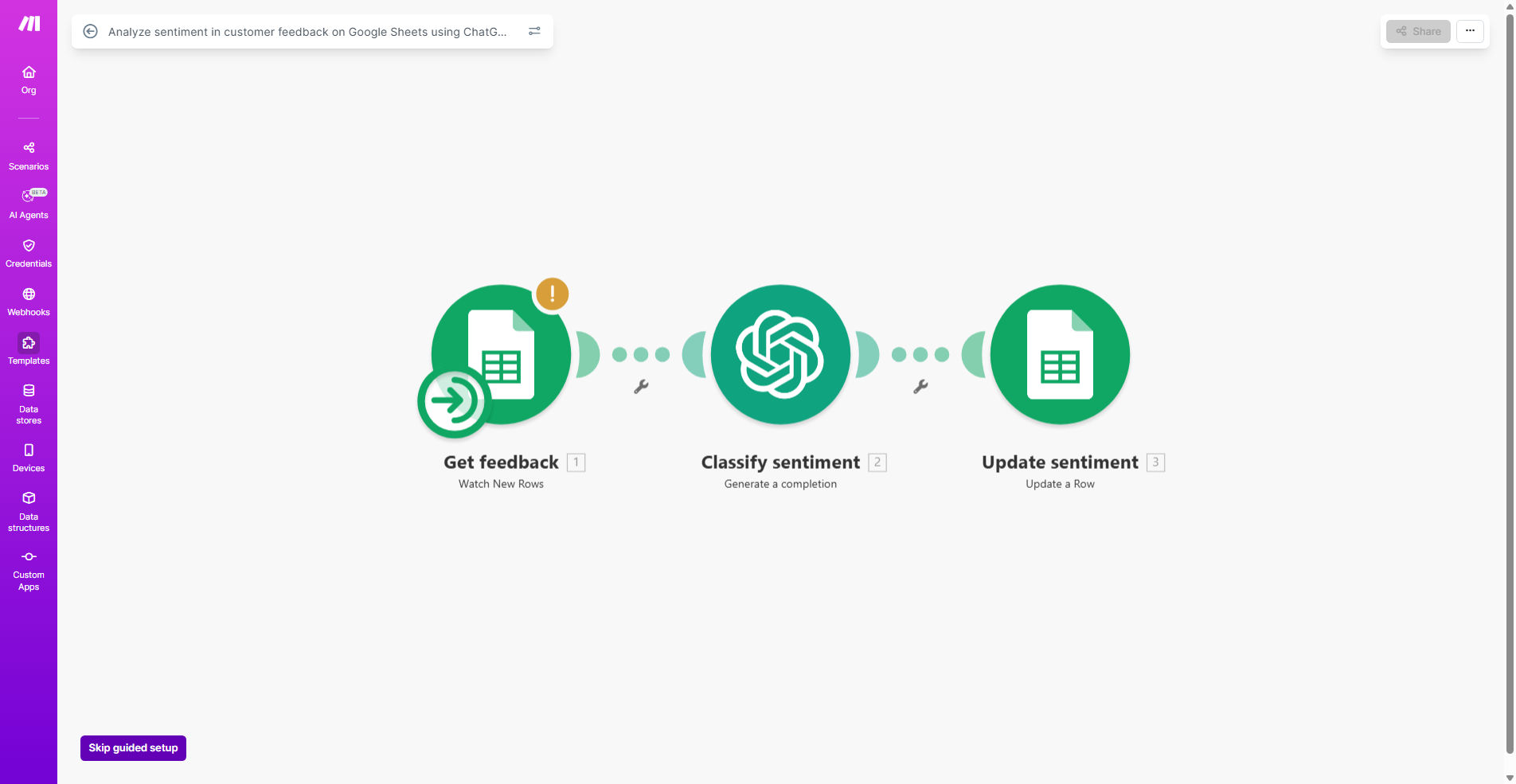
Sentiment analysis workflow diagram showing Google Sheets and ChatGPT integration

What This Workflow Does

This automation solves the challenge of manually analyzing customer feedback sentiment at scale. Businesses collect feedback through surveys, reviews, and support tickets, but manually categorizing each response as positive, negative, or neutral is time-consuming and subjective.

The workflow automatically processes customer feedback stored in Google Sheets using ChatGPT's advanced natural language processing capabilities. It analyzes each feedback entry, determines the sentiment, and updates your spreadsheet with the results. This transforms qualitative feedback into quantitative data you can analyze and act upon.

How It Works

1. Trigger Setup

The workflow monitors a specific Google Sheet for new customer feedback entries. You can configure it to run on a schedule (daily, weekly) or trigger immediately when new feedback is added.

2. Feedback Processing

Each feedback entry is sent to ChatGPT's API with a carefully crafted prompt that asks for sentiment analysis. The AI evaluates the emotional tone and context of the feedback.

3. Sentiment Classification

ChatGPT returns a sentiment classification (positive, negative, neutral) along with confidence scores. Some implementations can also extract specific emotions like frustration or excitement.

4. Results Logging

The workflow writes the sentiment analysis results back to your Google Sheet, creating a complete record of feedback and its emotional classification.

Pro tip: Add a column for "key themes" to have ChatGPT also summarize the main topics mentioned in each feedback entry alongside sentiment.

Who This Is For

This workflow is ideal for:

  • Customer support teams tracking satisfaction trends
  • Product managers analyzing feature feedback
  • Marketing teams monitoring brand sentiment
  • E-commerce businesses processing product reviews
  • Service businesses evaluating client feedback

What You'll Need

  1. A Google Sheet containing customer feedback data
  2. A Make.com account (free tier available)
  3. OpenAI API access (ChatGPT)
  4. Basic understanding of Google Sheets and Make.com

Quick Setup Guide

  1. Duplicate the template scenario in Make.com
  2. Connect your Google Sheets account
  3. Enter your OpenAI API key
  4. Specify your Google Sheet ID and feedback column
  5. Configure where sentiment results should be written
  6. Test with sample feedback entries
  7. Activate the scenario

Key Benefits

Save dozens of hours per month by automating what would otherwise require manual reading and categorization of every feedback entry.

Gain consistent, unbiased analysis that applies the same criteria to all feedback, eliminating human subjectivity.

Identify trends faster with quantitative sentiment data you can filter, sort, and visualize in Google Sheets.

Scale effortlessly to handle thousands of feedback entries without additional work.

Improve customer experience by quickly spotting negative sentiment patterns that need attention.

Frequently Asked Questions

Common questions about customer feedback automation and sentiment analysis

Sentiment analysis helps businesses quickly understand customer emotions and satisfaction levels at scale. It transforms qualitative feedback into actionable quantitative data, allowing teams to identify trends, prioritize issues, and measure satisfaction improvements over time.

For example, a sudden spike in negative sentiment around a specific feature can alert product teams to investigate potential bugs or usability issues before they impact more customers.

ChatGPT provides highly accurate sentiment analysis when properly configured, often outperforming traditional sentiment analysis tools. It understands context, sarcasm, and nuanced language better than rule-based systems, though results should still be reviewed periodically for your specific use case.

In benchmarks, ChatGPT achieves over 85% accuracy on standard sentiment analysis tasks, compared to 65-75% for traditional lexicon-based approaches. The AI continues to improve as OpenAI updates its models.

This workflow works best with direct customer feedback like survey responses, product reviews, support tickets, and social media comments. Structured feedback with complete sentences yields the most accurate sentiment analysis results.

Short, ambiguous comments like "It's fine" may be harder to classify accurately. The system performs best with feedback that contains clear emotional indicators and context.

  • Ideal: Detailed product reviews
  • Good: Support ticket messages
  • Fair: Short survey responses

Use sentiment analysis to identify pain points in your customer journey, measure satisfaction after product changes, prioritize feature development, and track customer sentiment trends over time. Positive feedback can highlight strengths to emphasize in marketing.

A SaaS company might discover that negative sentiment spikes after major updates, indicating the need for better onboarding. An e-commerce store could correlate sentiment with shipping times to identify logistics issues.

Automation processes feedback instantly at any volume, applies consistent analysis criteria, and eliminates human bias. It saves hundreds of hours compared to manual review while providing standardized metrics for comparison across time periods.

Where a human might take 3-5 minutes to thoughtfully analyze each feedback entry, this workflow handles thousands in minutes with consistent accuracy. Automation also never gets tired or changes its evaluation standards.

Yes, ChatGPT can be prompted to categorize sentiment into more specific emotions like frustration, excitement, or disappointment. The workflow can be modified to use these custom categories based on your business needs.

For example, a hotel chain might want to distinguish between "disappointment" and "anger" in guest feedback. A software company could track "confusion" separately to identify documentation gaps.

  • Modify the ChatGPT prompt
  • Add custom response handling
  • Map to your preferred categories

Absolutely. Our team specializes in building tailored customer feedback analysis systems that integrate with your specific tools and workflows. We can create custom sentiment models, reporting dashboards, and alert systems based on your requirements.

Beyond basic sentiment analysis, we can implement advanced features like automatic tagging by topic, integration with your CRM, sentiment trend alerts for management, and customized reporting visualizations.

  • Custom sentiment categories
  • Integration with your existing tools
  • Automated alerts for critical feedback

Need a Custom Customer Feedback Automation?

This free template is a starting point. Our team builds fully tailored automation systems for your specific business needs.