WooCommerce Sage Accounting Product Sync Ecommerce Make.com

Sync WooCommerce Products to Sage Accounting

Automatically transfer new products from your online store to accounting software

Get This Workflow → Make.com · Ecommerce · Free Template
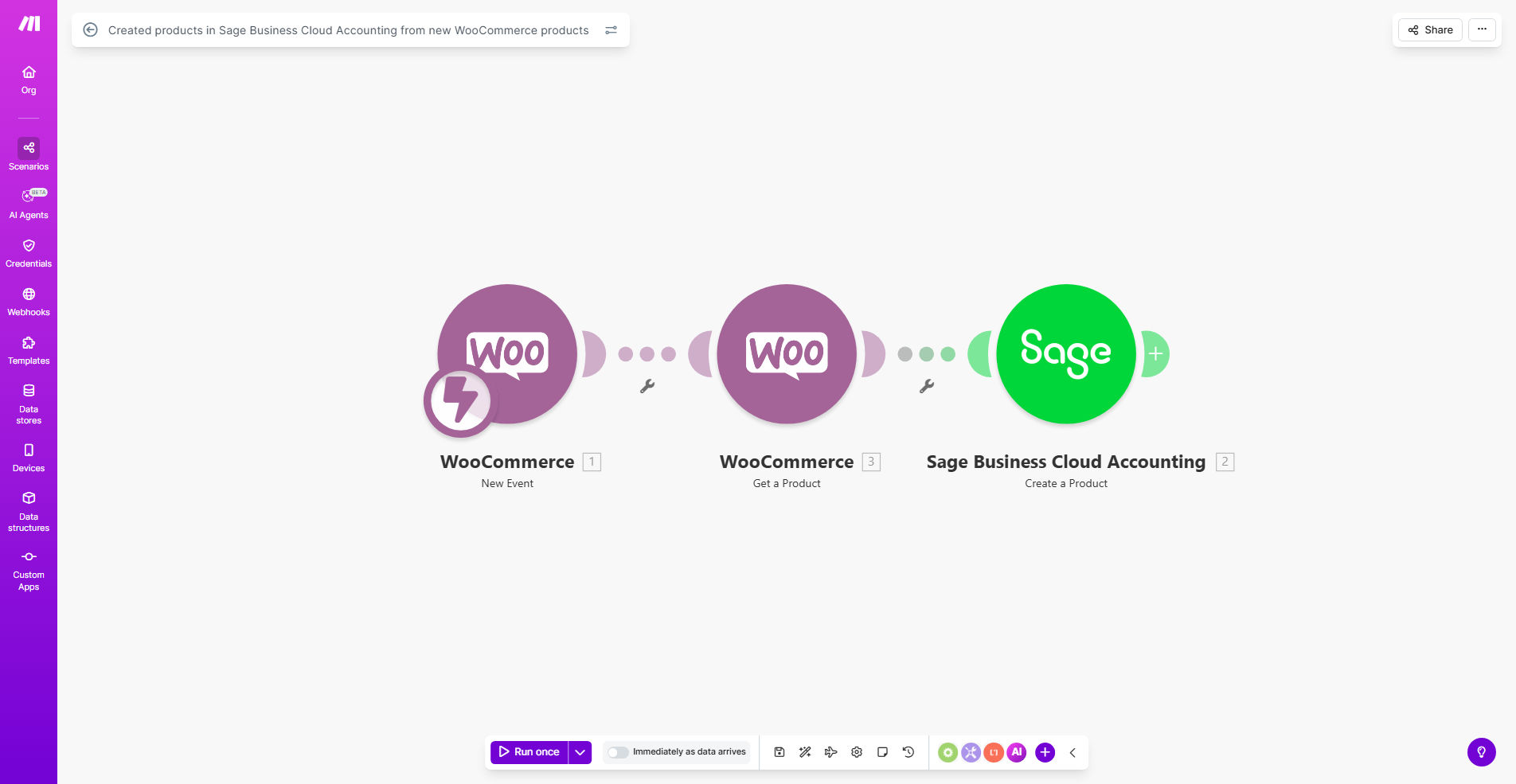
Diagram showing WooCommerce products syncing to Sage Business Cloud Accounting

What This Workflow Does

This automation eliminates the tedious manual process of recreating WooCommerce products in Sage Business Cloud Accounting. Whenever you add a new product to your online store, the workflow automatically creates a corresponding product record in Sage with all the necessary financial details.

For ecommerce businesses using both platforms, this integration solves several critical problems: mismatched inventory counts between systems, delayed financial reporting due to manual data entry, and human errors in transferring product specifications. The automation ensures your accounting system always reflects your current product catalog.

How It Works

1. New Product Detection

The workflow monitors your WooCommerce store for newly created products. It triggers instantly when a product is added, before it goes live in your store.

2. Data Transformation

Product information is formatted to match Sage's requirements. This includes converting WooCommerce categories to Sage's accounting categories and ensuring proper tax mappings.

3. Sage Product Creation

The system creates a new product in Sage with all transferred details. Critical financial fields like cost price, sales price, and inventory tracking are populated accurately.

4. Verification & Error Handling

The workflow confirms successful creation in Sage and logs any errors for review. Failed attempts automatically retry with adjusted parameters when possible.

Who This Is For

This automation benefits ecommerce businesses that:

  • Manage more than 50 products across both systems
  • Frequently add new products or update existing ones
  • Need real-time accuracy between store inventory and accounting records
  • Have experienced errors from manual data entry between platforms

What You'll Need

  1. Active WooCommerce store with administrator access
  2. Sage Business Cloud Accounting subscription
  3. Make.com account (free tier available)
  4. Product taxonomy documentation for both systems

Quick Setup Guide

  1. Install the template in your Make.com account
  2. Connect your WooCommerce and Sage accounts
  3. Map product fields between the two systems
  4. Test with sample products to verify mappings
  5. Activate the workflow for live product additions

Pro tip: Create a dedicated "Sync Test" product in WooCommerce that you can modify to verify all field mappings work correctly before going live with real products.

Key Benefits

Eliminate duplicate data entry - Products only need to be created once in WooCommerce, saving 5-15 minutes per product that would otherwise be spent recreating them in Sage.

Maintain accurate financial records - Automatic syncing ensures your accounting system always reflects current product costs, prices, and inventory levels for precise profit calculations.

Reduce human error - The system prevents common mistakes like transposed numbers, missed fields, or incorrect category assignments that frequently occur with manual entry.

Scale product catalog efficiently - Adding dozens or hundreds of new products becomes manageable since the accounting side updates automatically without additional staff time.

Frequently Asked Questions

Common questions about WooCommerce and Sage accounting integration

Syncing products ensures accurate financial reporting and inventory management. When products aren't synced, accounting records become outdated, leading to mismatched inventory counts and incorrect profit calculations.

This automation eliminates manual data transfer errors while saving 5-10 hours per month on average for most ecommerce businesses. It also prevents situations where sales are recorded against products that don't exist in the accounting system.

The integration typically syncs product names, SKUs, descriptions, prices, and inventory levels. You can customize which fields transfer based on your accounting needs.

Critical financial data like cost prices and tax classifications are often included to maintain accurate accounting records. The system can also handle variant products with multiple SKUs under a single parent item.

The sync triggers instantly whenever a new product is added in WooCommerce. For existing products, you can set the sync to run daily or weekly batches.

Real-time syncing prevents discrepancies between your storefront and accounting system, especially important during peak sales periods when inventory changes frequently.

Yes, the integration allows field mapping for custom product attributes. This is particularly useful for businesses with unique inventory requirements like serial numbers, lot tracking, or custom tax categories.

Proper mapping ensures all necessary product details flow correctly into your accounting system. You can even create conditional mappings where certain WooCommerce fields populate different Sage fields based on product type.

The system logs errors and can notify your team via email or Slack. Common issues like duplicate SKUs or missing required fields are flagged immediately.

You can configure retry attempts or set up approval steps for problematic items before they reach Sage. The workflow maintains a full audit trail of all sync attempts for compliance purposes.

Automation reduces product entry errors by 92% compared to manual processes according to industry studies. It also eliminates the 15-30 minute delay per product when staff manually transfers data between systems.

The time savings allow your team to focus on higher-value tasks. One client reported saving 47 staff hours monthly after implementing this automation for their 300-product catalog.

Absolutely. GrowwStacks specializes in tailored ecommerce accounting automations. We can build custom field mappings, add approval workflows, integrate with your ERP system, or create specialized reporting.

Book a free consultation to discuss your specific WooCommerce and Sage integration needs. Our solutions typically pay for themselves within 3-6 months through labor savings alone.

Need a Custom WooCommerce-Sage Integration?

This free template is a starting point. Our team builds fully tailored automation systems for your specific business needs.