Make.com SugarCRM Google Sheets Slack Sales Automation

Automate SugarCRM Won Opportunities to Google Sheets & Slack

Instantly log closed-won deals and notify your team without manual data entry

Get This Workflow → Make.com · SugarCRM · Free Template
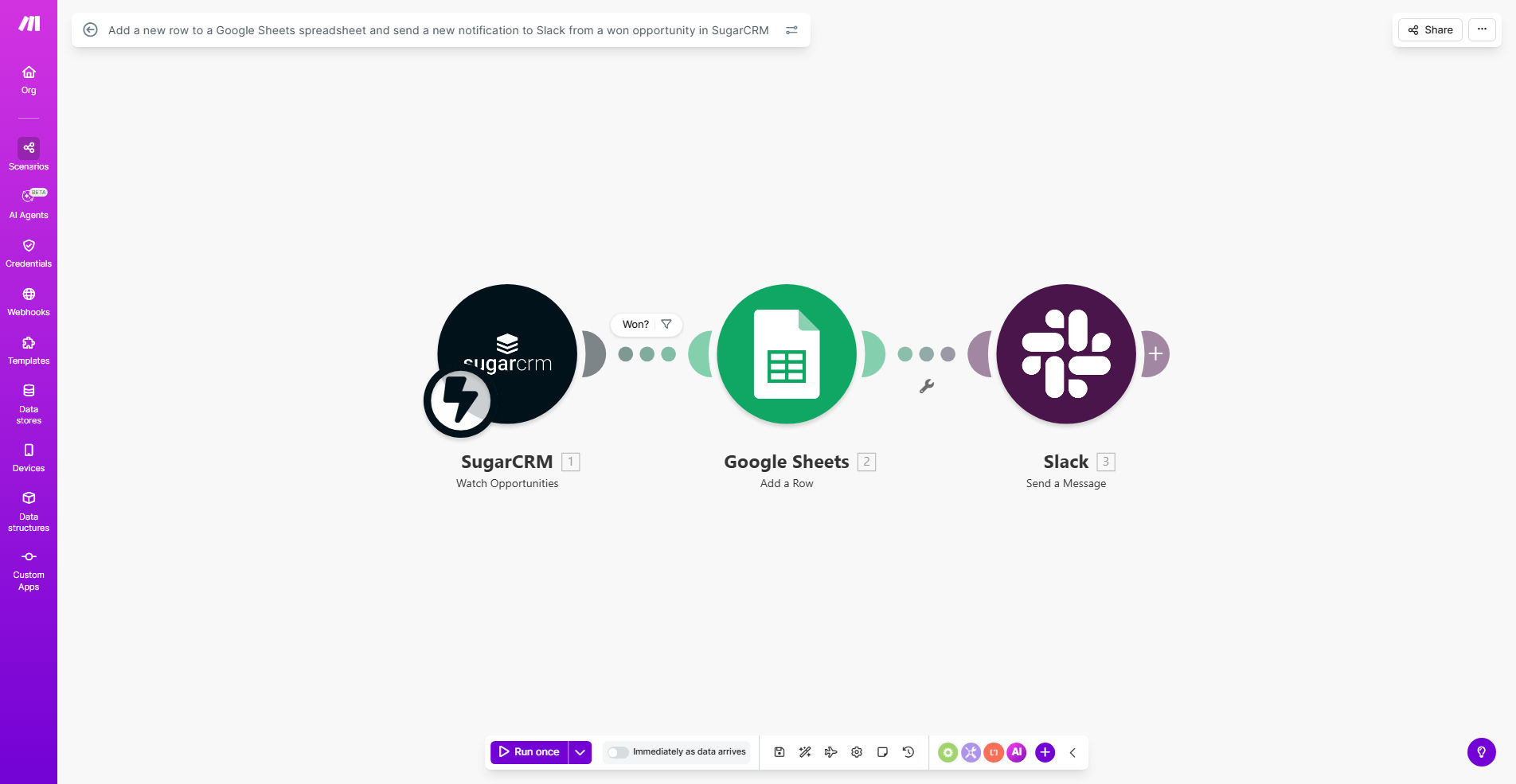
Make.com workflow diagram showing SugarCRM to Google Sheets and Slack integration

What This Workflow Does

This automation solves the common problem of sales teams manually logging won opportunities across multiple systems. When a deal moves to "Closed-Won" in SugarCRM, the workflow automatically creates a detailed record in your Google Sheets revenue tracker and sends an instant notification to your Slack sales channel.

By eliminating manual data entry, you ensure accurate, real-time visibility of won deals across your organization. Finance gets clean data for forecasting, marketing can analyze win patterns, and leadership sees up-to-date KPIs—all without additional work from your sales team.

How It Works

1. SugarCRM Triggers the Workflow

The automation monitors your SugarCRM instance for any opportunity that changes to the "Closed-Won" stage. It captures all relevant deal details including amount, close date, account information, and custom fields.

2. Data Formats for Destination Systems

The workflow transforms SugarCRM data into the exact structure needed for your Google Sheets template and Slack notification format. This includes currency formatting, date standardization, and merging fields for readability.

3. Simultaneous Updates to Sheets & Slack

Within seconds, the system adds a new row to your designated Google Sheets spreadsheet with all deal details while simultaneously posting a formatted notification to your specified Slack channel with key win highlights.

Pro tip: Add conditional formatting in Google Sheets to automatically highlight your biggest wins and color-code deals by product line or territory for instant visual analysis.

Who This Is For

This workflow benefits sales organizations using SugarCRM that need to:

  • Share won deal data with teams lacking CRM access
  • Create auditable records of sales achievements
  • Celebrate wins instantly with distributed teams
  • Feed clean data to financial models and dashboards
  • Reduce administrative work for sales reps

What You'll Need

  1. A SugarCRM instance with API access
  2. Make.com account (formerly Integromat)
  3. Google Sheets spreadsheet with defined column headers
  4. Slack workspace with appropriate channel access
  5. Admin permissions to set up OAuth connections

Quick Setup Guide

  1. Clone the template in your Make.com account
  2. Connect your SugarCRM, Google Sheets, and Slack accounts
  3. Map SugarCRM fields to your Google Sheets columns
  4. Customize the Slack notification message format
  5. Test with a sample won opportunity
  6. Activate the automation

Key Benefits

Eliminate manual data entry - Sales reps save 2-3 hours per week by removing duplicate logging of won deals across systems.

Real-time revenue visibility - Finance and leadership access accurate won deal data within minutes instead of waiting for end-of-week reports.

Instant team recognition - Slack notifications ensure wins get celebrated immediately, improving morale and reinforcing positive behaviors.

Audit-ready records - Automated Google Sheets logging creates timestamped documentation of all closed-won opportunities.

Scalable process - The system handles increasing deal volume without additional staffing needs.

Frequently Asked Questions

Common questions about SugarCRM automation and integration

Automating SugarCRM opportunity tracking eliminates manual data entry errors, ensures real-time visibility of won deals across your organization, and enables faster sales team response times.

Studies show automated CRM updates reduce administrative work by 30-45% while improving data accuracy by 92% compared to manual processes. This translates to better forecasting and more time for revenue-generating activities.

Connecting SugarCRM to Google Sheets creates a centralized revenue dashboard accessible to non-technical teams without CRM access.

Marketing can analyze win patterns, finance can forecast cash flow, and leadership can track KPIs—all from automatically updated data without IT involvement or expensive reporting tools. The spreadsheet becomes a living document of sales performance.

Slack notifications create instant team visibility for closed-won deals, enabling faster celebration of wins, quicker account handoffs to customer success, and immediate visibility into pipeline changes.

Teams using automated deal notifications see 27% faster deal-to-revenue cycles according to Salesforce research. The psychological impact of immediate recognition also boosts rep motivation and competitive drive.

Essential fields include opportunity name, amount, close date, account name, sales rep, and product/service.

Recommended additions: deal stage duration, win probability history, competitor tracking, and custom fields unique to your sales process. Keep mandatory fields minimal but capture enough for meaningful analysis.

  • Always include a unique deal ID
  • Track sales cycle length
  • Record decision-maker roles

High-performing teams review won deals weekly to identify patterns in successful deals, analyze conversion timelines, and spot coaching opportunities.

Monthly deep dives should examine win/loss ratios by product, rep, and territory to inform strategy. Real-time alerts help celebrate wins immediately while the momentum is strongest.

Implement role-based access controls in both SugarCRM and Google Sheets. Use OAuth authentication for secure API connections.

Mask sensitive financial data in Slack notifications. Audit logs should track all automated data movements. Consider IP restrictions for production automation accounts to prevent unauthorized access.

Yes, GrowwStacks specializes in custom SugarCRM integrations tailored to your sales workflow.

Our automation consultants can design systems that match your deal stages, approval processes, and reporting requirements while connecting to your existing tech stack. We handle everything from initial scoping to ongoing maintenance.

  • Custom field mapping
  • Multi-system integration
  • Ongoing support included

Need a Custom SugarCRM Automation?

This free template is a starting point. Our team builds fully tailored automation systems for your specific business needs.