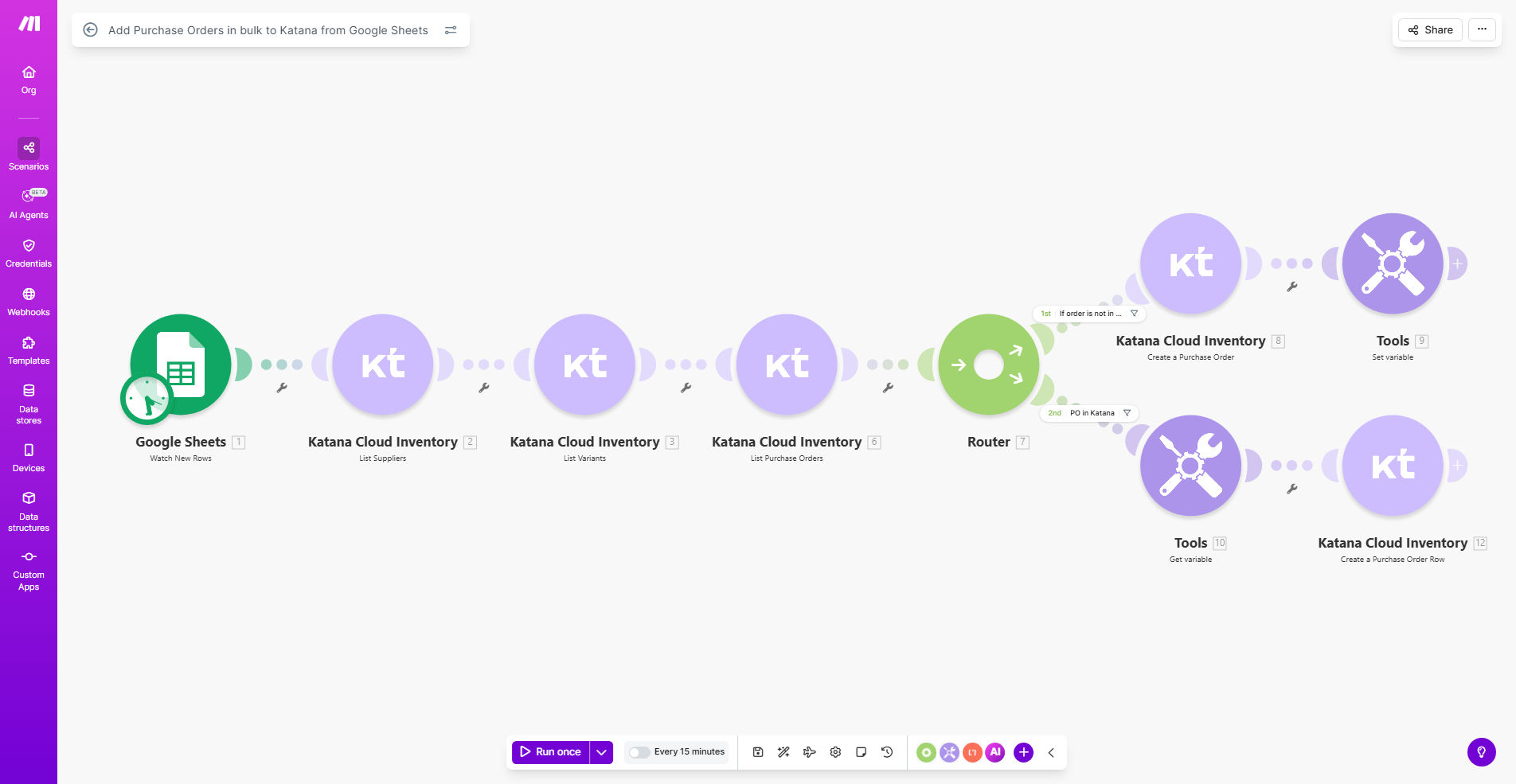
What This Workflow Does
This automation solves a critical pain point for manufacturing businesses using Katana MRP - the tedious manual entry of purchase orders. By connecting Google Sheets directly to Katana, it enables bulk processing of purchase orders with complete accuracy.
The workflow automatically transfers all purchase order details from your standardized Google Sheets template into Katana's manufacturing system. This includes vendor information, product SKUs, quantities, pricing, and delivery dates - eliminating hours of repetitive data entry while ensuring 100% data consistency between systems.
How It Works
1. Google Sheets data preparation
Your procurement team maintains purchase orders in a standardized Google Sheets template. The spreadsheet can be collaboratively edited by multiple team members with all changes automatically saved.
2. Triggering the automation
The workflow can be scheduled to run at specific intervals (daily, weekly, etc.) or triggered manually when ready to process a batch of purchase orders.
3. Data validation and processing
Each row in the spreadsheet is validated to ensure all required fields are present and formatted correctly before being sent to Katana. Invalid entries are flagged for correction.
4. Katana integration
Validated purchase orders are automatically created in Katana using its API, with all relevant details mapped to the correct fields in your manufacturing system.
5. Confirmation and logging
The workflow provides confirmation of successful uploads and logs any errors for follow-up, creating a complete audit trail of all processed orders.
Pro tip: Maintain a dedicated "Processed POs" tab in your Google Sheet to track which orders have been successfully uploaded to Katana.
Who This Is For
This automation delivers the most value for manufacturing businesses that:
- Process 20+ purchase orders weekly
- Have multiple team members entering PO data
- Use Katana MRP for production planning
- Already manage vendor and product data in Google Sheets
- Need to reduce manual data entry errors
What You'll Need
- A Katana MRP account with API access enabled
- A Google Sheets document formatted with your purchase order data
- A Make.com account (formerly Integromat)
- Basic understanding of your Katana PO fields and requirements
Quick Setup Guide
- Copy the template scenario from Make.com to your account
- Connect your Google Sheets account and select your PO spreadsheet
- Connect your Katana account using API credentials
- Map the Google Sheets columns to corresponding Katana PO fields
- Test with a small batch of purchase orders
- Schedule the automation to run at your preferred frequency
Key Benefits
Eliminate manual data entry errors that can disrupt manufacturing schedules when incorrect quantities or products are ordered.
Save 5-15 hours per week by automating what would otherwise be tedious copy-paste work between systems.
Improve procurement team productivity by allowing them to focus on vendor relationships rather than data entry.
Ensure real-time inventory accuracy with purchase orders reflected in Katana immediately rather than waiting for manual processing.
Scale your purchasing operations without adding administrative staff as order volumes increase.