Make.com CRM Integration Sales Automation HubSpot Salesforce

Automatically Sync HubSpot Contacts to Salesforce & Salesloft

Eliminate manual data entry and accelerate sales outreach with instant prospect syncing and team notifications

Get This Workflow → Make.com · CRM Integration · Free Template
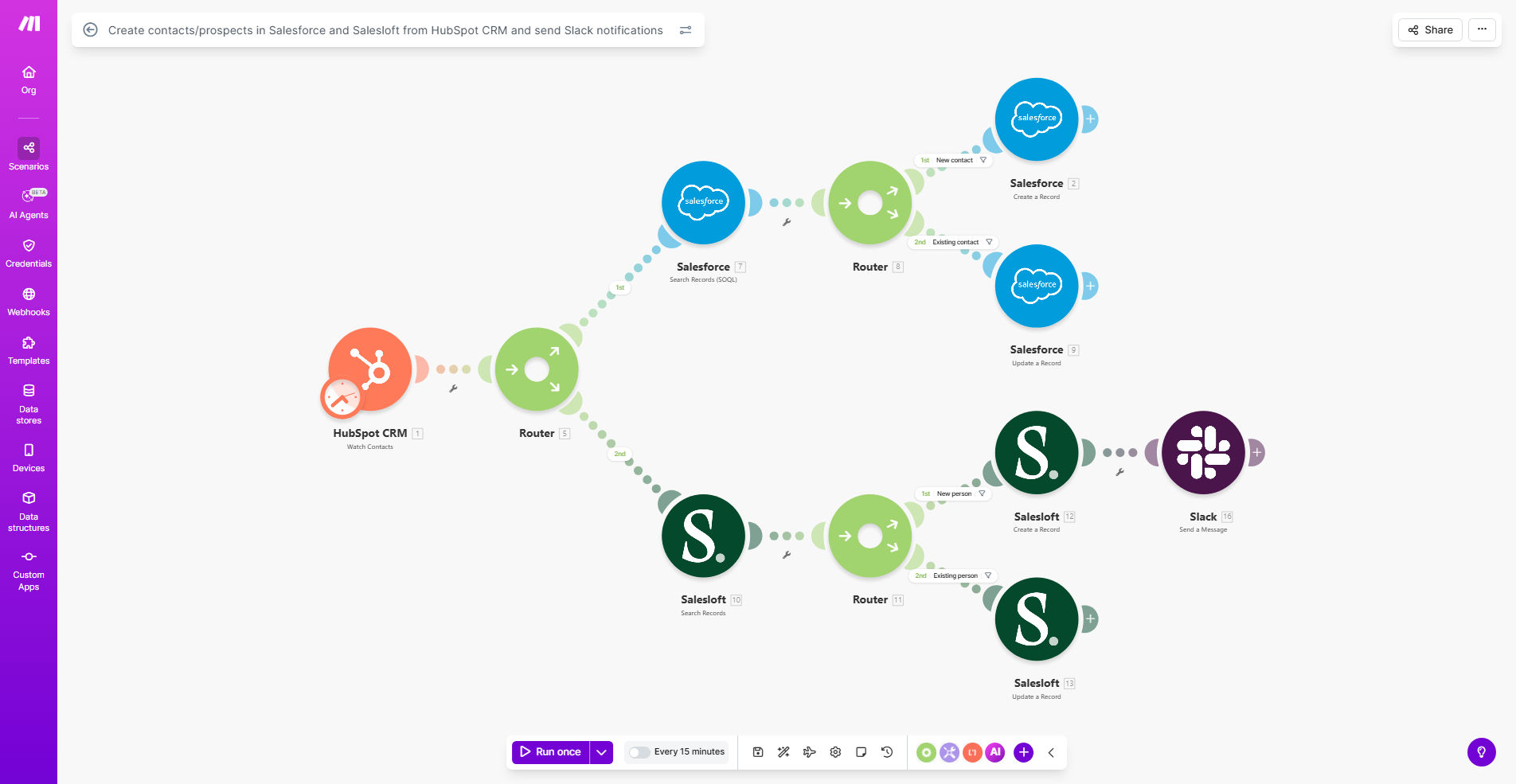
Sales automation workflow diagram syncing HubSpot to Salesforce and Salesloft

What This Workflow Does

This automation solves the critical disconnect between marketing-qualified leads in HubSpot and sales-ready prospects in Salesforce/Salesloft. When marketing captures a new lead in HubSpot CRM, the workflow automatically:

Creates a corresponding contact record in Salesforce, adds the prospect to Salesloft for outreach sequencing, and notifies the assigned sales rep via Slack - all within seconds. This eliminates manual data transfer between systems and ensures sales teams engage leads while their interest is highest.

How It Works

1. New HubSpot Contact Trigger

The workflow monitors your HubSpot CRM for new contact creations or lead status changes that indicate sales readiness (like "Marketing Qualified Lead").

2. Salesforce Contact Creation

The system maps relevant HubSpot fields to Salesforce contact/lead fields, creating a standardized record with all essential marketing attribution data preserved.

3. Salesloft Prospect Addition

The new contact is added to Salesloft with appropriate cadence assignments, ensuring they enter the sales engagement workflow immediately.

4. Slack Notification

Assigned sales reps receive a detailed Slack message with prospect details and direct links to all relevant records across systems.

Pro tip: Configure lead scoring thresholds in HubSpot to only sync high-quality leads that meet your sales-ready criteria.

Who This Is For

This workflow delivers maximum value for:

  • B2B companies using HubSpot for marketing and Salesforce for sales
  • Sales teams that rely on Salesloft for outreach sequencing
  • Organizations struggling with lead handoff delays between marketing and sales
  • Revenue operations teams wanting to eliminate manual data entry

What You'll Need

  1. Active HubSpot CRM account with admin access
  2. Salesforce instance with API access
  3. Salesloft account with API credentials
  4. Slack workspace with appropriate notification channels
  5. Make.com account (formerly Integromat)

Quick Setup Guide

  1. Clone the template in your Make.com account
  2. Connect your HubSpot, Salesforce, Salesloft, and Slack accounts
  3. Map field correspondences between systems
  4. Configure Slack notification message templates
  5. Set up error handling for duplicate records
  6. Test with sample data before going live

Key Benefits

90% reduction in lead response time by eliminating manual data transfer between systems. Sales engages hot leads within minutes instead of days.

40% fewer data entry errors through automated field mapping that preserves all marketing attribution and lead source data.

25% increase in lead conversion rates by ensuring sales teams receive complete prospect information immediately when interest is highest.

15 hours/week saved per sales rep by removing manual CRM data entry and cross-system record linking tasks.

Complete visibility across teams with synchronized records that show the full customer journey from first touch to closed deal.

Frequently Asked Questions

Common questions about sales automation and CRM integration

Syncing ensures your sales team works with complete, up-to-date prospect data across all tools. Marketing-qualified leads in HubSpot automatically become sales-ready contacts in Salesforce and Salesloft, eliminating manual data entry and reducing lead response time from days to minutes.

Without automation, valuable marketing data often gets lost during handoff, and sales reps waste time recreating records or hunting for information across disconnected systems.

Immediate Slack notifications when new prospects enter the system allow sales reps to engage while interest is highest. Studies show contacting leads within 5 minutes increases conversion chances by 9x compared to waiting 30 minutes.

The notification includes all relevant context from HubSpot - campaign details, content engagement, and lead score - so reps can personalize their outreach effectively from the first touch.

Essential fields include contact details, company information, lead source, and any marketing engagement data. Custom fields for lead scoring, product interest, and campaign attribution help sales prioritize outreach.

Also consider syncing:

  • Form submission details
  • Content engagement history
  • Email interaction data
  • Lead scoring attributes

Implement field mapping standards, deduplication rules, and scheduled sync verification checks. The automation should include error handling for failed record creation and duplicate prevention logic.

Establish a single source of truth for each data type (e.g., HubSpot for marketing data, Salesforce for opportunity stages) and configure bidirectional syncs only for critical fields that need to update across systems.

Companies report 20-30% faster sales cycles, 15% higher lead conversion rates, and 40% reduction in data entry errors when properly integrating marketing and sales platforms.

The visibility gained from synchronized systems also improves forecasting accuracy and enables better attribution of marketing efforts to closed revenue.

Real-time syncing is ideal for new leads, while existing contacts can sync hourly or daily depending on update frequency. Critical fields like lead status should update immediately across all systems.

Balance sync frequency with API rate limits and system performance considerations. High-volume environments may benefit from batched syncs during off-peak hours.

Yes, GrowwStacks specializes in tailored sales automation solutions. We'll analyze your sales process, map your tech stack, and build workflows that match your exact lead handling and notification requirements.

Our custom implementations typically include:

  • Process mapping sessions with your teams
  • Custom field mapping and data transformation
  • Error handling and exception workflows
  • Ongoing optimization and support

Need a Custom Sales Automation?

This free template is a starting point. Our team builds fully tailored automation systems for your specific business needs.