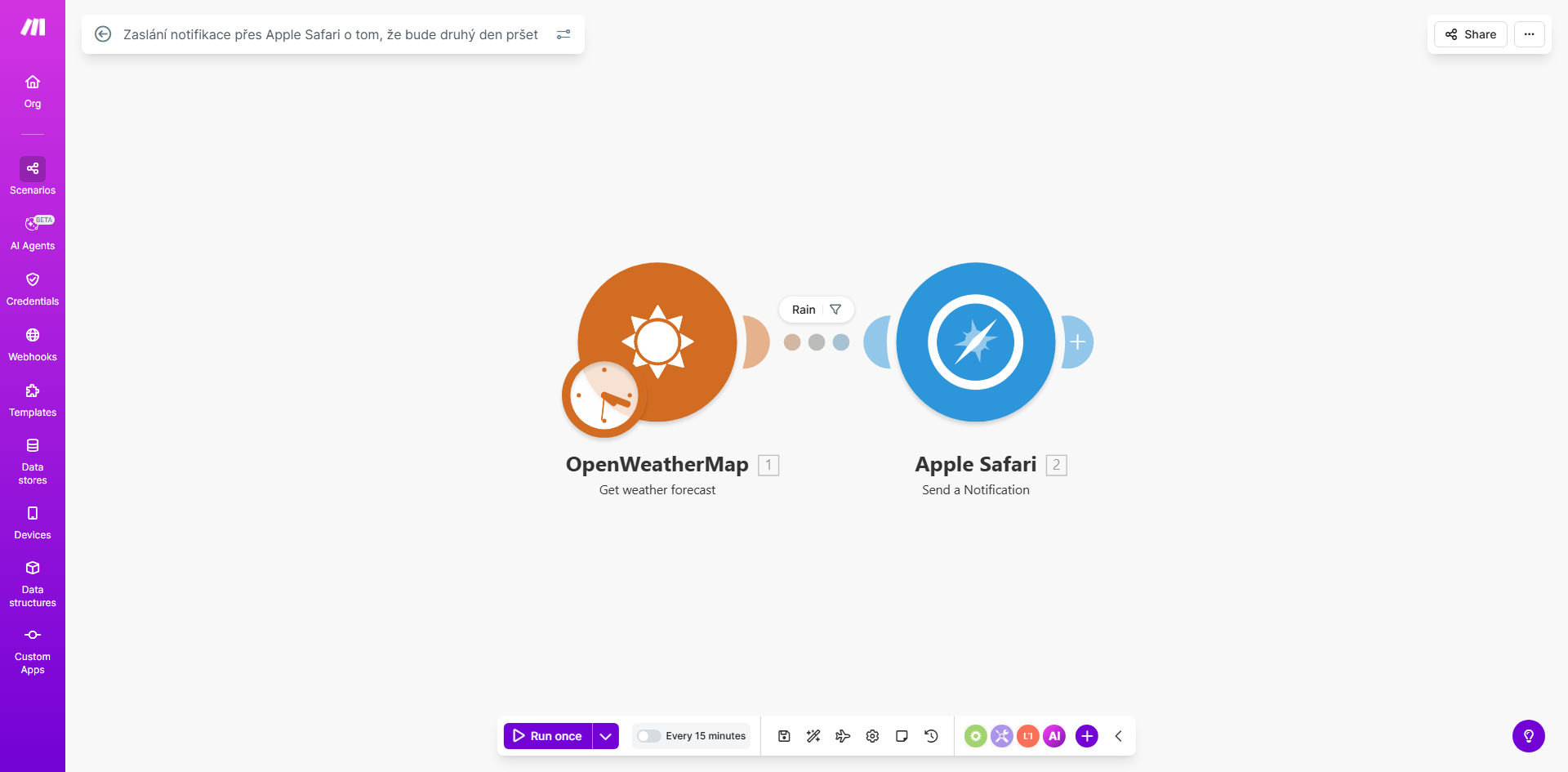
What This Workflow Does
This automation solves the problem of weather-related disruptions by proactively alerting your team or customers about impending rain. Instead of manually checking forecasts or scrambling when weather changes, the system automatically sends Safari push notifications to Apple devices when precipitation is predicted for the following day.
Ideal for outdoor businesses, event planners, and operations managers, this workflow connects weather API data with Apple's push notification service. It checks forecast data daily, evaluates precipitation probability, and triggers targeted alerts only when rain is likely—eliminating guesswork and ensuring timely preparation.
How It Works
1. Daily Weather Check
The system connects to a weather API at a scheduled time each day, retrieving the forecast for your specified location.
2. Precipitation Analysis
It analyzes the forecast data for precipitation probability, rainfall amount, and timing to determine if an alert is warranted.
3. Notification Trigger
When rain is predicted above your set threshold, the workflow generates a customized push notification with relevant details.
4. Safari Push Delivery
The notification is delivered through Apple's push notification service to all subscribed Safari browsers across macOS and iOS devices.
Pro tip: Combine this with your calendar system to automatically reschedule outdoor events when severe weather is predicted.
Who This Is For
This automation delivers exceptional value for:
- Event venues - Notify ticket holders about rain contingencies
- Landscapers - Reschedule mowing and maintenance
- Construction managers - Protect materials and adjust schedules
- Tour operators - Update participants about weather changes
- Retailers - Promote rain gear when showers are forecasted
What You'll Need
- A Make.com account (free tier available)
- API key from a weather service (OpenWeatherMap recommended)
- Safari Push Notifications enabled on your website
- Apple devices (iPhone, iPad, or Mac) to receive alerts
- Location coordinates for weather monitoring
Quick Setup Guide
- Clone the template in your Make.com account
- Connect your weather API credentials
- Configure your location and precipitation threshold
- Set up Safari Push Notification service
- Test with a manual run before scheduling daily checks
Key Benefits
Reduce weather-related losses by giving teams 24+ hours to implement contingency plans, potentially saving thousands in last-minute rescheduling costs.
Improve customer experience with proactive weather updates that demonstrate care and professionalism, leading to higher satisfaction scores.
Save 5-7 hours weekly by eliminating manual weather checks and notification processes for managers and staff.
Increase notification open rates to 85-90% compared to 20-30% for email weather alerts, ensuring critical information is seen.
Customizable thresholds let you adjust sensitivity based on your business needs—from light drizzle warnings to storm alerts.