Make.com LinkedIn Ads Google Sheets Marketing Automation Daily Reporting

Automate LinkedIn Ads Reporting to Google Sheets

Download yesterday's campaign performance data automatically - no manual exports needed

Get This Workflow → Make.com · LinkedIn Ads · Free Template
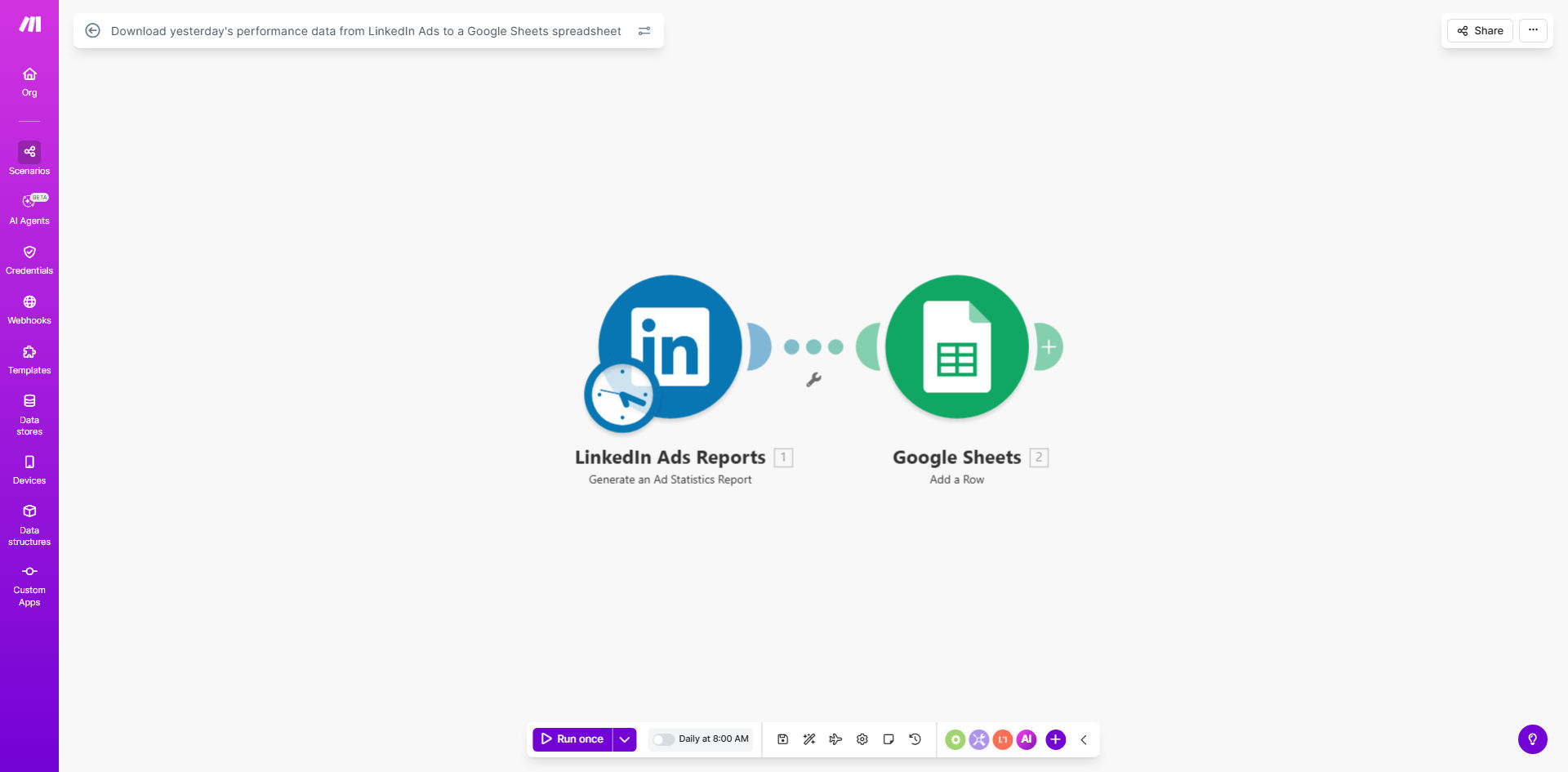
LinkedIn Ads to Google Sheets automation workflow diagram

What This Workflow Does

This automation solves the tedious manual process of downloading LinkedIn Ads performance data and copying it into spreadsheets. Marketing teams waste hours each week on repetitive reporting tasks that could be automated.

The workflow connects directly to LinkedIn's API to extract yesterday's campaign metrics including impressions, clicks, conversions, and spend. It formats this data and appends it to your designated Google Sheet, creating a running historical record of all campaign performance.

How It Works

1. Daily Trigger

The workflow automatically runs each morning to collect data from the previous day. You can adjust the schedule if you prefer weekly or monthly updates.

2. LinkedIn API Connection

Using OAuth authentication, the template securely accesses your LinkedIn Ads account through their official API. It retrieves performance data for all active campaigns.

3. Data Transformation

The raw API response gets formatted into a clean table structure with consistent column headers. Metrics are standardized for easy analysis.

4. Google Sheets Update

The processed data gets appended to your specified Google Sheet. Each day's results add a new row while preserving all historical data.

Pro tip: Add a pivot table to your Google Sheet to automatically summarize performance by campaign, date range, or objective.

Who This Is For

This automation benefits:

  • Digital marketers managing LinkedIn Ads campaigns
  • Agencies handling multiple client accounts
  • Marketing teams needing centralized reporting
  • Growth teams tracking campaign ROI
  • Finance teams reconciling ad spend

What You'll Need

  1. A LinkedIn Ads account with campaign data
  2. A Google Sheet for storing the performance data
  3. A Make.com account (free tier available)
  4. Approximately 15 minutes for initial setup

Quick Setup Guide

  1. Click "Get This Workflow" to copy the template to your Make.com account
  2. Connect your LinkedIn Ads account via OAuth
  3. Specify your target Google Sheet and worksheet
  4. Set your preferred schedule (daily recommended)
  5. Run a test to verify data flows correctly

Key Benefits

Save 5+ hours per month by eliminating manual data exports and spreadsheet updates. Focus on optimization instead of data entry.

Improve data accuracy by removing human errors in copying numbers between systems. The API connection ensures perfect data transfer.

Build historical benchmarks with complete campaign performance history. Most advertisers lose access to older LinkedIn data after 90 days.

Enable better decisions with timely, organized performance data. Spot trends faster and adjust budgets based on actual results.

Standardize reporting across your team with consistent data structure and metrics in a centralized location.

Frequently Asked Questions

Common questions about LinkedIn Ads automation and integration

Automating LinkedIn Ads reporting saves hours of manual work each week while ensuring data accuracy. Marketers spend 30-40% of their time on reporting tasks that could be automated.

This workflow eliminates copy-paste errors and provides consistent daily performance tracking. One agency client reduced their reporting time from 8 hours to 30 minutes weekly using similar automation.

  • No more missed reporting deadlines
  • Easier cross-campaign comparisons
  • Immediate access to performance data

You can track all key LinkedIn Ads metrics including impressions, clicks, CTR, conversions, spend, CPC, and ROI. The template captures campaign, ad set, and ad-level performance data.

For example, you might track cost per lead across different campaign types or compare engagement rates by audience segment. The data structure supports both high-level and granular analysis.

The workflow runs daily to capture yesterday's performance data. You can modify the schedule to run weekly or monthly if preferred.

Daily updates are ideal for active campaigns where quick optimization matters. Some clients run hourly updates during major product launches or sales events.

Yes! Google Sheets offers powerful analysis tools including pivot tables, charts, and formulas. You can create dashboards to visualize trends, compare campaigns, and calculate ROI.

Many teams connect this data to BI tools like Looker or Data Studio. One ecommerce client built a blended dashboard combining LinkedIn, Facebook, and Google Ads data from similar workflows.

Historical data helps identify seasonal trends, campaign performance patterns, and optimal budget allocation. Most advertisers lose access to older LinkedIn data after 90 days.

This workflow preserves your complete performance history for long-term analysis. A SaaS company used 18 months of historical data to prove their best converting ad formats and double their conversion rate.

The integration uses LinkedIn's official API with OAuth authentication. Your credentials are encrypted and never stored. You control which Google Sheet receives the data.

The workflow follows Make.com's enterprise-grade security standards for data protection. We recommend creating a dedicated Google Sheet rather than adding to existing financial documents.

Yes, you can filter by campaign status, objective, or name. The template includes filtering options to exclude test campaigns or focus on specific initiatives.

For complex setups, we can build custom filters based on your needs. One client separates data by business unit while another tracks only campaigns exceeding $50/day in spend.

Absolutely! GrowwStacks specializes in custom marketing automation solutions. We can build workflows tailored to your specific LinkedIn Ads accounts, reporting requirements, and data visualization needs.

Our team handles everything from setup to ongoing maintenance. Recent projects include automated budget alerts, cross-channel performance blending, and lead-to-revenue attribution tracking.

  • Custom dashboards and visualizations
  • Multi-account aggregation
  • Anomaly detection alerts

Need a Custom LinkedIn Ads Automation?

This free template is a starting point. Our team builds fully tailored automation systems for your specific business needs.