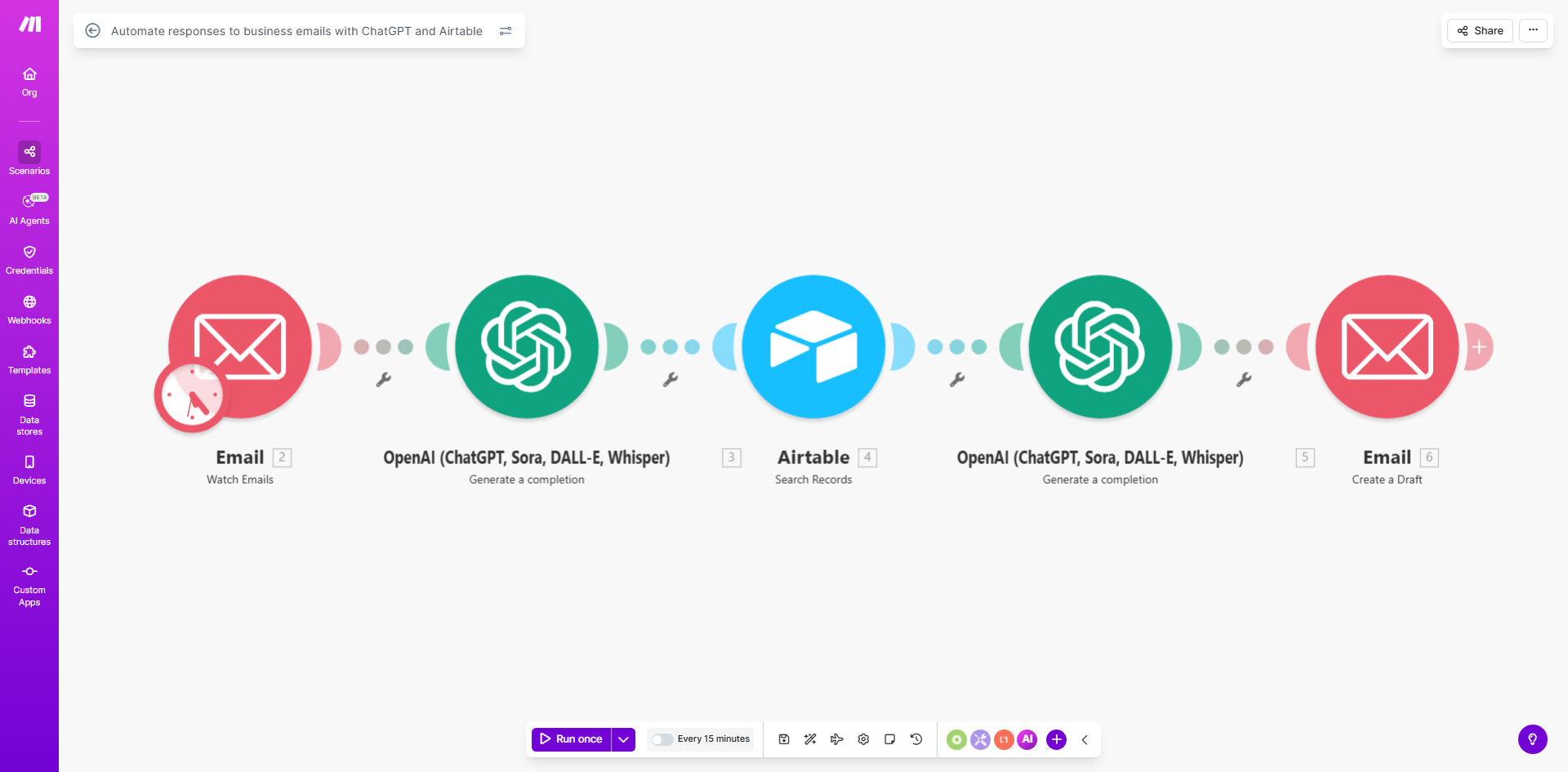
What This Workflow Does
This automation transforms how you handle incoming business emails by combining AI-powered drafting with human oversight. When a new email arrives in your Gmail inbox, the system analyzes its content, references your Airtable knowledge base, and uses ChatGPT to generate a professional draft response.
The key advantage is that all responses are saved as drafts rather than sent automatically. This gives you or your team the opportunity to review, edit if needed, and approve each response before it goes out to customers. It's perfect for businesses that want to maintain personalization and quality control while automating the time-consuming first draft process.
How It Works
1. Email Trigger
The workflow activates whenever a new email arrives in your designated Gmail inbox. It filters out newsletters and internal emails to focus only on customer inquiries.
2. Content Analysis
The system extracts key information from the email including the sender's question, any mentioned products/services, and the general inquiry type (pricing, support, scheduling etc.).
3. Knowledge Base Lookup
Your Airtable base serves as the single source of truth, providing accurate product details, pricing, FAQs, and approved response templates that ChatGPT references.
4. AI Response Generation
ChatGPT crafts a personalized response using your brand voice guidelines from Airtable. The AI considers previous correspondence with the sender for continuity.
5. Draft Creation
The generated response is saved as a draft in Gmail with clear labeling indicating it's an AI-assisted draft awaiting review.
Pro tip: Maintain a spreadsheet of common customer questions and your ideal responses in Airtable. This trains ChatGPT to produce drafts that already match your preferred style.
Who This Is For
This workflow delivers the most value for:
- Ecommerce stores receiving product questions
- Service businesses handling appointment requests
- Professional services firms managing client inquiries
- Startups with limited staff but growing customer communication needs
- Any business spending more than 5 hours/week on repetitive email responses
What You'll Need
- A Make.com account (free plan works)
- Gmail or Google Workspace account
- ChatGPT API access (or OpenAI account)
- Airtable account with your knowledge base setup
- 15-30 minutes for initial configuration
Quick Setup Guide
- Clone the template from Make.com to your account
- Connect your Gmail, OpenAI, and Airtable accounts
- Import the provided Airtable template or adapt your existing base
- Customize the ChatGPT prompts to match your brand voice
- Test with sample emails and refine your knowledge base as needed
- Activate the workflow and monitor drafts for the first few days
Key Benefits
Reduce response times from hours to minutes while maintaining personalization. Customers get faster replies without sacrificing quality.
Save 5-15 hours per week per team member by eliminating the need to manually draft responses to common inquiries.
Improve response consistency across your team by using standardized templates and information from your Airtable knowledge base.
Scale customer support without adding staff during busy periods or business growth phases.
Maintain quality control with the human review step that catches any AI inaccuracies before responses go out.