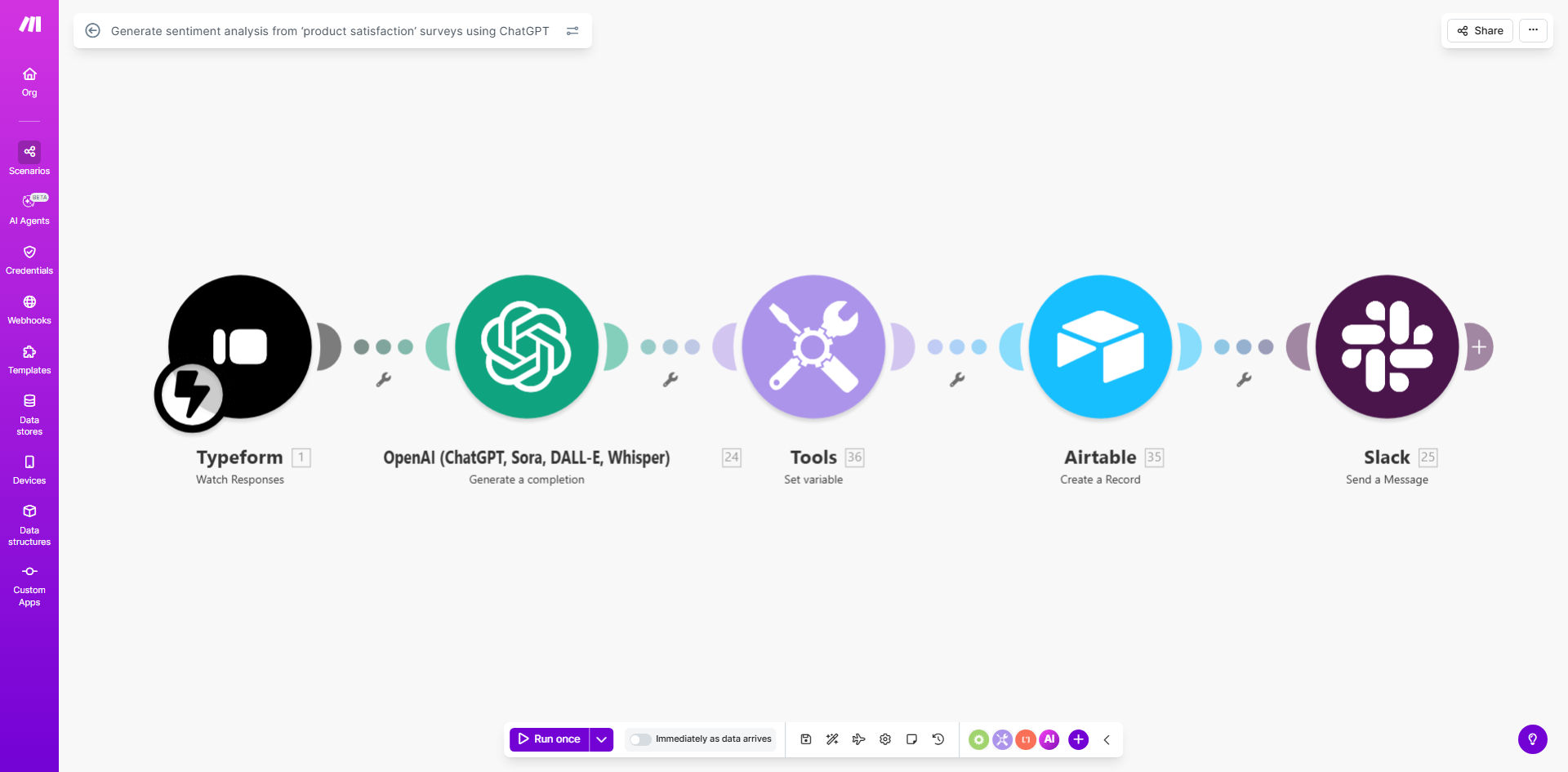
What This Workflow Does
This automation transforms unstructured product survey responses into quantified sentiment data using ChatGPT's natural language processing. Instead of manually reading hundreds of survey comments, the workflow automatically categorizes each response as positive, negative, or neutral while extracting key themes and suggestions.
The system connects directly to your survey platform (like Typeform, Google Forms, or Airtable), processes new responses through ChatGPT's API, then delivers analyzed results to your preferred destination - whether that's a spreadsheet, CRM, or team Slack channel. This creates a continuous feedback loop where customer sentiments directly inform product decisions.
How It Works
1. Survey Response Collection
The workflow monitors your connected survey tool for new submissions, triggering whenever customers complete your product satisfaction questionnaire.
2. ChatGPT Sentiment Processing
Each open-ended response gets analyzed by ChatGPT, which evaluates emotional tone, identifies specific product mentions, and scores sentiment on a consistent scale.
3. Data Enrichment
The AI extracts recurring themes, suggested improvements, and notable praise points from responses, adding structured metadata to the raw feedback.
4. Results Delivery
Analyzed data gets formatted into your preferred reporting structure and sent to destinations like Google Sheets, Looker Studio, or your product team's communication channels.
Who This Is For
This workflow benefits product managers, customer experience teams, and growth marketers who need to:
- Track customer satisfaction trends over time
- Quickly identify pain points after feature releases
- Justify product roadmap decisions with data
- Reduce manual analysis time for large survey volumes
What You'll Need
- A survey tool with API access (Typeform, Google Forms, Airtable, etc.)
- OpenAI API key for ChatGPT access
- Destination for analyzed data (Google Sheets, Slack, etc.)
- Make.com account (free tier available)
Quick Setup Guide
- Duplicate the Make.com template and connect your survey tool
- Configure your OpenAI API key in the ChatGPT module
- Map the survey response fields to be analyzed
- Set up your output destination and preferred report format
- Test with sample responses and adjust sentiment prompts as needed
Key Benefits
80% time reduction in survey analysis versus manual processing, allowing weekly rather than quarterly sentiment tracking.
Consistent evaluation standards as ChatGPT applies the same criteria to every response, eliminating human bias fluctuations.
Actionable insights at scale with automated theme extraction across thousands of responses that would be impractical to read individually.
Real-time alerting when negative sentiment spikes occur, enabling faster response to emerging issues.
Historical benchmarking by storing analyzed data to compare sentiment across product versions and time periods.