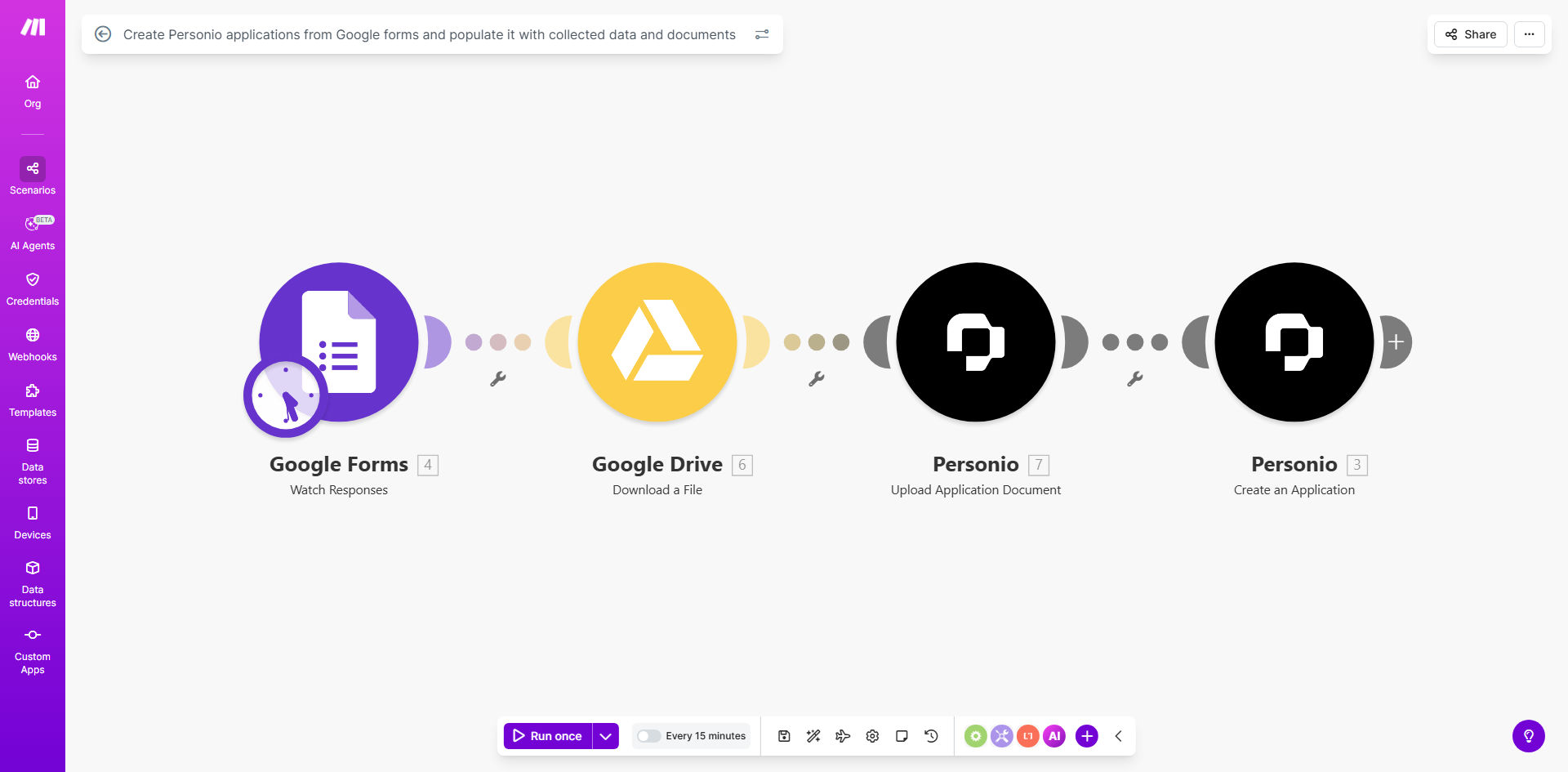
What This Workflow Does
This automation transforms your HR onboarding process by seamlessly connecting Google Forms with Personio. When candidates submit their applications through your Google Form, the workflow automatically creates a corresponding application in Personio, complete with all submitted data and attached documents.
The system eliminates manual data entry, reduces errors, and ensures no application gets lost in the shuffle. HR teams benefit from having all candidate information neatly organized in Personio from the moment applications are submitted, allowing for faster processing and better candidate experiences.
How It Works
1. Candidate Submits Google Form
Applicants complete your customized job application form, providing their information and uploading any required documents like resumes or cover letters.
2. Automation Triggers on Submission
The workflow detects new form submissions and immediately begins processing the data, extracting all relevant information from the form fields.
3. Data Validation and Processing
The system checks for complete information, formats data appropriately, and prepares it for transfer to Personio according to your specified mappings.
4. Personio Application Creation
The workflow creates a new candidate application in Personio, populating all relevant fields with the data from the Google Form submission.
5. Document Attachment
Any files uploaded through the form are automatically attached to the Personio application, ensuring all candidate materials are properly stored.
6. Confirmation and Notifications
The system can send confirmation emails to applicants and notifications to your HR team about new applications received.
Who This Is For
This automation is ideal for:
- HR teams managing high volumes of job applications
- Companies using Personio as their HRIS system
- Organizations that want to streamline their hiring process
- Teams looking to reduce manual data entry errors
- Businesses that need better organization of candidate materials
What You'll Need
- A Google Workspace account with Forms access
- A Personio account with API access
- A Make.com account (free tier available)
- Your Google Form configured with necessary application fields
- Personio application fields mapped to your form questions
Quick Setup Guide
- Copy this template to your Make.com account
- Connect your Google Forms and Personio accounts
- Map form fields to corresponding Personio application fields
- Configure document handling settings
- Set up notification preferences
- Test with sample form submissions
- Go live with your automated application process
Pro tip: Create separate Google Forms for different job types or departments, then use conditional logic in Make.com to route applications to appropriate teams in Personio.
Key Benefits
80% time savings on manual data entry between Google Forms and Personio, allowing HR teams to focus on candidate evaluation rather than administrative tasks.
Error reduction by eliminating manual transcription mistakes that often occur when transferring information between systems.
Faster processing of applications since candidates appear in Personio immediately after submitting their forms, reducing time-to-review.
Better organization with all application materials automatically attached to the correct candidate records in your HR system.
Scalable solution that handles increasing application volumes without additional administrative burden on your team.