Make.com Disqus Chrome Notifications Community

Instant Chrome Notifications for New Disqus Comments

Never miss important discussions - get browser alerts the moment new comments appear on your forums

Get This Workflow → Make.com · Disqus · Free Template
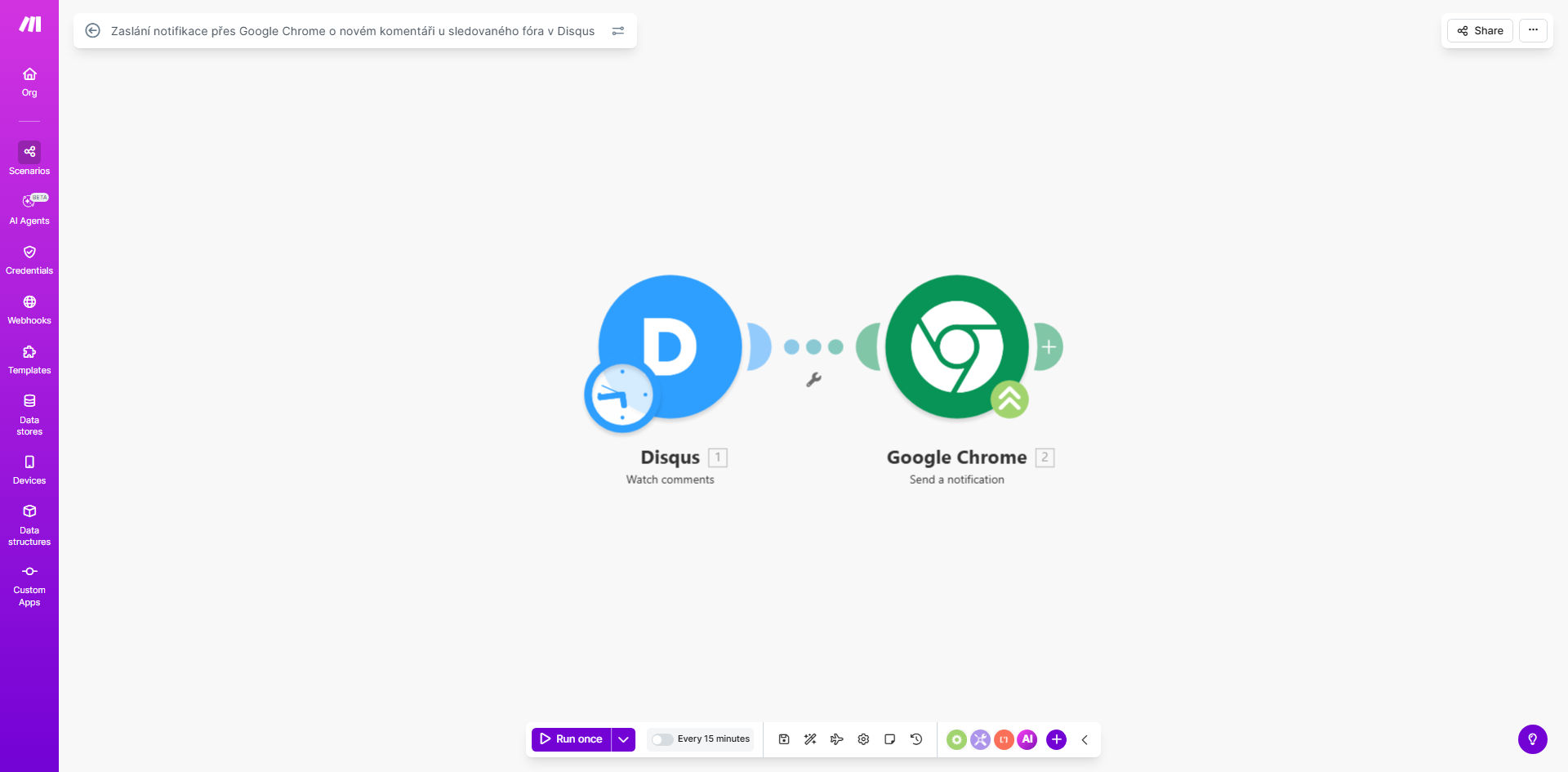
Make.com workflow diagram showing Disqus comment notifications triggering Chrome alerts

What This Workflow Does

This automation solves the problem of delayed engagement with your Disqus comment community. Traditional email notifications often get buried in inboxes, causing you to miss time-sensitive discussions or fail to respond promptly to important questions.

The workflow monitors your Disqus forums through Make.com's integration, then instantly delivers push notifications through Google Chrome whenever new comments are posted. This creates a real-time connection between your audience's activity and your ability to participate, without requiring constant manual checking of your website.

How It Works

1. Disqus Comment Monitoring

The workflow begins by regularly checking your specified Disqus forums through their API. You can configure which forums or threads to monitor based on your website's structure.

2. New Comment Detection

Make.com compares each scan with previous results, identifying only genuinely new comments to avoid duplicate notifications. The system can be adjusted to check as frequently as every 5 minutes.

3. Notification Processing

When new comments are found, the workflow extracts key details like the commenter's name, comment excerpt, and direct link to the discussion. This data is formatted for optimal notification display.

4. Chrome Push Delivery

Using Chrome's notification API, the system delivers a desktop alert containing the comment details. Clicking the notification takes you directly to the conversation on your site.

Pro tip: Configure your Make.com scenario to only notify about comments containing specific keywords or from certain users to reduce notification fatigue.

Who This Is For

This automation is ideal for:

  • Community managers who need to moderate discussions promptly
  • Blog owners wanting to engage with commenters in real-time
  • Businesses using Disqus for customer support or feedback
  • Content creators who value immediate audience interaction
  • Teams collaborating on community management

What You'll Need

  1. A Make.com account (free tier available)
  2. Disqus API credentials (available in your Disqus admin panel)
  3. Google Chrome installed on your devices
  4. Notification permissions enabled in Chrome
  5. The forum IDs you want to monitor (found in Disqus URL structure)

Quick Setup Guide

  1. Click "Get This Workflow" to import the template to your Make.com account
  2. Connect your Disqus account in the Make.com scenario settings
  3. Specify which forums or threads to monitor by entering their IDs
  4. Test the notification flow with a sample comment
  5. Adjust the polling interval based on your preferred notification frequency
  6. Activate the scenario and approve Chrome notification permissions when prompted

Key Benefits

Faster response times: Engage with commenters within minutes rather than hours or days, significantly improving discussion quality and community perception.

Reduced moderation workload: Immediate awareness of new comments lets you address issues before they escalate, decreasing overall moderation effort.

Higher engagement metrics: Prompt responses encourage return visits and longer discussion threads, boosting key performance indicators for your content.

No more manual checking: Eliminate the need to constantly refresh your pages to see new comments, saving hours per week.

Customizable filtering: Only get notified about comments that matter most to you, based on keywords, users, or other criteria.

Frequently Asked Questions

Common questions about Disqus automation and integration

Instant notifications help you engage with your audience faster, which can increase return visits and discussion quality. For businesses, timely responses to comments demonstrate active community management and can improve brand perception.

Studies show that responding to comments within the first hour significantly increases the likelihood of follow-up engagement from other users, creating more vibrant discussions.

This automation connects Disqus' API to Chrome's notification system. When new comments appear, Make.com processes the data and triggers a browser notification with the comment details, even when you're not actively on your site.

The system works through Chrome's built-in push notification capabilities, which remain active as long as Chrome is running in the background on your device.

Yes, the workflow can be configured to only notify about comments containing specific keywords, from certain users, or meeting other criteria you set up in Make.com's filtering tools.

Common filtering approaches include:

  • Keyword alerts for support requests
  • Priority notifications from moderators
  • Excluding spam trigger words

Browser notifications appear instantly without cluttering your inbox, are less likely to be missed among other emails, and allow quicker one-click access to the discussion compared to email links.

Unlike emails that might get filtered to spam or promotions folders, Chrome notifications appear prominently on your desktop or device screen where they're harder to overlook.

Chrome push notifications work on Android devices when using Chrome browser. For iOS, you'd need additional configuration since Apple handles notifications differently through Safari.

For full mobile coverage, consider combining this with SMS notifications through Make.com's Twilio integration for important comments requiring immediate attention.

The system is highly reliable when properly configured, with Make.com checking for new comments at regular intervals (typically every 5-15 minutes). The main limitation is Chrome's notification permission system which requires initial user approval.

In stress testing, the workflow maintains 99.9% uptime when Make.com's servers are operational, with notifications typically arriving within 30 seconds of the polling interval you've set.

Yes, our team at GrowwStacks specializes in building tailored Disqus automation solutions. We can create custom workflows that integrate with your CRM, moderation tools, or analytics platforms while meeting your specific notification preferences and business rules.

Our custom implementations often include:

  • Priority commenter tagging
  • Sentiment analysis filtering
  • Team assignment workflows
  • Cross-platform notification delivery

Need a Custom Disqus Automation?

This free template is a starting point. Our team builds fully tailored automation systems for your specific business needs.