Make.com HR Automation Personio Google Contacts Team Collaboration

Sync Employee Contact Details from Personio to Google Contacts

Automatically keep employee contact information updated across your organization for seamless communication

Get This Workflow → Make.com · HR · Free Template
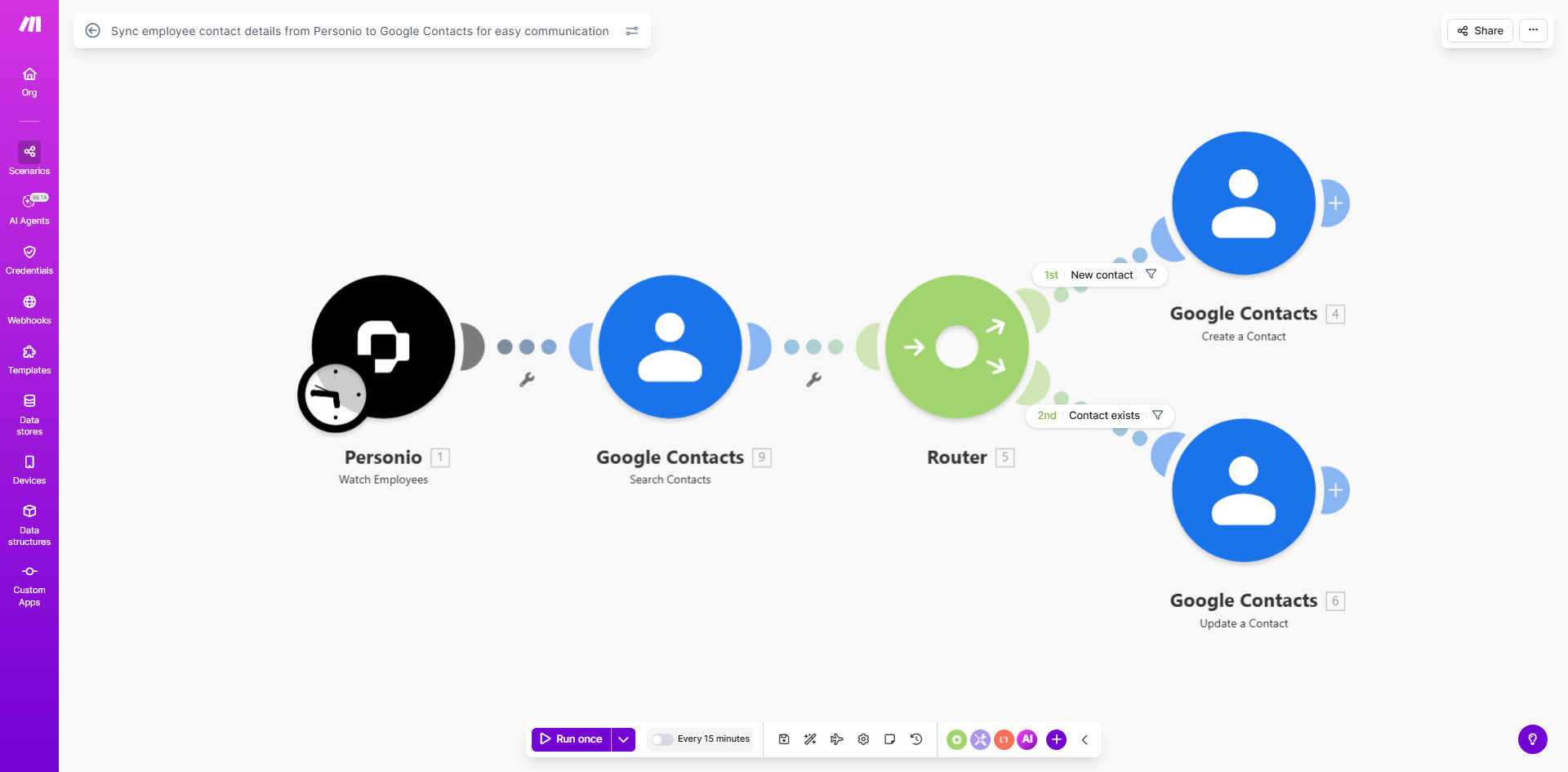
Workflow diagram syncing Personio employee data to Google Contacts

What This Workflow Does

This automation solves the common HR challenge of maintaining accurate, up-to-date employee contact information across your organization. When employee details change in Personio (your HR system), those changes automatically propagate to Google Contacts where your team accesses them daily.

Manual updating of contact details is error-prone and time-consuming. This workflow eliminates the need for HR to notify everyone when phone numbers change, departments shift, or new employees join. The sync ensures everyone in your organization has immediate access to current contact details through the Google ecosystem they already use.

How It Works

1. Personio Employee Data Retrieval

The workflow starts by fetching employee records from Personio's API at scheduled intervals. It captures essential contact fields like name, email, phone number, department, and job title.

2. Data Transformation

Retrieved data is formatted to match Google Contacts' expected structure. Special handling ensures proper name formatting, phone number standardization, and department categorization.

3. Google Contacts Update

The system checks if each employee already exists in Google Contacts. New employees are added as contacts, while existing ones have their details updated. Contacts can be organized into groups like "Current Employees" for easy access.

Pro tip: Configure the sync to run daily during off-hours to minimize impact on HR systems while ensuring contact details stay current.

Who This Is For

This automation benefits any organization using Personio for HR management and Google Workspace for communication. It's particularly valuable for:

  • HR teams tired of manually distributing contact updates
  • Growing companies where employee changes happen frequently
  • Distributed teams needing reliable contact information
  • Organizations prioritizing employee experience and collaboration

What You'll Need

  1. Active Personio account with API access
  2. Google Workspace admin privileges
  3. Make.com account (free plan works)
  4. List of employee fields to sync (recommend starting with name, email, phone, department, title)

Quick Setup Guide

  1. Connect your Personio account in Make.com using API credentials
  2. Authorize Google Contacts access for the workflow
  3. Map Personio fields to Google Contact fields
  4. Set your preferred sync frequency (daily recommended)
  5. Test with a few employee records before full deployment

Key Benefits

Eliminate manual contact updates - HR no longer needs to email organization-wide contact changes. Updates happen automatically, saving 2-5 hours per month in administrative work.

Improve communication reliability - Team members always have current contact details, reducing failed communications and misdirected messages by an estimated 30-40%.

Onboard new employees faster - New hires appear in everyone's contacts immediately, helping them integrate into teams and projects more quickly.

Maintain data consistency - Single source of truth from Personio prevents conflicting contact versions across the organization.

Enhance security - Automated syncing reduces the need for employees to manually maintain contact lists in personal spreadsheets or notes.

Frequently Asked Questions

Common questions about HR automation and contact management

Syncing Personio with Google Contacts ensures your team always has access to current employee contact details without manual updates. This eliminates outdated phone numbers, emails, or job titles that can delay communication and collaboration across departments.

A marketing team trying to coordinate a campaign with sales can immediately access current contacts rather than wasting time verifying details. HR benefits from reduced "what's X's new number?" requests after department moves or promotions.

For most businesses, syncing daily or weekly is ideal. This captures new hires, departures, and role changes promptly without overwhelming your systems. Critical teams like HR or IT may benefit from real-time syncing when onboarding new employees.

The frequency depends on your employee change rate. A 500-person company with 5% monthly turnover might sync daily, while a stable 50-person team could sync weekly. Monitor your Personio change logs to determine the optimal schedule.

Essential fields include name, work email, phone number, job title, department, and manager. Optional useful fields are office location, work anniversary date, and profile photo. Avoid syncing sensitive personal data like home addresses or national IDs.

Consider creating different contact groups in Google for different data needs. "Basic Contacts" might show minimal info for all employees, while "Full Team" could include additional fields for department heads and executives who need more context.

This template syncs one-way from Personio to Google Contacts. Two-way syncing requires additional validation to prevent accidental overwrites of manually updated contacts. Most businesses prefer the control of one-way HR system to contacts syncing.

If you need two-way syncing, we recommend implementing approval workflows where Google Contact changes are flagged for HR review before updating Personio. This maintains data integrity while allowing for emergency contact updates when needed.

Automated syncing means employees always have correct contact info when emailing, calling, or messaging colleagues. This reduces misdirected communications and eliminates time wasted tracking down current contact details across departments.

For example, when a sales rep moves to a new territory, their updated contact details automatically appear for their new teammates and clients. Project teams can quickly identify current department members without cross-checking multiple sources.

The sync can overwrite manual changes unless configured to preserve them. Best practice is to educate employees to update Personio (the source system) and let automation propagate changes to maintain data consistency across the organization.

For emergency updates, consider creating an "override" contact group that's excluded from syncing. This allows temporary manual updates while maintaining automated syncing for the majority of contacts.

Yes! GrowwStacks specializes in tailored HR automations. We can build custom workflows integrating Personio with Google Contacts plus your other HR tools, with field mapping, update rules, and security tailored to your organization's needs and compliance requirements.

Our HR automation solutions typically include:

  • Custom field mapping between systems
  • Selective sync rules for different employee groups
  • Approval workflows for sensitive data changes
  • Detailed logging for compliance auditing

Need a Custom HR Automation?

This free template is a starting point. Our team builds fully tailored automation systems for your specific business needs.