Pipedrive Xero CRM Integration Accounting Make.com

Automate Xero Invoices from Pipedrive Deals

Free Make.com template to automatically create invoices when deals reach specific stages

Get This Workflow → Make.com · Free Template
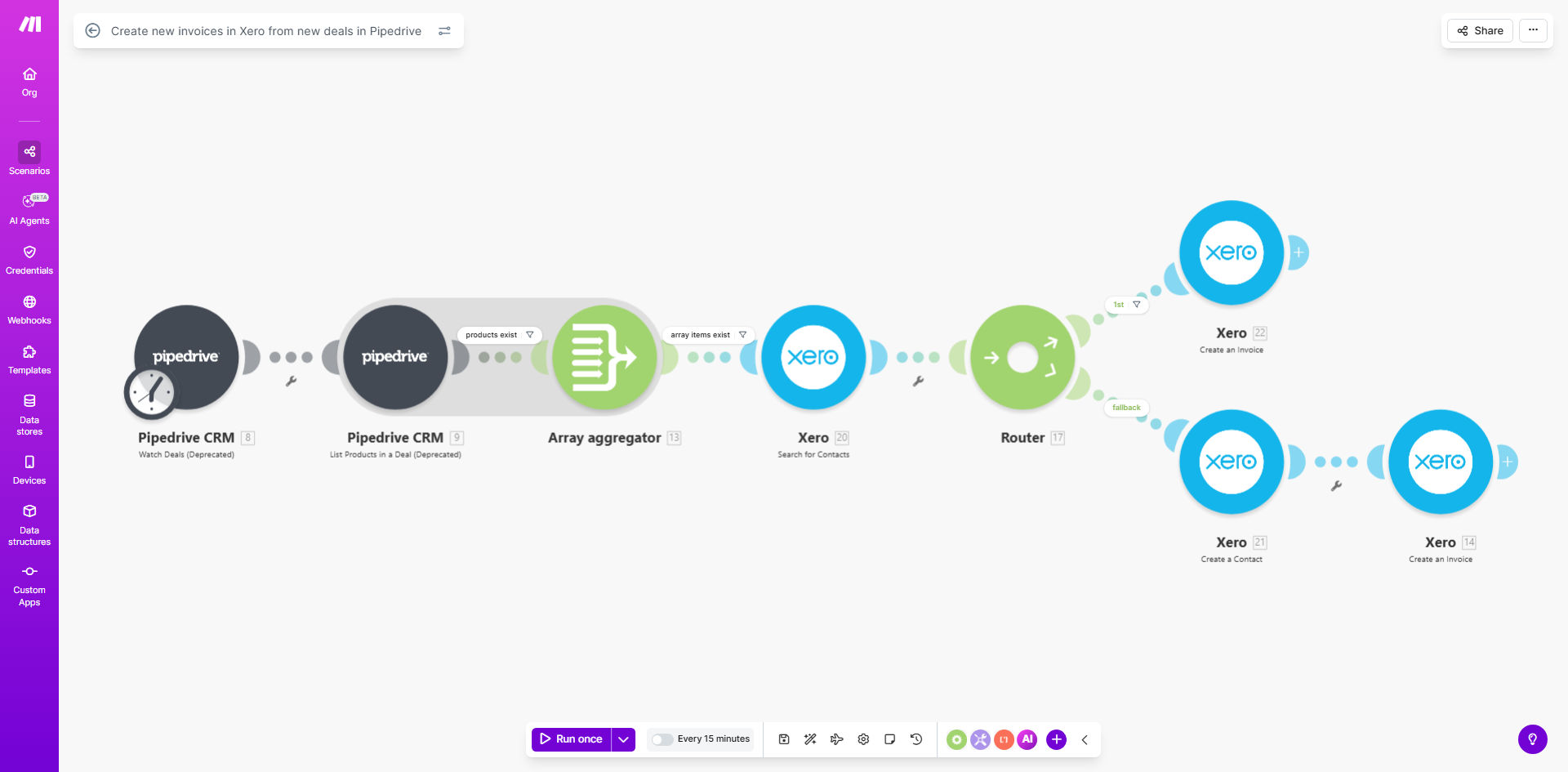
Make.com workflow diagram showing Pipedrive to Xero integration

What This Workflow Does

This automation bridges the gap between your sales pipeline and accounting system by automatically generating Xero invoices when deals reach specific stages in Pipedrive. It eliminates manual data entry, reduces errors, and ensures invoices go out immediately when deals are ready to bill.

The workflow checks for new qualifying deals every 15 minutes (configurable), extracts all relevant product and pricing information, and creates corresponding invoices in Xero with proper line items, taxes, and customer details. This maintains perfect synchronization between your CRM and accounting records.

How It Works

1. Pipedrive Deal Monitoring

The workflow watches for deals entering your specified "Ready to Invoice" stage in Pipedrive. You configure which stage triggers the automation based on your sales process.

2. Product Data Extraction

For each qualifying deal, the system retrieves all associated products with their quantities, prices, and any custom fields you need on invoices.

3. Customer Information Mapping

Contact details from Pipedrive map to the corresponding Xero customer record, creating new contacts in Xero if necessary while preventing duplicates.

4. Invoice Generation

The system creates a complete Xero invoice with all line items, applying your configured tax rates and accounting codes automatically.

Who This Is For

This automation delivers the most value for:

  • Sales teams using Pipedrive who bill through Xero
  • Businesses with 10+ invoices per week
  • Companies selling products with multiple line items
  • Organizations wanting real-time financial visibility

What You'll Need

  1. Active Pipedrive account with deals containing products
  2. Xero subscription with invoice creation permissions
  3. Make.com account (free tier available)
  4. 5 minutes to configure the template

Pro tip: Before going live, test with a dummy Pipedrive deal and check the resulting Xero invoice matches your expectations for formatting and data mapping.

Quick Setup Guide

  1. Click "Get This Workflow" to copy the template to your Make.com account
  2. Connect your Pipedrive and Xero accounts when prompted
  3. Specify which Pipedrive deal stage should trigger invoices
  4. Map your Pipedrive products to Xero invoice line items
  5. Set your default tax rates and accounting codes in Xero
  6. Run a test deal through to verify the invoice output

Key Benefits

Eliminate manual data entry between sales and accounting systems, saving 5-7 hours per week on average.

Improve cash flow by ensuring invoices go out immediately when deals close rather than waiting for manual processing.

Reduce accounting errors caused by mistyped amounts or product details during manual entry.

Maintain perfect records with every invoice automatically tied to the original deal for complete auditability.

Frequently Asked Questions

Common questions about CRM to accounting automation

Automating invoice creation saves 5-7 hours per week by eliminating manual data entry between systems. It reduces human errors in financial records and ensures invoices go out immediately when deals close, improving cash flow.

For example, a marketing agency reduced their invoice processing time from 2 days to 15 minutes after implementing this automation, while eliminating three recurring mistakes in their manual process.

Pipedrive's deal stages perfectly track sales progress while Xero handles accounting. This integration ensures product details, pricing and customer data flow accurately from sales to finance without re-entry.

The visual pipeline in Pipedrive makes it obvious when deals are ready to invoice, while Xero provides robust accounting features like multi-currency support and detailed financial reporting.

The default 15-minute interval balances responsiveness with system load. For high-volume sales teams, consider 5-minute checks during business hours. Low-volume businesses might use hourly checks.

Monitor your Make.com task history to adjust the schedule based on your deal volume and how quickly you need invoices generated after deal stage changes.

This template creates new invoices but doesn't update existing ones. For amendment workflows, you'd need additional automation to handle credit notes or invoice updates in Xero.

Many businesses add a second workflow that watches for deal updates after invoicing and either flags them for manual review or automatically creates correcting entries in Xero.

Yes, configure the Pipedrive trigger to only watch specific deal stages where you're ready to invoice. You can also add filters based on deal size, product type or custom fields.

Common filters include minimum deal value, specific product categories, or custom fields like "Approved for Billing" to prevent premature invoicing.

The template maps deal details, products, quantities, prices, customer info and any custom fields you configure. Tax rates and accounting codes can be set in the Xero invoice template.

You control exactly which fields transfer through the Make.com mapping interface, allowing you to include project codes, internal references, or special terms as needed.

Absolutely. GrowwStacks specializes in tailored integrations between sales CRMs like Pipedrive and accounting systems including Xero, QuickBooks and Netsuite. We'll design workflows matching your exact sales process and financial requirements.

Our consultants can build custom solutions for complex scenarios like partial payments, milestone billing, multi-company setups, or special compliance needs that go beyond template capabilities.

Need a Custom CRM-Accounting Automation?

This free template is a starting point. Our team builds fully tailored automation systems for your specific business needs.