Make.com Wix Automation FreeFinance Ecommerce Billing

Create a new outgoing invoice to FreeFinance from a new order in Wix

Automatically generate professional invoices in FreeFinance every time you receive a Wix store order

Get This Workflow → Make.com · Wix · Free Template
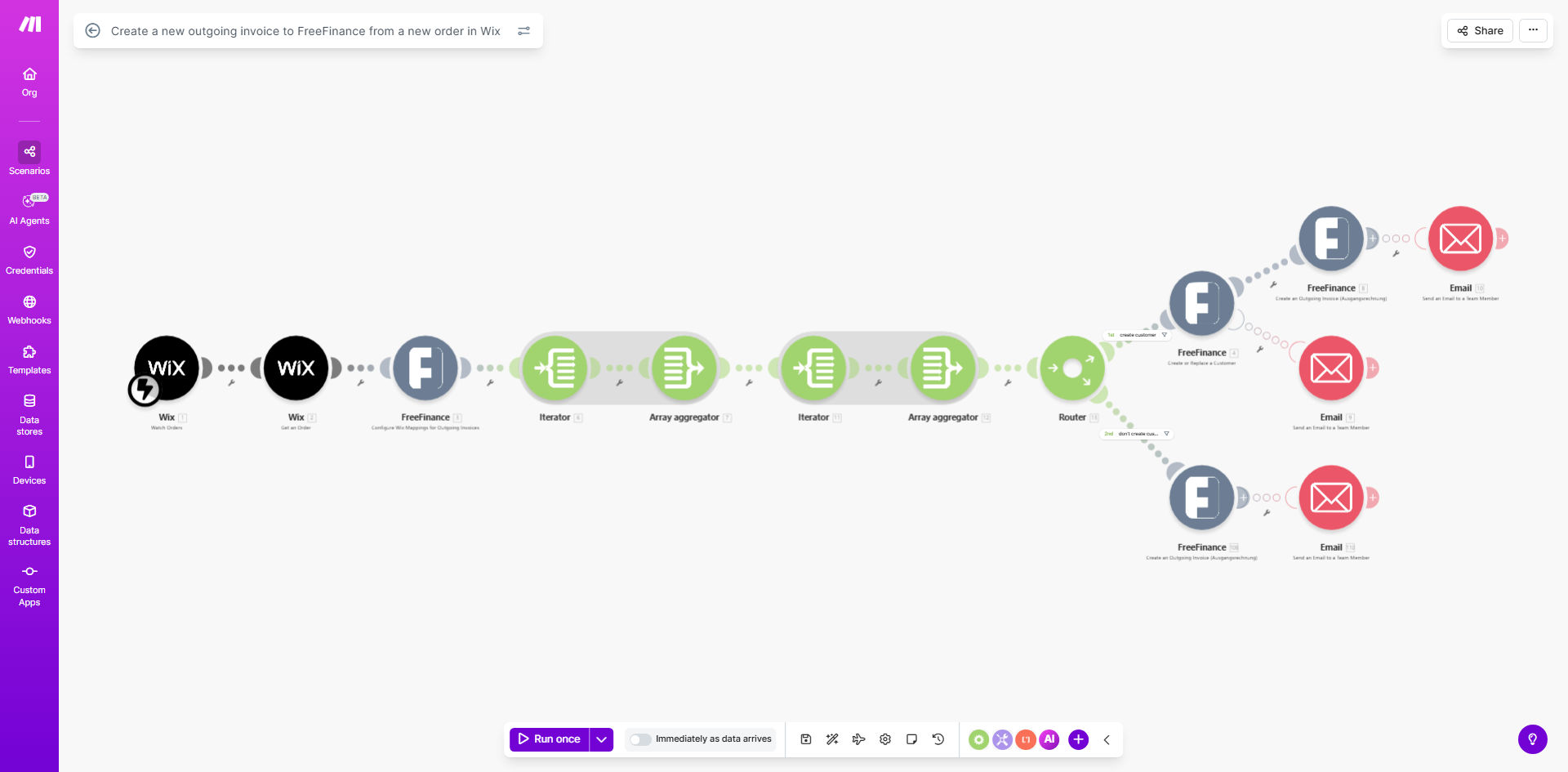
Wix to FreeFinance invoice automation workflow diagram

What This Workflow Does

This automation bridges your Wix ecommerce store with FreeFinance accounting software, eliminating manual invoice creation. Every time a customer completes an order in your Wix store, the workflow instantly generates a corresponding outgoing invoice in FreeFinance with all relevant details.

Manual invoice creation is time-consuming and prone to errors - especially during busy periods when orders flood in. This solution ensures your billing stays synchronized with sales in real-time, improving cash flow visibility and reducing administrative overhead.

How It Works

1. New order detection

The workflow monitors your Wix store for new orders through Wix's API. It triggers immediately when an order is marked as paid.

2. Data extraction

Key order details are extracted including customer information, purchased items, quantities, prices, and payment method.

3. Invoice creation

The system formats the data according to FreeFinance's requirements and creates a draft invoice with all line items.

4. Validation & submission

Before finalizing, the workflow verifies all required fields are populated correctly then submits the invoice to FreeFinance.

Pro tip: For businesses with complex tax requirements, extend this workflow to automatically apply the correct VAT rates based on customer location.

Who This Is For

This automation is ideal for:

  • Wix store owners using FreeFinance for accounting
  • Businesses processing 10+ orders daily
  • Teams wanting to eliminate duplicate data entry
  • Companies needing real-time sales-to-accounting sync
  • Operations looking to reduce billing errors

What You'll Need

  1. A Wix store with API access (Business plan or higher)
  2. Active FreeFinance account with API credentials
  3. Make.com account (free tier works for basic usage)
  4. Mapped product SKUs between systems (if using inventory tracking)

Quick Setup Guide

  1. Install the template in your Make.com account
  2. Connect your Wix store by authenticating via OAuth
  3. Enter your FreeFinance API credentials
  4. Map Wix order fields to FreeFinance invoice fields
  5. Test with a sample order and verify invoice creation
  6. Activate the workflow for live processing

Key Benefits

Save 5-10 hours weekly by eliminating manual invoice creation and data entry between systems.

Reduce billing errors by 90% with automated data transfer that avoids typos and omissions.

Improve cash flow visibility with real-time accounting updates as sales occur.

Scale effortlessly during peak seasons without adding administrative staff.

Enhance customer experience with consistent, professional invoices matching order details.

Frequently Asked Questions

Common questions about Wix-FreeFinance automation and integration

Automating invoice creation eliminates manual data entry between systems. For a store processing 50 orders weekly, this saves 3-5 hours of administrative work while reducing human error in invoice details.

The workflow handles repetitive tasks like customer data transfer, line item entry, and calculation verification automatically. Staff can focus on higher-value activities like customer service and financial analysis.

The workflow typically transfers customer details, order amounts, product descriptions, and payment methods. Tax calculations may require additional mapping based on your regional requirements.

For complex scenarios like split payments or discounts, the workflow can be extended to include these nuances. Most implementations capture all essential billing elements automatically.

  • Customer name and contact information
  • Order date and payment status
  • Itemized product list with quantities

Yes, FreeFinance allows customizing invoice layouts with your logo, payment terms, and branding. These templates will automatically apply to invoices generated from Wix orders.

Professional invoice templates improve brand consistency and customer trust. The automation preserves all your custom fields and formatting while populating the dynamic content from Wix orders.

The Make.com workflow processes orders in real-time, creating FreeFinance invoices within seconds of the Wix order confirmation. This ensures immediate billing records without delays.

Unlike manual processes that might batch invoices at day's end, this automation provides up-to-the-minute financial visibility. Your accounting system always reflects current sales activity.

This workflow would need extension to handle refunds. We recommend building a complementary automation that creates credit memos in FreeFinance when Wix refunds are processed.

A complete financial automation system should mirror all order adjustments in your accounting software. This maintains accurate books without manual reconciliation work.

The integration works with Wix stores using the paid Business or Enterprise plans that include API access. Wix's free plan doesn't support third-party integrations.

For stores on lower-tier plans, upgrading unlocks powerful automation capabilities. The time savings from automated invoicing often justify the plan upgrade cost.

Absolutely. GrowwStacks specializes in tailored ecommerce-finance automations. We can build workflows handling complex scenarios like partial payments, subscription billing, or multi-currency conversions.

Our team will analyze your specific business processes and design an automation system that fits perfectly. Custom solutions often pay for themselves within months through efficiency gains.

  • Industry-specific compliance features
  • Multi-store consolidation
  • Advanced reporting integrations

Need a Custom Wix-Finance Automation?

This free template is a starting point. Our team builds fully tailored automation systems for your specific business needs.