Make.com Shopify FreeFinance Invoice Automation Accounting

Automate Shopify Orders to FreeFinance Invoices

Eliminate manual data entry and ensure accurate billing with automatic invoice generation from Shopify orders

Get This Workflow → Make.com · FreeFinance · Free Template
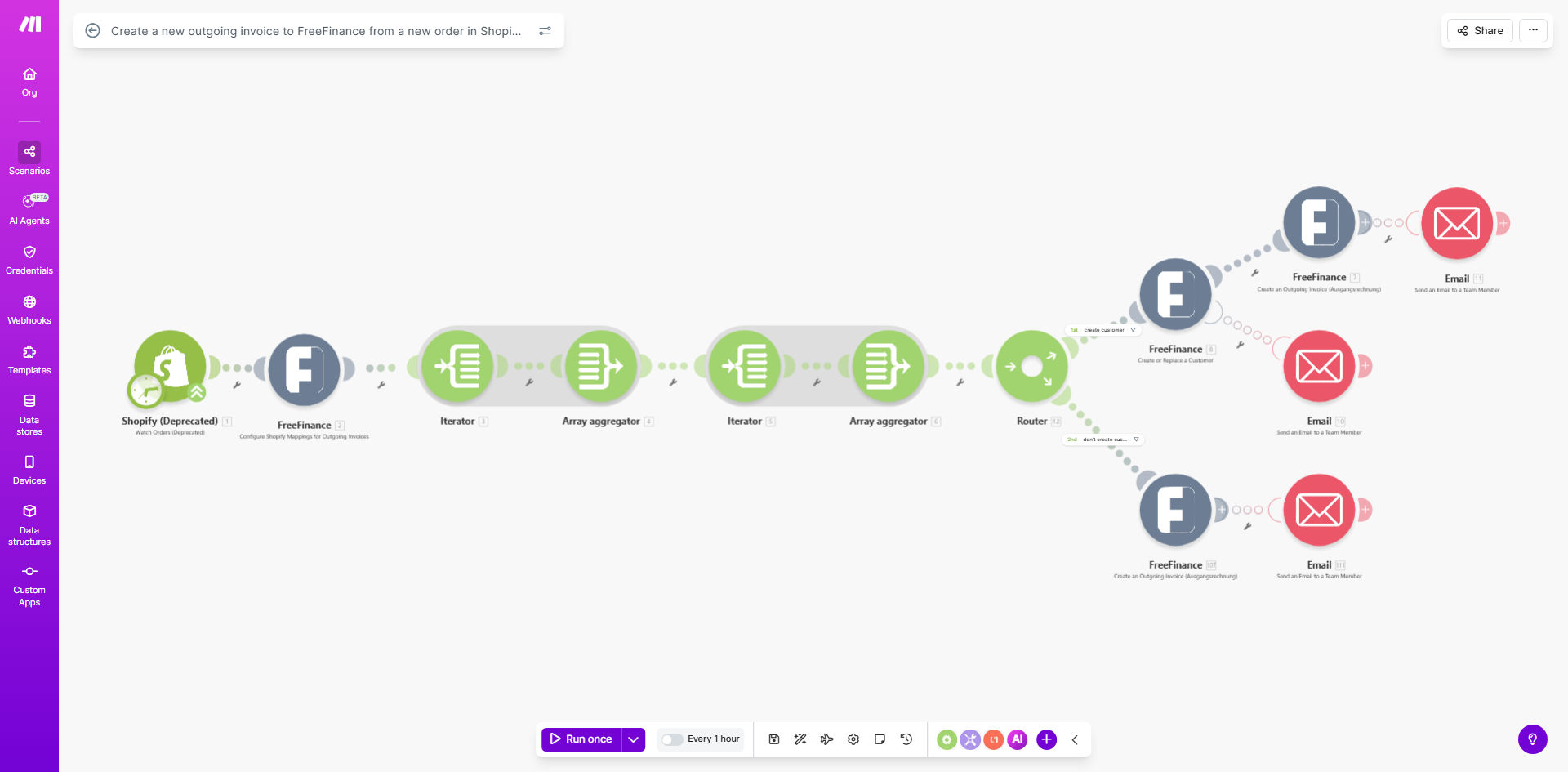
Make.com workflow diagram showing Shopify order data flowing to FreeFinance invoice creation

What This Workflow Does

This automation bridges the gap between your Shopify store and FreeFinance accounting software, automatically generating accurate invoices for every new order. It eliminates the tedious, error-prone process of manually transferring order details between systems.

The workflow checks for new Shopify orders at regular intervals (default: hourly), extracts all relevant billing information, and creates corresponding outgoing invoices in FreeFinance with proper line items, taxes, and customer details. This ensures your accounting records stay perfectly synchronized with sales activity.

How It Works

1. Order Monitoring

The workflow polls your Shopify store for new orders based on your configured schedule. It identifies orders that haven't been invoiced yet using Shopify's order status and creation timestamps.

2. Data Extraction

For each new order, the system retrieves complete order details including customer information, purchased items, quantities, prices, discounts, shipping costs, and tax calculations.

3. Invoice Creation

The extracted data is formatted to match FreeFinance's invoice requirements and sent via API to create a new outgoing invoice. The invoice includes all line items with proper descriptions, quantities, and pricing.

4. Status Update

Optionally, the workflow can update Shopify's order notes or custom fields to indicate the invoice has been created, maintaining a clear audit trail between systems.

Pro tip: For high-volume stores, consider adding a validation step to verify order payments before invoice creation to prevent invoicing unpaid or fraudulent orders.

Who This Is For

This automation is ideal for Shopify merchants using FreeFinance for accounting who want to:

  • Eliminate duplicate data entry between sales and accounting systems
  • Reduce billing errors from manual transcription mistakes
  • Accelerate invoice generation to improve cash flow
  • Maintain perfect synchronization between sales and accounting records
  • Free staff from repetitive administrative tasks

What You'll Need

  1. A Shopify store with API access
  2. A FreeFinance account with API credentials
  3. A Make.com account (formerly Integromat)
  4. Basic understanding of your invoice requirements (tax handling, payment terms, etc.)

Quick Setup Guide

  1. Copy the template to your Make.com account
  2. Connect your Shopify store via API
  3. Authenticate with your FreeFinance account
  4. Map Shopify order fields to FreeFinance invoice fields
  5. Test with a recent Shopify order
  6. Adjust the scheduling frequency as needed
  7. Activate the scenario

Key Benefits

Time savings: Reduces invoice processing from 5-15 minutes per order to seconds, saving dozens of hours monthly for busy stores.

Error reduction: Eliminates manual data entry mistakes that can lead to billing disputes or accounting discrepancies.

Faster billing: Invoices are generated immediately after order placement, accelerating payment cycles.

Audit trail: Maintains clear connections between Shopify orders and FreeFinance invoices for easy reconciliation.

Scalability: Handles order volume spikes effortlessly without additional staff workload.

Frequently Asked Questions

Common questions about Shopify and FreeFinance integration

Automating invoice creation saves significant time by eliminating manual data entry between systems. It reduces human errors in billing details and ensures invoices are generated immediately after orders are placed, improving cash flow through faster billing cycles.

A clothing retailer processing 50 orders daily would save 4-6 hours per week previously spent copying order details. More importantly, they eliminated the 2-3 billing errors per week that required correction and delayed payments.

The default setting checks every 60 minutes, which works for most businesses. High-volume stores may want to run it more frequently (every 15-30 minutes), while low-volume stores could extend to 2-4 hours to reduce API calls.

Consider your order volume and accounting needs. Businesses requiring real-time financial reporting may need more frequent checks, while those with batch processing can run it less often to conserve API resources.

The workflow transfers customer details, order items, quantities, prices, taxes, shipping costs, and payment information. It maps Shopify's order data structure to FreeFinance's invoice fields automatically.

All standard invoice components are included: product SKUs/names, variant details, discounts applied, tax breakdowns, and customer contact information. The automation handles the data transformation so invoices match your accounting requirements.

Yes, you can modify the template to include your branding, payment terms, or additional fields. The automation uses FreeFinance's API which supports custom invoice templates you've configured in your account.

Common customizations include adding your logo, specific payment instructions, or additional legal text. These appear automatically on all generated invoices while maintaining the automated data transfer from Shopify.

The basic template creates one-time invoices. For order updates, you'd need to extend the workflow to check for order modifications and either update existing invoices or create credit memos in FreeFinance.

This requires additional logic to track order changes and handle returns/refunds properly. Many businesses start with the basic template and add these features later as needed.

Automation reduces invoice processing time from 5-15 minutes per order to seconds, with 99%+ accuracy. It eliminates the need to toggle between systems and manually re-enter data, freeing staff for higher-value work.

Manual processes often introduce errors in quantities, prices, or customer details that require correction. Automation ensures consistency and allows accounting teams to focus on analysis rather than data entry.

Absolutely. GrowwStacks specializes in building tailored ecommerce accounting automations. We can add features like partial payments, multi-currency support, tax rule handling, and reconciliation workflows specific to your business processes.

Our custom solutions address unique requirements such as wholesale pricing tiers, subscription billing, or complex tax jurisdictions. We'll design an automation that fits your exact Shopify-FreeFinance integration needs.

  • Custom field mapping for your products
  • Advanced error handling and alerts
  • Integration with your other business systems

Need a Custom Shopify-FreeFinance Automation?

This free template is a starting point. Our team builds fully tailored automation systems for your specific business needs.