Shopify FreeFinance Accounting Refunds Make.com

Automate Shopify Refunds to FreeFinance Negative Invoices

Eliminate manual refund processing with automatic negative invoice creation for accurate accounting

Get This Workflow → Make.com · Free Template
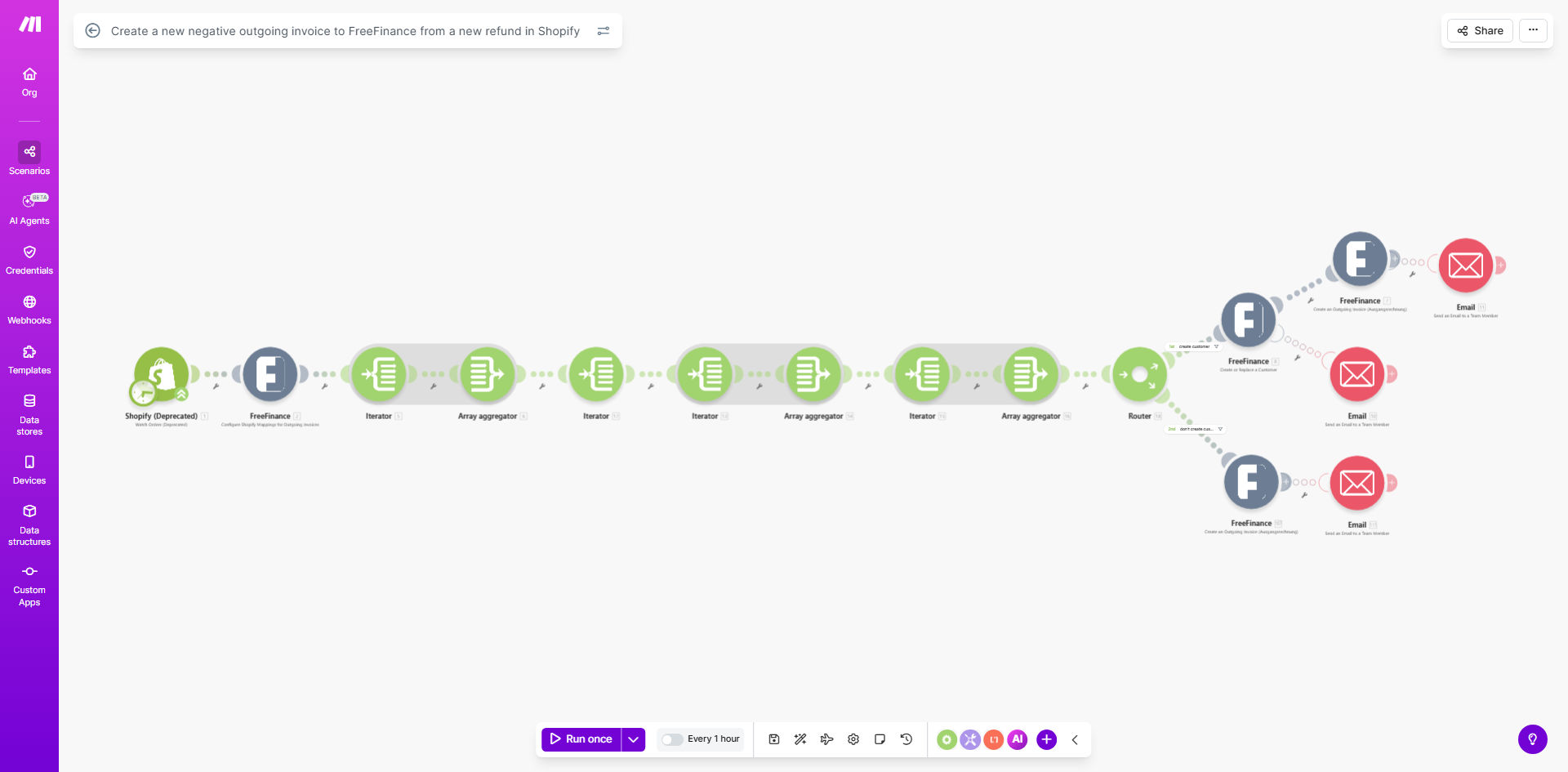
Make.com workflow diagram showing Shopify refund data flowing to FreeFinance negative invoice creation

What This Workflow Does

This automation bridges the gap between your Shopify store's refund activity and FreeFinance accounting records. Whenever a refund is issued in Shopify, the workflow automatically generates a corresponding negative outgoing invoice in FreeFinance. This maintains perfect financial records without manual intervention.

For ecommerce businesses processing numerous refunds, this eliminates the time-consuming and error-prone process of manually creating negative invoices. The system captures all relevant details including refund amount, reason, original order information, and customer data - ensuring your accounting records remain complete and audit-ready.

How It Works

1. Shopify Refund Detection

The workflow checks your Shopify store for new refunds at scheduled intervals (default: hourly). It identifies both full and partial refunds, capturing all transaction details.

2. Data Transformation

Refund information is formatted into FreeFinance's required invoice structure, converting positive values to negatives and mapping Shopify fields to the correct accounting categories.

3. FreeFinance Invoice Creation

The system creates a negative outgoing invoice in FreeFinance that exactly mirrors the original sale but with reversed values, maintaining clean audit trails.

4. Error Handling & Notifications

If any step fails, the workflow triggers alerts so you can manually intervene before accounting discrepancies occur.

Who This Is For

This automation delivers the most value for:

  • Ecommerce businesses processing 10+ refunds weekly
  • Accounting teams spending hours monthly on manual refund entries
  • Businesses requiring precise revenue reporting for investors or tax purposes
  • Stores with complex refund policies (partial refunds, store credit, etc.)

What You'll Need

  1. Active Shopify store with refund processing enabled
  2. FreeFinance account with API access
  3. Make.com account (free plan sufficient)
  4. Basic understanding of your chart of accounts in FreeFinance

Quick Setup Guide

  1. Install the template in your Make.com account
  2. Connect your Shopify store via API
  3. Authenticate with FreeFinance
  4. Map Shopify refund fields to FreeFinance invoice fields
  5. Set your preferred processing schedule
  6. Test with a manual refund in Shopify

Pro tip: Start with daily runs and increase frequency as needed. High-volume stores may benefit from real-time processing, while others can process refunds in batches.

Key Benefits

Eliminates manual data entry errors that commonly occur when transferring refund details between systems. The automation ensures 100% accuracy in your financial records.

Saves 3-5 hours weekly for accounting teams by automating what's typically a tedious, repetitive task. This time can be redirected to strategic financial analysis.

Maintains perfect audit trails with negative invoices that clearly document every refund transaction in relation to its original sale.

Reduces revenue leakage by ensuring no refund slips through the cracks unrecorded in your accounting system.

Provides real-time financial visibility with refunds reflected in FreeFinance immediately rather than waiting for manual processing.

Frequently Asked Questions

Common questions about Shopify to FreeFinance refund automation

Automating refund processing eliminates manual data entry errors and ensures accounting records stay perfectly synchronized. This prevents revenue leakage from missed refund entries and saves 3-5 hours per week for accounting teams processing moderate refund volumes.

The automation also provides immediate financial visibility, allowing you to see your true net revenue in FreeFinance without waiting for manual bookkeeping cycles.

Negative invoices create clear audit trails by mirroring the original transaction in reverse. This maintains accurate financial reporting and makes reconciliation simpler during tax season or financial audits.

Unlike journal entries or manual adjustments, negative invoices preserve all original transaction details while clearly indicating the refund nature, which helps with customer service inquiries and financial analysis.

The template defaults to hourly checks, but daily runs often suffice. Balance frequency with your refund volume - high-volume stores may need real-time processing, while others can batch process refunds once daily.

Consider your accounting close cycles too. If you reconcile books weekly, processing refunds daily keeps records current without unnecessary API calls.

The workflow transfers refund amount, date, reason, original order details, and customer information. This ensures FreeFinance records contain all context needed for accounting and customer service purposes.

You can customize which fields map to your FreeFinance invoice structure, including product-level details for partial refunds and any custom Shopify refund properties you track.

Manual processing risks data entry mistakes and delays. Automation ensures instant, error-free recording while freeing staff for higher-value tasks like analyzing refund patterns to reduce future returns.

Automated processing also creates consistent records following your accounting policies, whereas manual methods often vary by who performs the entry.

Yes, the template accommodates partial refunds by proportionally adjusting line items. For store credit, you can configure whether to treat it as a refund or internal accounting adjustment based on your policies.

The system maintains all original item details even for partial refunds, which helps with inventory reconciliation and customer service inquiries about specific product returns.

Absolutely! Our team specializes in tailored ecommerce accounting automations. We can customize this workflow for your specific refund policies, multi-currency needs, or integration with additional systems like your CRM or ERP.

We'll analyze your current refund process, identify optimization opportunities, and build a solution that perfectly fits your business requirements and existing tech stack.

  • Custom field mappings for your chart of accounts
  • Special handling for gift cards and loyalty points
  • Integration with your returns management system

Need a Custom Shopify-FreeFinance Automation?

This free template is a starting point. Our team builds fully tailored automation systems for your specific business needs.