Make.com Wix FreeFinance Accounting Automation E-commerce

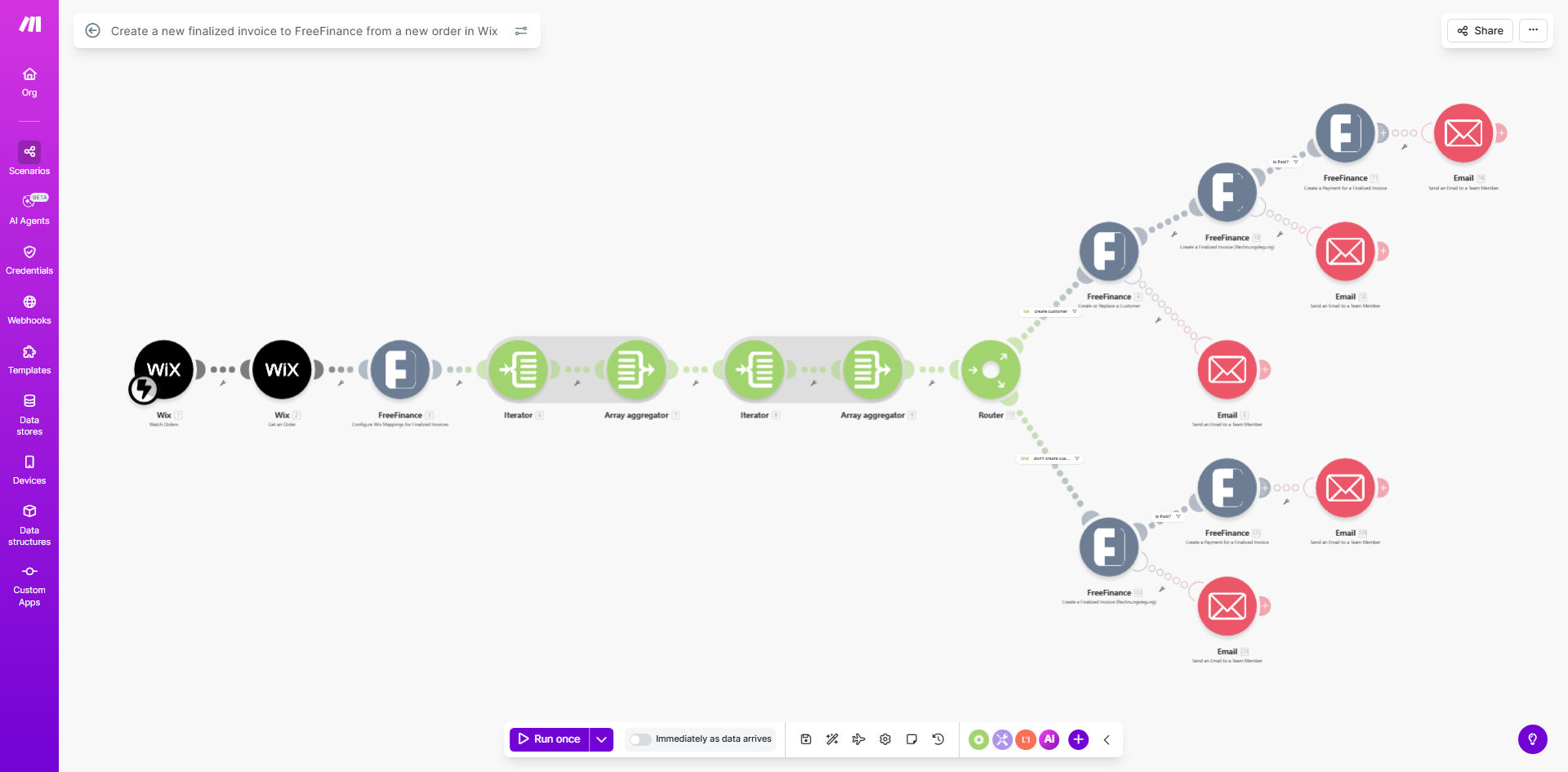
Create a new finalized invoice to FreeFinance from a new order in Wix

Automatically generate FreeFinance invoices whenever you receive new Wix orders

Get This Workflow → Make.com · Wix · Free Template
Automated invoice workflow between Wix and FreeFinance

What This Workflow Does

This automation solves a common pain point for e-commerce businesses using Wix - the manual transfer of order data into accounting systems. Every time a customer places an order on your Wix store, this workflow automatically creates a corresponding finalized invoice in FreeFinance, Austria's popular accounting software.

The solution eliminates hours of manual data entry while reducing errors that often occur when transferring information between systems. By automating this financial process, you ensure accurate bookkeeping from the moment an order is placed, giving you real-time visibility into your revenue without additional administrative work.

How It Works

1. New order detection

The workflow constantly monitors your Wix store for new orders. As soon as a customer completes a purchase, the system detects the new order event.

2. Data extraction

Key order details like customer information, products purchased, quantities, prices, and totals are extracted from the Wix order.

3. Invoice creation

The system formats the extracted data according to FreeFinance's requirements and creates a new finalized invoice in your accounting system.

4. Error handling

If any issues occur during the process, the workflow can notify administrators or retry the operation according to predefined rules.

Pro tip: For high-volume stores, consider adding a delay step to batch process invoices at set intervals rather than creating them individually.

Who This Is For

This automation is ideal for:

  • Wix store owners using FreeFinance for accounting
  • E-commerce businesses processing 10+ orders daily
  • Companies wanting to reduce manual accounting work
  • Businesses needing real-time financial reporting
  • Teams looking to minimize data entry errors

What You'll Need

  1. A Wix store with orders enabled
  2. FreeFinance account with API access
  3. Make.com account (formerly Integromat)
  4. Basic understanding of your invoice requirements

Quick Setup Guide

  1. Duplicate the template in your Make.com account
  2. Connect your Wix account in the first module
  3. Authenticate with your FreeFinance credentials
  4. Map the Wix order fields to FreeFinance invoice fields
  5. Test with a sample order and verify the invoice creation
  6. Activate the scenario for live processing

Key Benefits

Save 5-10 hours monthly by eliminating manual invoice creation. This automation handles the repetitive work so your team can focus on higher-value activities.

Reduce accounting errors by 90% by removing human data entry between systems. Automated transfers ensure perfect consistency between orders and invoices.

Improve financial visibility with real-time invoice generation. Your books stay current without waiting for manual processing periods.

Scale effortlessly during peak seasons. The system handles 1 order or 1000 orders with the same reliability.

Maintain compliance by ensuring every sale is properly documented in your accounting system according to Austrian regulations.

Frequently Asked Questions

Common questions about e-commerce accounting automation

Automating invoice creation saves significant time by eliminating manual data entry between systems. It ensures accuracy by reducing human error in transferring order details to invoices. This automation also speeds up your accounting cycle by instantly generating invoices when orders are placed.

For example, a store processing 50 orders daily might spend 2-3 hours weekly just creating invoices. Automation reduces this to near zero while providing better consistency in your financial records.

Integrating Wix with FreeFinance creates a seamless flow from sales to accounting. It ensures all revenue is properly recorded without manual intervention. The integration also provides real-time financial visibility by automatically updating your books with each sale.

Businesses using this integration often see faster month-end closing and more accurate tax reporting. The automatic matching of orders to invoices simplifies reconciliation and audit processes.

Automated invoice workflows are highly reliable when properly configured. They consistently follow the same rules for every transaction. Modern integration platforms like Make.com provide error handling and notifications if any issues occur during processing.

Most businesses find automation actually improves reliability compared to manual processes. The system never gets tired, distracted, or makes typos like human operators might during repetitive data entry tasks.

Most integrations transfer customer information, product details, quantities, prices, and order totals. Tax calculations and shipping costs often transfer as well. Some systems can include custom fields or order notes if configured properly.

The specific fields available depend on both your Wix configuration and FreeFinance's API capabilities. Common transferred elements include:

  • Customer name and contact information
  • Order date and number
  • Line items with SKUs and quantities
  • Payment method and status

Yes, most integration platforms allow field mapping customization. You can choose which data points transfer and how they're formatted. Advanced setups can even transform data during transfer to match each system's requirements.

For instance, you might combine first and last names from Wix into a single customer name field in FreeFinance. Or convert product variants into separate line items. The flexibility depends on the specific integration tools you're using.

Quality automation workflows include error handling mechanisms. They can retry failed operations or notify administrators. Some systems create error logs for troubleshooting while preventing duplicate invoice creation attempts.

Common safeguards include:

  • Automatic retries with increasing delays
  • Email/SMS alerts for critical failures
  • Error queues for manual review
  • Duplicate detection to prevent double invoicing

Yes, GrowwStacks specializes in custom e-commerce accounting automations. We can build workflows tailored to your specific systems and business rules. Our solutions integrate with various platforms beyond Wix and FreeFinance.

Whether you need simple invoice generation or complex multi-system financial workflows, our team designs automation that fits your exact requirements. We handle everything from initial consultation to ongoing maintenance.

  • Custom field mappings and transformations
  • Special tax handling requirements
  • Multi-currency support
  • Advanced error recovery systems

Need a Custom E-commerce Accounting Automation?

This free template is a starting point. Our team builds fully tailored automation systems for your specific business needs.