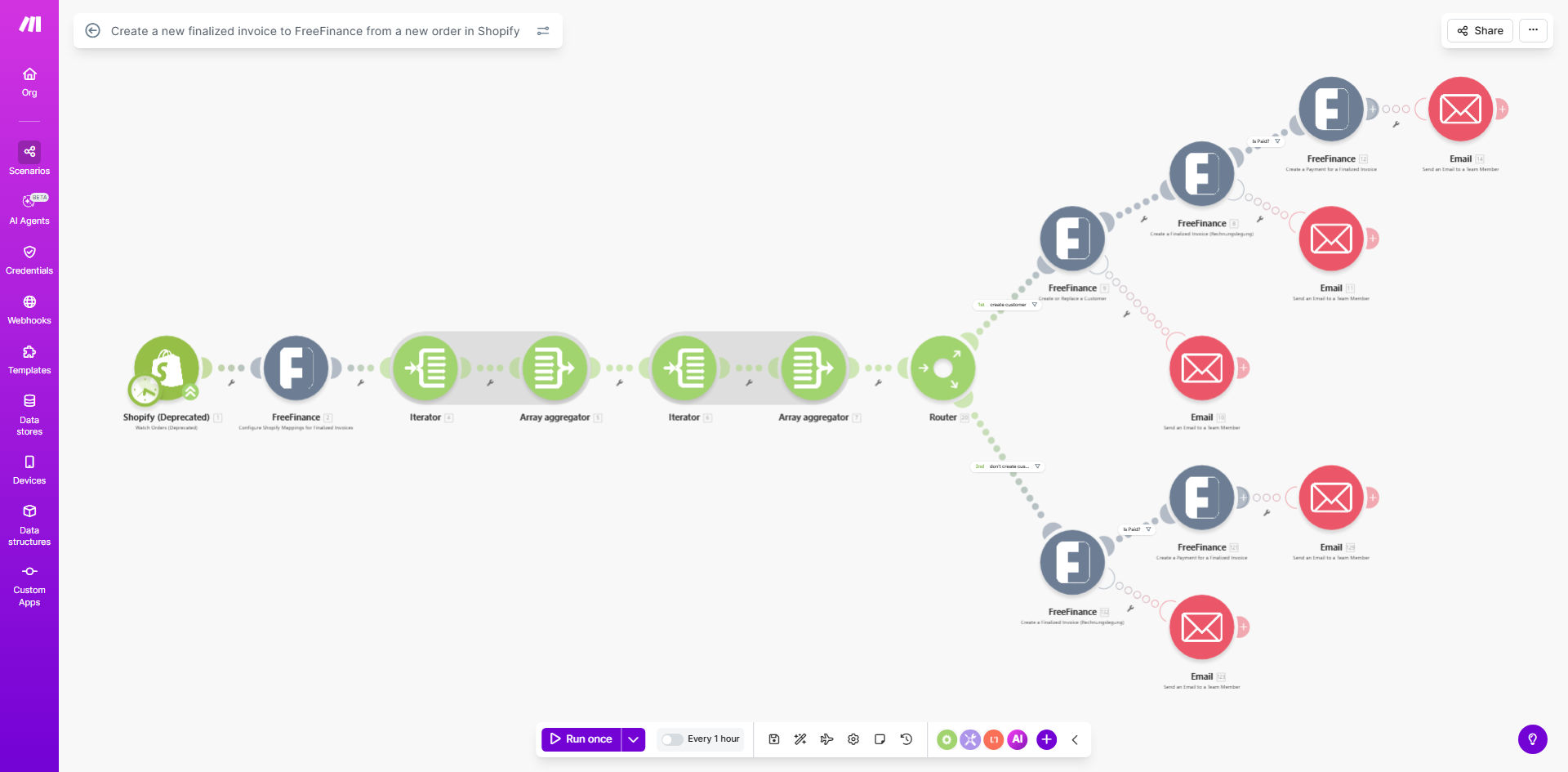
What This Workflow Does
This automation bridges your Shopify store with FreeFinance accounting software, automatically generating finalized invoices for every new order. It eliminates the tedious manual process of recreating order details in your accounting system, reducing errors and saving valuable time.
The workflow checks for new Shopify orders at regular intervals (default every 60 minutes), extracts all relevant order information including customer details, products, quantities, prices, and taxes, then creates corresponding invoices in FreeFinance with matching line items and totals. This ensures your financial records stay perfectly synchronized with your ecommerce sales.
How It Works
1. Scheduled Order Checks
The workflow automatically polls your Shopify store for new orders at your specified interval. You can adjust the frequency based on your order volume and accounting needs.
2. Order Data Extraction
For each new order, the system retrieves complete details including customer information, shipping address, product SKUs, quantities, unit prices, discounts, taxes, and payment method.
3. Invoice Creation in FreeFinance
The workflow maps all order details to corresponding fields in FreeFinance, creating a finalized invoice with proper line items, totals, and customer references. The invoice is marked as finalized immediately upon creation.
4. Error Handling
If any issues occur during processing (like missing customer data), the workflow can be configured to notify your team or retry the operation after a delay.
Who This Is For
This automation is ideal for Shopify merchants using FreeFinance for accounting who want to:
- Eliminate duplicate data entry between systems
- Reduce accounting errors from manual processes
- Accelerate month-end closing procedures
- Maintain perfect sync between sales and accounting records
- Free up staff time from repetitive administrative tasks
What You'll Need
- An active Shopify store with orders
- A FreeFinance account with admin access
- Make.com account (free tier available)
- API credentials for both platforms
- Basic understanding of your invoice numbering scheme
Quick Setup Guide
- Install the template in your Make.com account
- Connect your Shopify store via API
- Authenticate with your FreeFinance account
- Map Shopify order fields to FreeFinance invoice fields
- Set your preferred schedule (default: hourly)
- Run a test with a recent Shopify order
- Verify the invoice appears correctly in FreeFinance
Pro tip: Before going live, run the automation in test mode with historical orders to verify all data transfers correctly. Adjust field mappings if any information appears incorrectly in FreeFinance.
Key Benefits
90% reduction in manual data entry - Automatically transfer all order details instead of recreating them manually in your accounting system.
Near-zero error rate - Eliminate typos, incorrect amounts, and missed line items that commonly occur with manual processing.
Faster financial reporting - Invoices appear in FreeFinance within minutes of the order being placed, accelerating your accounting cycle.
Scalable solution - Handles order volume spikes effortlessly without requiring additional accounting staff.
Audit-ready records - Maintains perfect alignment between Shopify sales data and accounting records for compliance.