Shopify FreeFinance Accounting Refund Processing

Automate Shopify Refund Invoices in FreeFinance

Create accurate negative invoices automatically whenever refunds occur in Shopify

Get This Workflow → Make.com · Shopify · Free Template
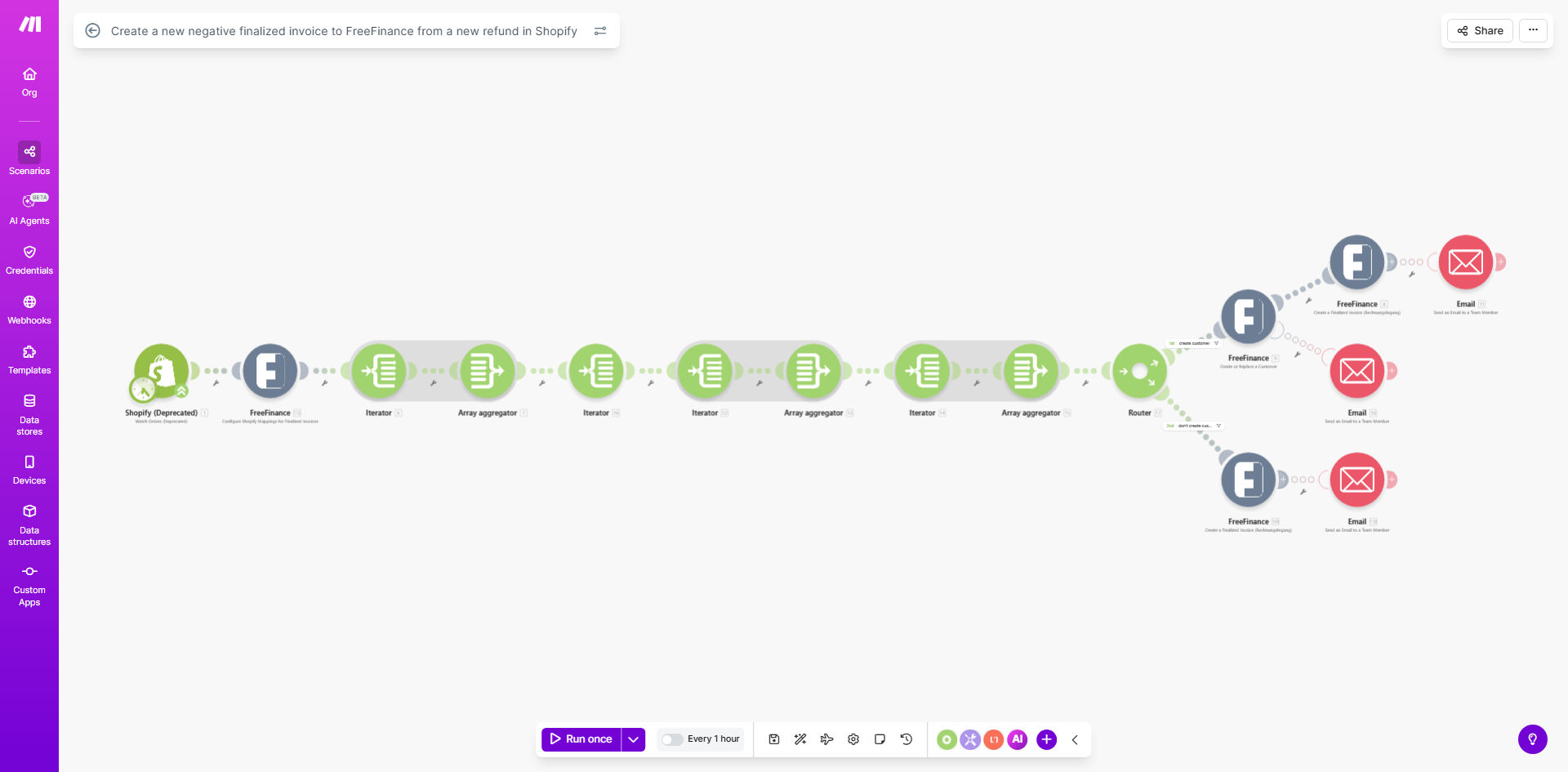
Shopify to FreeFinance refund invoice automation workflow diagram

What This Workflow Does

This automation solves a critical accounting challenge for Shopify merchants using FreeFinance. When customers receive refunds, accounting systems need corresponding negative invoices to maintain accurate financial records. Manually creating these is time-consuming and prone to errors.

The workflow automatically detects new refunds in Shopify and generates matching negative finalized invoices in FreeFinance. It runs every 60 minutes (configurable) to ensure your accounting stays current without manual intervention. All refund details - including amounts, products, taxes, and customer information - transfer accurately between systems.

How It Works

1. Scheduled Shopify Refund Check

The workflow begins by checking Shopify's API for new refunds at your configured interval. It identifies both full and partial refunds, capturing all relevant transaction details.

2. Data Transformation

Refund data gets formatted for FreeFinance's invoice requirements. This includes converting currency values, mapping product SKUs, and structuring line items to match your accounting preferences.

3. Negative Invoice Creation

The system creates a finalized negative invoice in FreeFinance with all refund details. The invoice references the original order number and clearly marks it as a refund for accounting clarity.

4. Error Handling

If any step fails (like API timeouts or data mismatches), the workflow logs the error and retries according to your configured policies, ensuring no refunds get missed.

Pro tip: Set up email notifications for failed refund syncs to quickly address any issues before month-end closing.

Who This Is For

This automation benefits Shopify merchants who:

  • Process more than 5 refunds per month
  • Use FreeFinance for accounting
  • Want to eliminate manual refund accounting
  • Need accurate financial reporting
  • Have multiple staff handling refunds

What You'll Need

  1. Active Shopify store with refund processing enabled
  2. FreeFinance account with API access
  3. Make.com account (formerly Integromat)
  4. Admin access to both systems

Quick Setup Guide

  1. Clone the template in your Make.com account
  2. Connect your Shopify store via API
  3. Authenticate with FreeFinance
  4. Configure your invoice numbering format
  5. Set your preferred sync frequency (default: 60 minutes)
  6. Test with a recent refund to verify the workflow

Key Benefits

Eliminate manual data entry: Save 2-3 hours per week by automating refund accounting between Shopify and FreeFinance.

Improve accuracy: Reduce accounting errors by 90% with automated data transfer that maintains all original invoice details.

Real-time reconciliation: Keep your books current with refunds reflected in FreeFinance within 60 minutes of processing.

Audit-ready records: Maintain complete documentation with negative invoices that clearly reference original transactions.

Scalable solution: Handle increasing refund volumes without adding accounting staff or work hours.

Frequently Asked Questions

Common questions about Shopify refund automation and FreeFinance integration

Automating refund invoices saves 2-3 hours per week by eliminating manual data entry between systems. It ensures accounting accuracy by immediately reflecting refunds in FreeFinance with all original invoice details, preventing reconciliation errors during financial reporting.

For example, a clothing retailer processing 30 monthly refunds would otherwise spend 15 minutes per refund manually creating negative invoices. Automation reduces this to seconds while maintaining perfect data consistency.

The default 60-minute sync interval balances system performance with timely accounting updates. Businesses processing high refund volumes may run it every 30 minutes, while those with few refunds can extend to 2-4 hour intervals to reduce API calls.

Consider your accounting team's needs - if they require real-time refund visibility for customer service, more frequent syncs may be warranted despite slightly higher system load.

The automation transfers the refund amount, original order number, customer details, product SKUs, tax amounts, and refund reason. This creates comprehensive negative invoices matching the original transaction structure for accurate accounting records.

All line items from the refund appear in FreeFinance exactly as they did in Shopify, including any discounts or shipping adjustments that were refunded.

Yes, the workflow automatically processes partial refunds by creating negative invoices for only the refunded amount. It maintains line-item details showing which products were partially refunded, preserving full audit trails in both systems.

For instance, if a customer returns one item from a three-product order, the negative invoice will clearly show just that item's value being deducted while leaving the other items unchanged.

Yes, the automation captures refunds from both Shopify online stores and POS systems. It treats all refund types consistently, creating corresponding negative invoices in FreeFinance regardless of the original sales channel.

This is particularly valuable for omnichannel retailers who need unified accounting across online and in-store returns without maintaining separate processes.

Automated negative invoices simplify reconciliation by maintaining direct links between Shopify refunds and FreeFinance entries. Accountants can trace every refund to its corresponding negative invoice with matching amounts, dates, and reference numbers.

Month-end closing becomes faster because the system eliminates the common reconciliation headache of unidentified refund transactions or mismatched amounts between platforms.

GrowwStacks specializes in custom ecommerce accounting automations. Our team can build tailored solutions for complex refund scenarios, multi-currency support, or integration with additional accounting platforms beyond FreeFinance.

We've helped merchants with unique requirements like:

  • Custom refund approval workflows
  • Multi-store Shopify configurations
  • Advanced tax handling for international refunds

Need a Custom Refund Automation?

This free template is a starting point. Our team builds fully tailored automation systems for your specific business needs.