Make.com E-commerce Accounting Adobe Commerce FreeFinance

Automate Adobe Commerce to FreeFinance Invoicing

Eliminate manual data entry by automatically creating FreeFinance invoices for every new Adobe Commerce order

Get This Workflow → Make.com · Adobe Commerce · Free Template
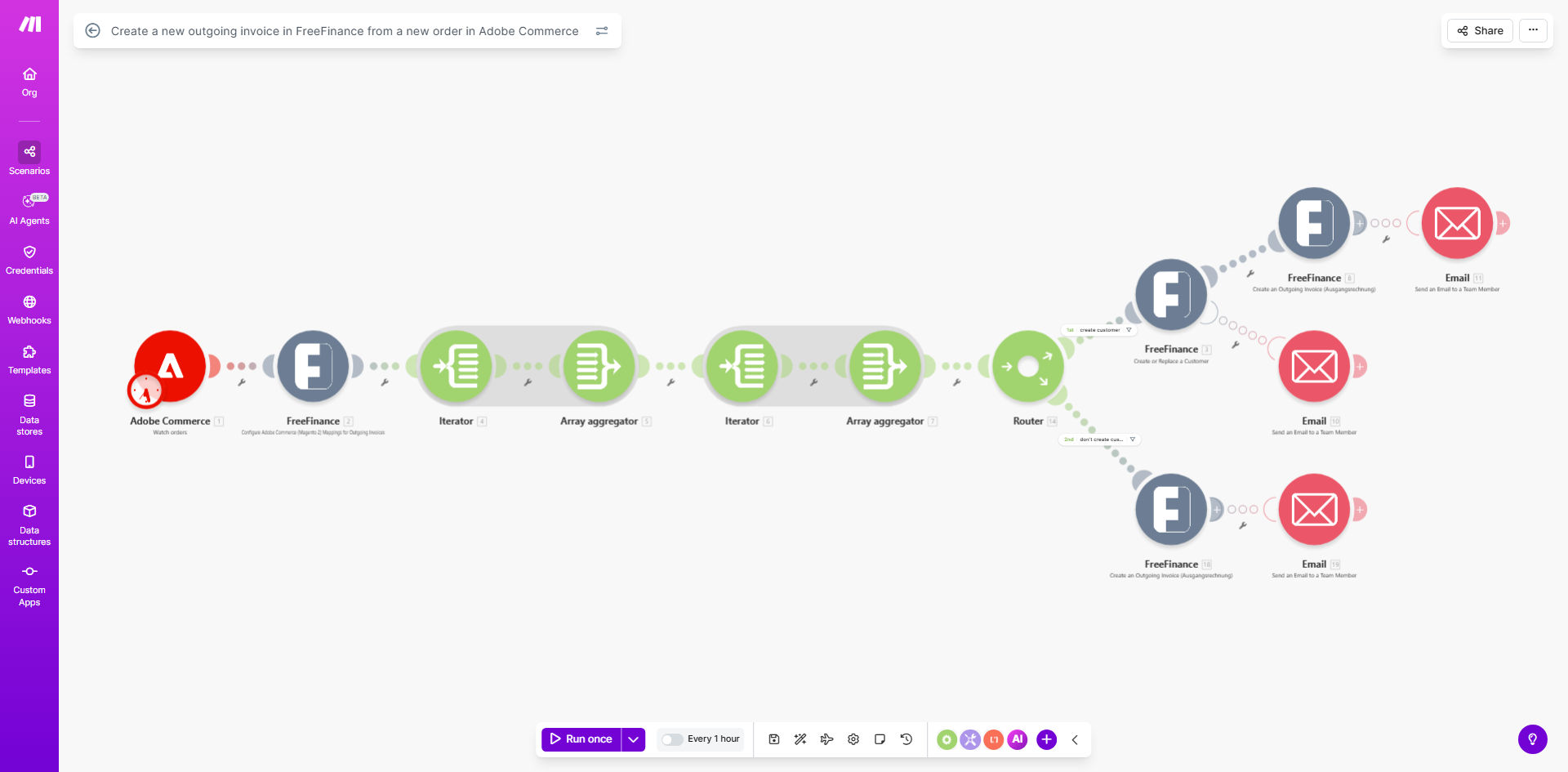
Diagram showing Adobe Commerce orders syncing to FreeFinance invoices via Make.com automation

What This Workflow Does

This automation solves a critical pain point for e-commerce businesses using Adobe Commerce (formerly Magento) with FreeFinance accounting software. Every time a customer places an order, accounting teams typically spend 5-10 minutes manually recreating that information in their accounting system - a process prone to human error and delays.

The workflow automatically detects new Adobe Commerce orders, extracts all relevant customer and product data, and creates corresponding outgoing invoices in FreeFinance with proper line items, taxes, and payment terms. By running every hour, it ensures your accounting records stay perfectly synchronized with your sales activity.

How It Works

1. Scheduled Order Checks

The workflow begins by checking Adobe Commerce's API every 60 minutes (configurable) for new orders that haven't been processed yet.

2. Order Data Extraction

For each new order found, the system retrieves complete details including customer information, purchased items, quantities, prices, taxes, shipping costs, and payment method.

3. FreeFinance Invoice Creation

The order data gets transformed into FreeFinance's required invoice format and pushed to their API to create a properly formatted outgoing invoice with all line items.

4. Error Handling

If any step fails (like API connection issues), the workflow logs the error and can be configured to retry or send alerts to your team.

Pro tip: Add a filter step to only process orders with "Paid" status if you want to ensure invoices match actual payments received.

Who This Is For

This automation delivers the most value for:

  • E-commerce businesses using Adobe Commerce with FreeFinance accounting
  • Companies processing 50+ orders per week where manual invoicing becomes burdensome
  • Accounting teams spending hours each week recreating order details in their accounting system
  • Businesses needing real-time financial visibility without data entry delays

What You'll Need

  1. An active Adobe Commerce (Magento) store with API access
  2. A FreeFinance account with API credentials
  3. A Make.com account (free plan available)
  4. Basic understanding of your invoice requirements (tax handling, numbering schemes, etc.)

Quick Setup Guide

  1. Copy the template to your Make.com account
  2. Connect your Adobe Commerce API credentials
  3. Connect your FreeFinance API credentials
  4. Test with a recent order to verify data mapping
  5. Adjust the schedule frequency if needed
  6. Turn on the scenario to begin automated processing

Key Benefits

Eliminate manual data entry errors that occur when copying order details between systems, ensuring 100% accurate financial records.

Save 2-3 hours per employee weekly previously spent on repetitive invoice creation tasks.

Real-time accounting visibility with invoices created within minutes of orders being placed.

Scalable order processing that handles 10 or 10,000 orders with equal reliability.

Audit-ready documentation with automatic timestamps showing when each invoice was generated.

Frequently Asked Questions

Common questions about e-commerce to accounting automation

Automating invoice creation eliminates manual data entry errors, ensures accounting records are always up-to-date, and saves 2-3 hours per week per employee that would otherwise be spent copying order details between systems.

For example, a mid-sized retailer processing 200 orders weekly would save their accounting team 6-8 hours of repetitive work while reducing invoice discrepancies that often require costly corrections.

The workflow transfers customer details, product line items, quantities, prices, taxes, shipping costs, and payment terms from Adobe Commerce orders to create complete FreeFinance invoices with all required accounting fields.

You can customize which fields get mapped based on your accounting requirements. Common additions include internal order references, sales rep codes, or custom product attributes needed for financial reporting.

By default, the template checks for new Adobe Commerce orders every 60 minutes, but you can adjust this schedule to run as frequently as every 5 minutes or on specific days/times that match your accounting workflow.

High-volume stores may prefer more frequent checks, while businesses with batch accounting processes might set it to run just once daily before their bookkeeping session.

Yes, you can add filters to only process orders meeting specific criteria like payment status, order value thresholds, or customer groups before creating FreeFinance invoices.

Many businesses add conditions to exclude test orders, wholesale transactions needing special handling, or orders from certain geographic regions with unique tax requirements.

While this template is specifically built for FreeFinance, similar workflows can be created for other accounting platforms like QuickBooks, Xero, or DATEV by modifying the API connections and data mapping.

The core concept of extracting order data and transforming it for accounting systems applies universally. We've implemented variations for over a dozen different accounting platforms.

The current template creates one-time invoices. For order updates, you would need to extend the workflow to either void/recreate invoices or add credit memos in FreeFinance to reflect changes.

Common scenarios requiring this enhancement include order cancellations, partial returns, or price adjustments after the initial invoice was created.

Yes, GrowwStacks specializes in building tailored automation solutions that connect your specific e-commerce platform with your accounting software, including handling complex tax rules, multi-currency transactions, and custom approval workflows.

Our team has created custom integrations for Shopify to QuickBooks, WooCommerce to Xero, and many other combinations. We analyze your current workflow, identify automation opportunities, and build a solution that matches your exact business requirements.

  • Custom field mapping for your chart of accounts
  • Special handling for subscriptions or recurring billing
  • Automated reconciliation with payment processors

Need a Custom E-commerce to Accounting Automation?

This free template is a starting point. Our team builds fully tailored automation systems for your specific business needs.