Make.com Accounting Automation FreeFinance GetMyInvoices PDF Processing

Automated PDF Upload from GetMyInvoices to FreeFinance

Eliminate manual document transfers with this workflow that automatically uploads PDFs to FreeFinance's Book by Picture section

Get This Workflow → Make.com · Accounting · Free Template
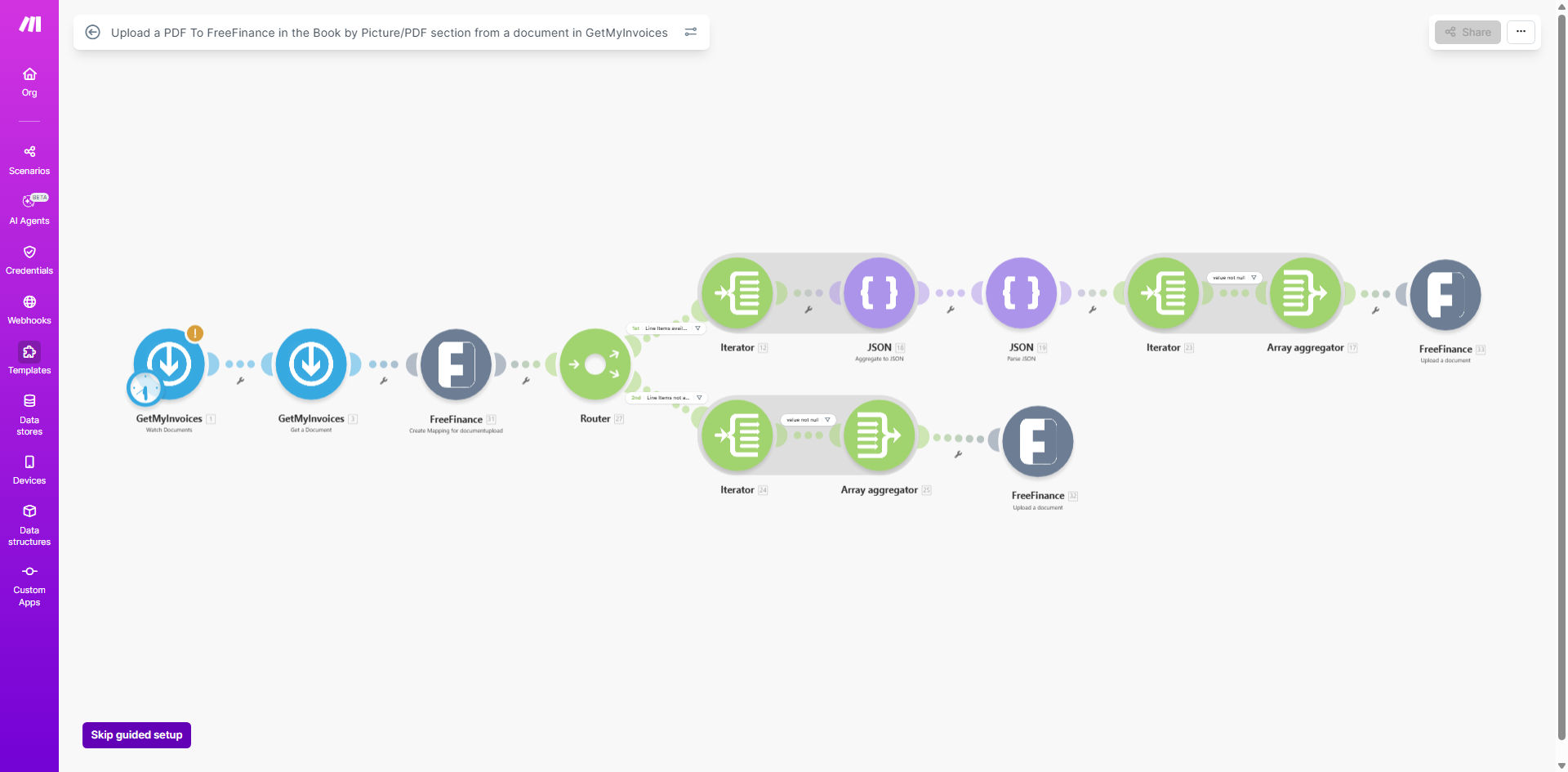
Automated PDF upload workflow diagram showing GetMyInvoices to FreeFinance integration

What This Workflow Does

This automation solves the tedious manual process of downloading PDF documents from GetMyInvoices and uploading them to FreeFinance's Book by Picture section. Accounting teams typically spend 5-10 hours per month on this repetitive task, which is prone to human errors like misfiled documents or missed uploads.

The workflow automatically checks GetMyInvoices for new documents every hour, extracts the relevant PDF files along with their metadata, and uploads them to the correct category in FreeFinance. This ensures all financial documents are properly archived without manual intervention while maintaining a complete audit trail.

How It Works

1. Scheduled Document Check

The workflow runs on a schedule (default hourly) to check your GetMyInvoices account for newly added documents. The schedule can be adjusted based on your document volume.

2. Document Retrieval

For each new document found, the system retrieves both the PDF file and associated metadata including invoice number, date, amount, and vendor information.

3. PDF Processing

The workflow prepares the PDF for upload by verifying its integrity and extracting any required information needed for proper categorization in FreeFinance.

4. FreeFinance Upload

The processed PDF is uploaded to FreeFinance's Book by Picture section with all relevant metadata preserved. The system confirms successful upload before moving to the next document.

Who This Is For

This automation is ideal for:

  • Accounting teams handling 50+ documents monthly
  • Businesses using both GetMyInvoices and FreeFinance
  • Organizations needing audit-compliant document trails
  • Companies wanting to reduce manual data entry errors
  • Finance departments looking to improve month-end closing speed

What You'll Need

  1. Active GetMyInvoices account with document access
  2. FreeFinance subscription with Book by Picture enabled
  3. Make.com account (free tier works)
  4. API access enabled for both platforms
  5. Basic understanding of document categorization rules

Quick Setup Guide

  1. Install the template in your Make.com account
  2. Connect your GetMyInvoices account via OAuth
  3. Authenticate with your FreeFinance credentials
  4. Configure document filters if needed (optional)
  5. Set your preferred schedule frequency
  6. Test with sample documents before going live

Pro tip: Start with hourly runs and adjust frequency based on your document volume. Businesses with high transaction volumes may benefit from running every 15-30 minutes.

Key Benefits

Saves 5-10 hours monthly by eliminating manual document transfers between systems. Accounting teams can focus on value-added analysis instead of data entry.

Reduces errors by 90%+ compared to manual processes. The automation ensures consistent categorization and complete document transfers every time.

Improves audit compliance with timestamped transfers and complete document trails. Never lose track of an invoice again.

Accelerates month-end closing by ensuring all documents are properly archived throughout the month rather than in a last-minute rush.

Scales effortlessly with your business growth. The system handles increased document volumes without additional staff time.

Frequently Asked Questions

Common questions about document transfer automation

Automating document transfers eliminates manual uploads that waste 5-10 hours monthly. It ensures all invoices are properly categorized in FreeFinance without human errors, improves audit trails with timestamped transfers, and reduces late payments from misplaced documents.

A mid-sized accounting firm using this automation reduced their document processing time by 85% while improving accuracy rates from 92% to 99.8% on invoice categorization.

This workflow handles all PDF documents from GetMyInvoices including invoices, receipts, contracts, and statements. The system preserves document metadata during transfer and can be configured to process specific document types based on your accounting needs.

For businesses with complex needs, we can add filters to process only certain vendor documents or documents above specific amounts, ensuring your accounting team only sees what's relevant.

Automated transfers eliminate manual data entry errors that occur in 3-5% of documents according to accounting studies. The workflow maintains document integrity during transfer and ensures proper categorization in FreeFinance's Book by Picture section.

One client reduced their invoice reconciliation errors from 47 monthly discrepancies to just 2 after implementing this automation, saving their accounting team 20+ investigation hours each month.

The workflow uses OAuth authentication for both systems, maintains encrypted connections during transfer, and preserves document access controls. Sensitive financial data never passes through intermediate servers unencrypted.

For businesses handling highly confidential documents, we can implement additional security layers including IP whitelisting, transfer receipts, and automated integrity verification checks.

Yes, the workflow efficiently processes batches of 50-100 documents per run. For businesses with 500+ monthly documents, we recommend custom solutions with parallel processing and advanced error handling.

A manufacturing client processing 1,200+ invoices monthly implemented a customized version that processes documents in parallel batches, completing their entire daily volume in under 15 minutes.

The default schedule checks hourly, but businesses with high document volumes may run it every 15 minutes. For seasonal businesses, the schedule can be adjusted dynamically based on document inflow patterns.

Retailers often increase frequency during holiday seasons when document volumes spike, then scale back during slower periods to optimize resource usage.

Yes, GrowwStacks specializes in custom accounting automation solutions. Our team can build workflows tailored to your specific document types, approval processes, and integration requirements between GetMyInvoices and FreeFinance.

We've created specialized solutions for clients needing multi-step approval workflows, automated OCR processing, and integration with additional accounting systems beyond FreeFinance.

  • Custom document filtering rules
  • Multi-user approval workflows
  • Advanced error handling

Need a Custom Document Transfer Automation?

This free template is a starting point. Our team builds fully tailored automation systems for your specific business needs.