Make.com Slack Mem Content Automation Team Collaboration

Create a Mem from Slack channel messages and send the link to the requester

Automatically convert Slack conversations into shareable Mems with instant notifications to requesters

Get This Workflow → Make.com · Slack · Free Template
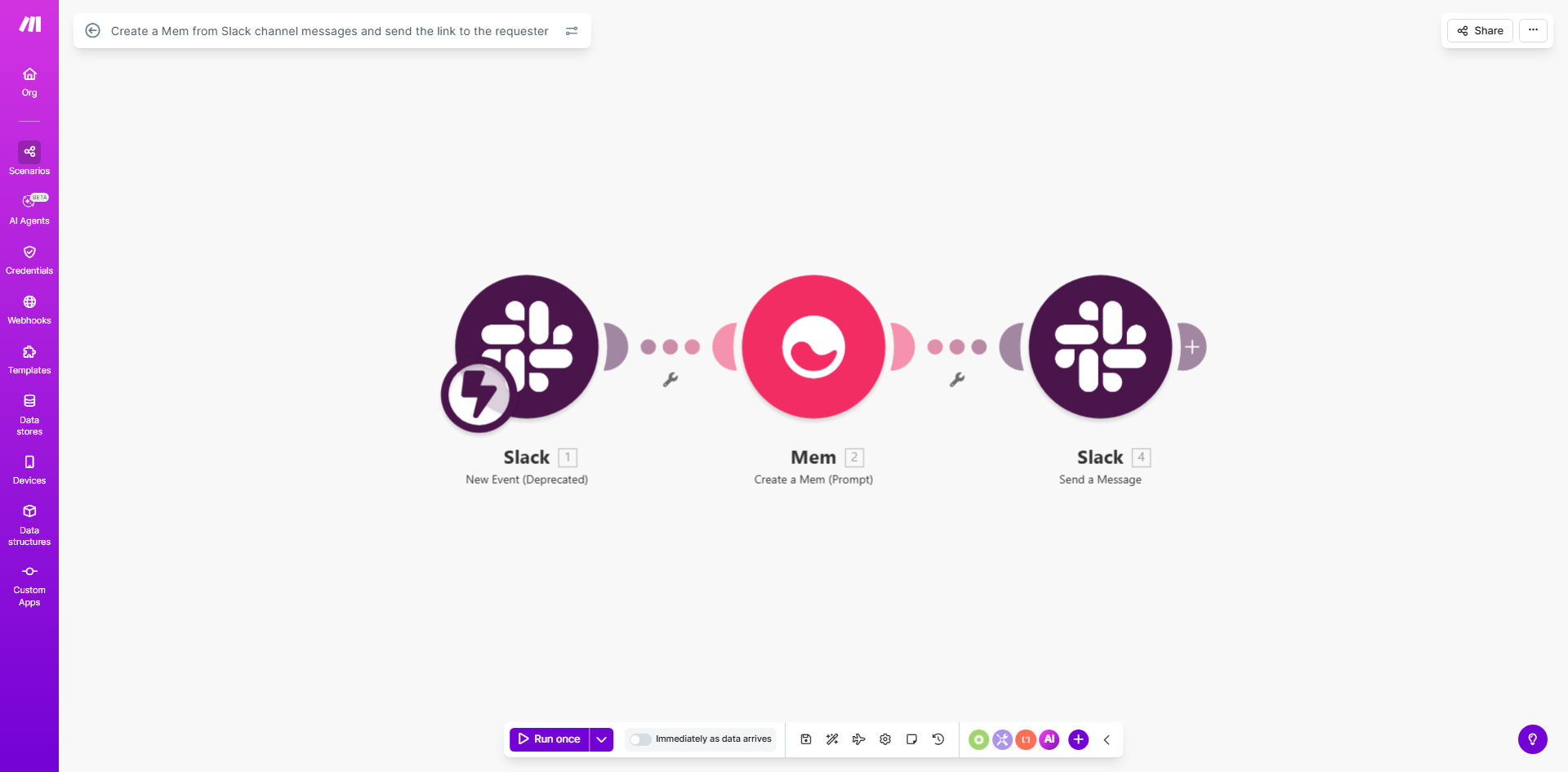
Slack to Mem automation workflow diagram showing message conversion process

What This Workflow Does

This automation solves the common problem of valuable ideas and discussions getting lost in Slack channels. When team members share important information or creative concepts in messages, this workflow instantly converts them into polished Mems - organized, shareable documents that preserve knowledge and facilitate collaboration.

The system automatically detects designated Slack messages, transforms them into properly formatted Mems with preserved structure and context, then sends the creator a direct link to their newly created document. This eliminates manual copying/pasting while ensuring no important content slips through the cracks.

How It Works

1. Slack message trigger

The workflow monitors specified Slack channels for messages containing trigger phrases or meeting certain criteria (like emoji reactions). You can configure it to watch all channels or only selected ones relevant to content creation.

2. Message processing

When a qualifying message is detected, the automation extracts the content while preserving formatting, attachments, and context. It can combine multiple related messages or threads into a single coherent Mem.

3. Mem creation

The system creates a new Mem in your connected account, applying your preferred templates and formatting rules. It can add metadata like original author, timestamp, and source channel for proper attribution.

4. Link delivery

Once the Mem is created, the workflow sends the shareable link back to the original requester via Slack DM or channel message. Optional approval steps can be added for quality control before distribution.

Who This Is For

This automation delivers the most value for teams that frequently convert Slack discussions into formal documentation or shareable content. Ideal use cases include:

  • Product teams capturing feature ideas
  • Marketing teams developing content from brainstorming sessions
  • Support teams documenting solutions to common issues
  • Remote teams preserving meeting notes and action items
  • Any organization wanting to reduce knowledge loss in chat streams

What You'll Need

  1. A Make.com account (free or paid)
  2. Admin access to your Slack workspace
  3. A Mem account with API access enabled
  4. Designated Slack channels for content collection
  5. Optional: Mem templates for consistent formatting

Quick Setup Guide

  1. Clone the template in your Make.com account
  2. Connect your Slack workspace via OAuth
  3. Connect your Mem account with API credentials
  4. Configure which Slack channels to monitor
  5. Set your preferred Mem formatting rules
  6. Test with sample messages and refine as needed
  7. Activate the scenario for live use

Key Benefits

80% faster content capture: Convert Slack messages to polished Mems instantly without manual copying, pasting, or reformatting.

Reduced knowledge loss: Important discussions become permanent, searchable assets instead of disappearing in chat history.

Improved collaboration: Team members get immediate access to shareable versions of their ideas and notes.

Consistent formatting: Automated templates ensure all Mems follow your brand guidelines and content standards.

Scalable solution: Handles increasing message volume without additional staff time or resources.

Frequently Asked Questions

Common questions about Slack to Mem automation and integration

Automating Mem creation from Slack saves significant time by eliminating manual copying and formatting. Teams can instantly capture ideas and discussions without switching apps, ensuring valuable conversations become shareable content assets. Studies show automation reduces content creation time by 60-80% while improving consistency.

For example, marketing teams running brainstorming sessions in Slack can have all ideas automatically converted to Mems for immediate review and development, rather than spending hours transcribing notes.

This workflow creates a direct bridge between team discussions and shareable content. When ideas emerge in Slack, they can immediately become polished Mems that anyone can reference later. This prevents knowledge loss in chat streams and makes information more accessible across the organization.

Remote teams particularly benefit from this instant documentation, as it creates a searchable knowledge base from natural conversations rather than requiring separate documentation sessions.

The workflow works best with structured Slack messages containing clear ideas, meeting notes, project updates, or actionable items. Messages with multiple paragraphs, bullet points, or numbered lists convert particularly well. You can configure triggers for specific channels or message formats to ensure quality output.

Technical teams often use it for converting code snippets and architecture discussions, while creative teams apply it to capture campaign ideas and content outlines.

Yes, the Make.com scenario allows extensive customization of how Slack messages convert to Mems. You can add headers, preserve formatting, include metadata like author and timestamp, or combine multiple related messages. The template provides a starting point you can adapt to your team's specific content needs.

Common customizations include adding company branding, standard sections for different content types, and automatic tagging based on source channel or keywords.

The integration uses official API connections with standard OAuth authentication. Data transfers are encrypted, and you control which Slack channels and Mem workspaces are connected. No messages are stored permanently in Make.com - they're processed in real-time then passed securely between platforms.

For enterprises with strict compliance requirements, additional security layers like IP restrictions and audit logging can be implemented.

The generated Mem remains fully editable in your Mem account like any other document. The workflow can be configured to include edit links alongside view links, or you can set up notifications when recipients request changes. All version history is preserved within Mem's native functionality.

Some teams add comment threads linking back to the original Slack discussion for additional context during editing.

Absolutely. GrowwStacks specializes in building tailored automation solutions that match your exact workflow requirements. We can create custom triggers, add approval steps, integrate with other tools in your stack, or build specialized formatting rules. Our team handles everything from initial consultation to ongoing maintenance.

Custom implementations typically include:

  • Multi-level approval workflows
  • Advanced content formatting rules
  • Integration with additional platforms
  • Detailed analytics and reporting

Need a Custom Slack-to-Mem Automation?

This free template is a starting point. Our team builds fully tailored automation systems for your specific business needs.