Make.com Accounting Automation Stripe Integration Bank Reconciliation

Automated Stripe Payments to FreeFinance Bank Statements

Eliminate manual data entry by automatically creating bank statement lines in FreeFinance for every Stripe payment

Get This Workflow → Make.com · FreeFinance · Free Template
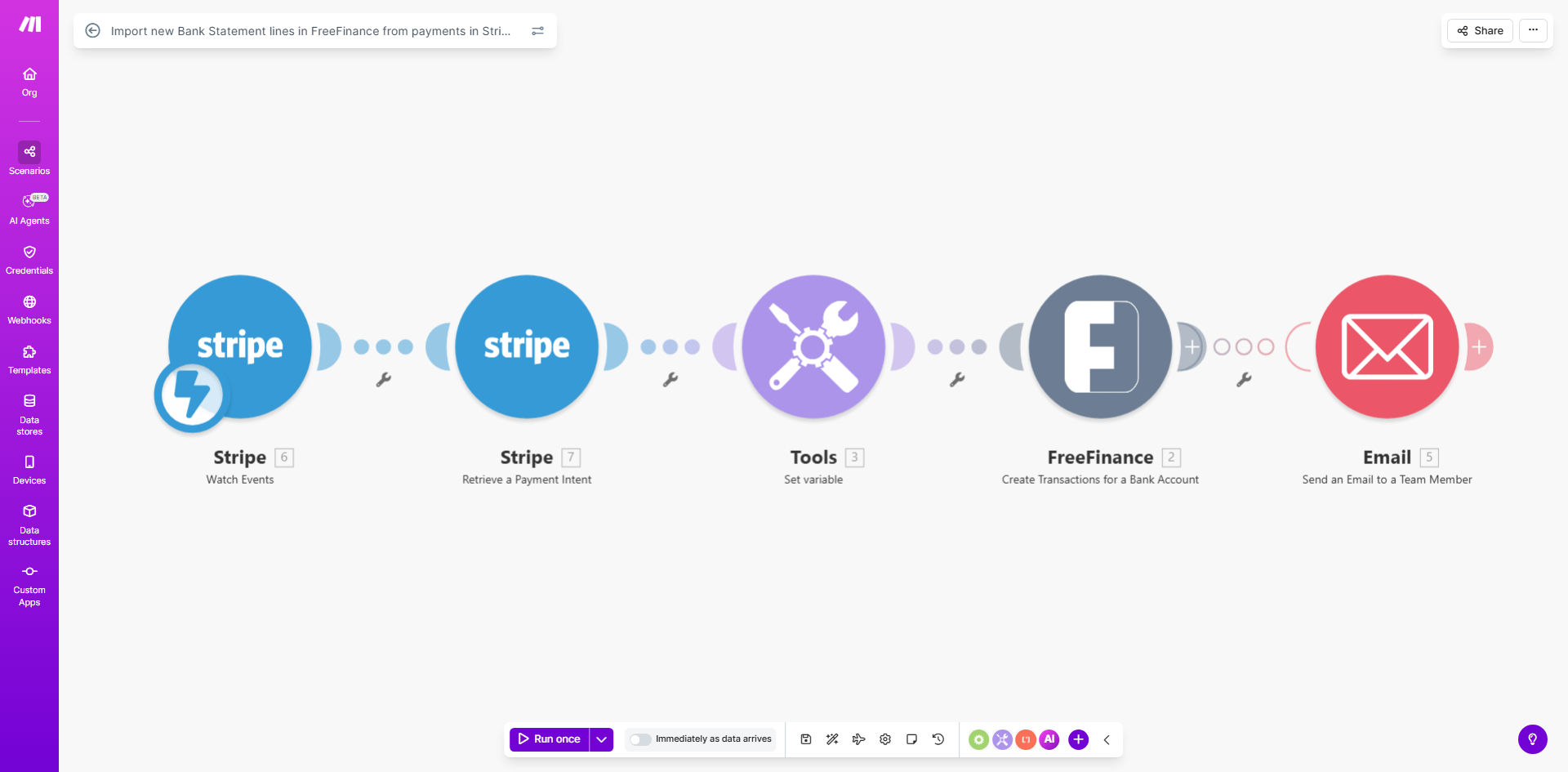
Stripe to FreeFinance bank statement automation workflow diagram

What This Workflow Does

This automation solves the tedious manual process of reconciling Stripe payments with bank statements in FreeFinance. Every time a customer makes a payment through Stripe, the workflow instantly creates a corresponding bank statement line in FreeFinance with all relevant transaction details.

The integration eliminates accounting errors that occur during manual data entry and ensures your financial records are always up-to-date. Financial teams save hours each week previously spent cross-referencing payments and updating accounting systems.

How It Works

1. Payment Trigger

The workflow monitors your Stripe account for new successful payments. Each time a customer completes a payment, Stripe sends real-time data about the transaction.

2. Data Transformation

The payment details are formatted to match FreeFinance's bank statement requirements. This includes converting timestamps, mapping payment methods to account codes, and calculating net amounts after fees.

3. FreeFinance Update

The formatted transaction data is pushed to FreeFinance as a new bank statement line. The entry includes all necessary references for easy reconciliation and audit purposes.

Who This Is For

This automation benefits businesses that:

  • Process payments through Stripe
  • Use FreeFinance for accounting
  • Have high transaction volumes
  • Need accurate real-time financial reporting
  • Want to reduce manual accounting work

What You'll Need

  1. Active Stripe account with payment processing enabled
  2. FreeFinance subscription with API access
  3. Make.com account (free plan sufficient)
  4. Admin access to both systems for initial setup

Quick Setup Guide

  1. Copy this template to your Make.com account
  2. Connect your Stripe account via API key
  3. Authenticate with FreeFinance using your credentials
  4. Test with a sample transaction to verify mapping
  5. Activate the scenario to begin live processing

Key Benefits

Eliminate reconciliation errors - Automated data transfer removes human error from manual entry, ensuring 100% accurate financial records.

Real-time financial visibility - Bank statements reflect payments the moment they're processed, improving cash flow management.

Audit-ready documentation - Complete transaction trails with timestamps and references simplify compliance and reporting.

Staff productivity gains - Accounting teams save 5-10 hours per week previously spent on manual reconciliation tasks.

Frequently Asked Questions

Common questions about Stripe to FreeFinance automation

Automating bank statement entries eliminates manual reconciliation errors and saves accounting teams hours per week. Financial data stays synchronized between payment processing and accounting systems in real-time.

Businesses processing 100+ transactions monthly typically see a 90% reduction in reconciliation errors after implementing this type of automation. The time savings compound as transaction volume grows.

Stripe integration automatically records every payment in your accounting system with complete transaction details. This maintains perfect audit trails and eliminates the risk of missed payments in financial reporting.

Accounting teams gain real-time visibility into cash flow without manual data entry. The integration also captures important metadata like payment methods and customer references that are often lost in manual processes.

FreeFinance automations can handle bank reconciliation, expense categorization, invoice matching, and financial reporting. Integration with payment processors creates a complete financial automation system.

Advanced implementations can automate vendor payments, tax calculations, and multi-currency conversions. The key is building workflows that match your specific accounting policies and business rules.

Automated entries are 100% accurate when properly configured, as they pull data directly from payment processor APIs. They include exact amounts, timestamps, and transaction references.

The automation handles currency conversions, fee calculations, and tax treatments exactly as configured. Regular audits should still be performed, but discrepancies become exceptionally rare.

Typically includes payment amount, date, customer reference, payment method, and any fees. Custom fields can be mapped based on your accounting requirements.

Common additional mappings include invoice numbers, product SKUs, shipping addresses, and tax breakdowns. The workflow can be customized to capture any data available in Stripe's API response.

With automation, reconciliation happens in real-time. For manual processes, weekly reconciliation is recommended to catch discrepancies early.

Monthly reconciliation leaves too much time for errors to compound. Businesses with high transaction volumes (>500/month) should reconcile daily when working manually.

Yes, GrowwStacks specializes in custom payment-to-accounting automations tailored to your specific financial workflows and software stack.

Our team can design integrations that handle complex scenarios like partial refunds, subscription billing, multi-currency operations, and custom reporting requirements. We ensure the solution matches your existing accounting processes.

  • Free initial consultation
  • 30-day implementation guarantee
  • Ongoing support included

Need a Custom Stripe-Finance Automation?

This free template is a starting point. Our team builds fully tailored automation systems for your specific business needs.