Make.com Accounting Automation PDF Processing FreeFinance Email Automation

Automatically Upload PDFs from Email to FreeFinance

Process email attachments and upload to Book by Picture section without manual work

Get This Workflow → Make.com · FreeFinance · Free Template
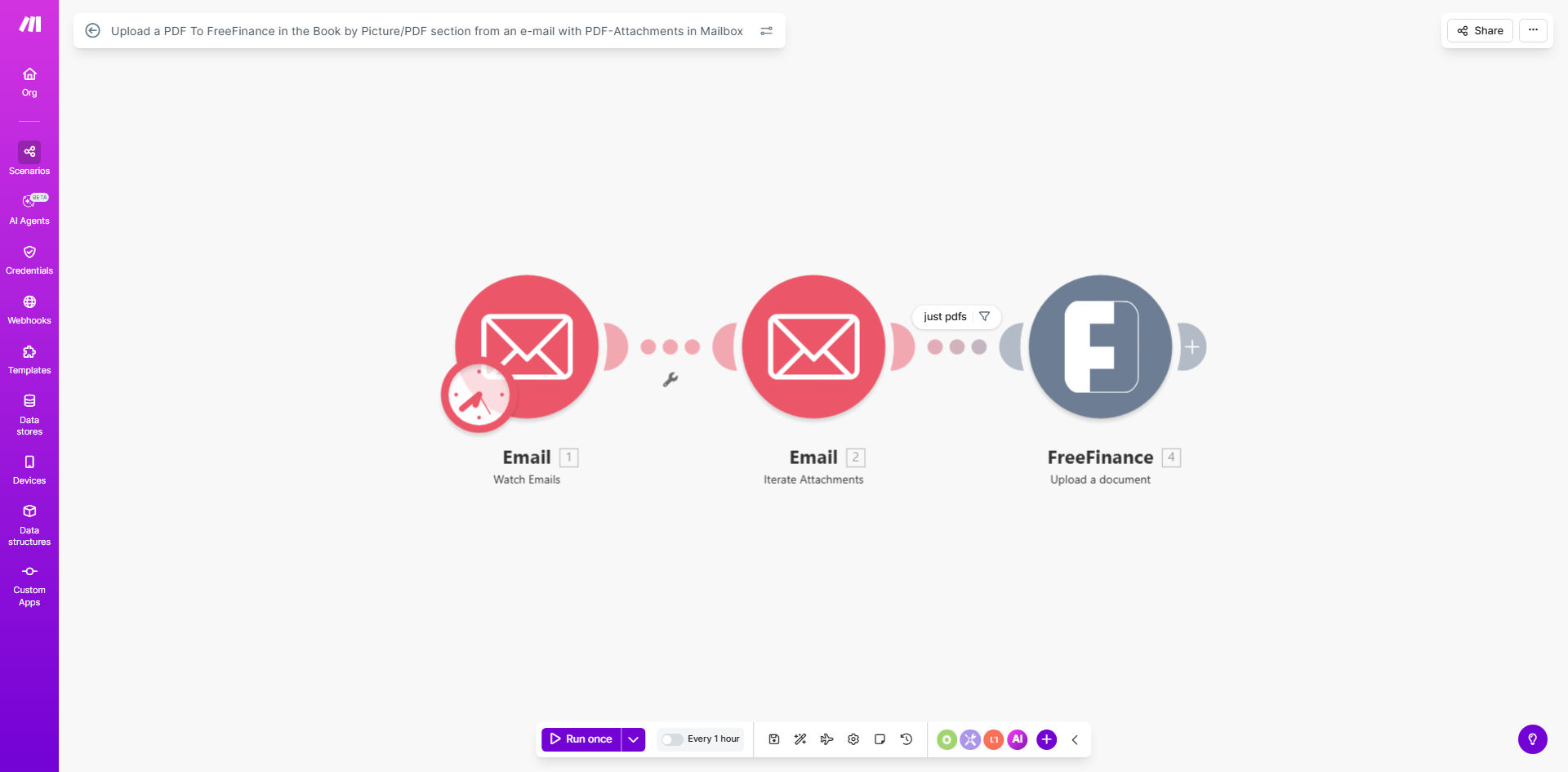
Make.com workflow diagram showing PDF attachment processing from email to FreeFinance

What This Workflow Does

This automation solves the tedious manual process of downloading PDF attachments from emails and uploading them to your FreeFinance accounting software. Many businesses receive invoices, receipts, and financial documents via email that need to be properly filed in their accounting system. The manual process is time-consuming and prone to human error.

The workflow automatically checks your email inbox at regular intervals (default every 60 minutes), identifies new messages with PDF attachments, extracts these documents, and uploads them directly to the Book by Picture section in FreeFinance. This eliminates the need for employees to manually download and upload documents, saving significant time while ensuring no important financial documents are missed.

How It Works

1. Email Monitoring

The workflow connects to your email account (IMAP or Office 365) and scans for new messages containing PDF attachments. You can specify which folders to monitor and set filters based on sender, subject, or other criteria.

2. PDF Extraction

When a qualifying email is found, the system extracts all PDF attachments while preserving the original file names and metadata. The workflow can process multiple attachments per email.

3. FreeFinance Upload

Each extracted PDF is automatically uploaded to the designated Book by Picture section in your FreeFinance account. The system maintains a log of processed documents for auditing purposes.

4. Scheduled Execution

The workflow runs on a schedule you control (default hourly). You can adjust the frequency based on your document volume and processing needs.

Who This Is For

This automation is ideal for:

  • Small businesses receiving invoices and receipts via email
  • Accounting teams processing high volumes of financial documents
  • Freelancers and consultants needing to track expense receipts
  • Any FreeFinance user who receives regular PDF documents via email

What You'll Need

  1. A Make.com account (free or paid)
  2. FreeFinance account with Book by Picture access
  3. Email account credentials (IMAP or Office 365)
  4. Basic understanding of Make.com scenario setup

Quick Setup Guide

  1. Click "Get This Workflow" to open the template in Make.com
  2. Connect your email account credentials
  3. Configure your FreeFinance API connection
  4. Set your preferred schedule (default is hourly)
  5. Test with sample emails containing PDFs
  6. Activate the scenario when ready

Key Benefits

Save 3-5 hours weekly by eliminating manual document processing. Businesses processing 20+ invoices weekly typically save 15-25 hours monthly.

Reduce human error by 90% compared to manual uploads. The automated system ensures every document is processed consistently without missed files or incorrect naming.

Improve document accessibility with immediate availability in FreeFinance. Your team can access uploaded documents faster without waiting for manual processing.

Maintain better audit trails with automatic logging of processed documents. The system creates a complete record of when each document was received and filed.

Scale with your business as document volume grows. The workflow handles increasing loads without additional staff time.

Frequently Asked Questions

Common questions about PDF automation and accounting integration

Automating PDF uploads eliminates manual downloading, renaming, and uploading of documents. Businesses processing 20+ invoices weekly save 3-5 hours per week. The system works 24/7, ensuring no documents are missed even during busy periods.

A retail business processing 50 supplier invoices monthly reduced their accounting team's document handling time from 10 hours to just 30 minutes per month after implementing this automation.

This workflow handles any PDF attachments including invoices, receipts, contracts, and statements. The system extracts the file and relevant metadata from emails for organized accounting records.

The automation can be configured to recognize different document types based on sender patterns or subject lines, allowing for automatic categorization within FreeFinance.

Make.com uses enterprise-grade encryption for all data transfers. The workflow maintains document integrity without storing sensitive data, only transferring files directly between your email and FreeFinance.

All connections use OAuth2 authentication where available, and the system never stores your full email contents or PDF documents after processing is complete.

Yes, the workflow can be configured to monitor multiple email inboxes simultaneously. Each account's PDFs will be processed and uploaded to the appropriate FreeFinance category.

Many businesses set up separate monitoring for accounts payable (vendor invoices), accounts receivable (customer payments), and expense receipts from different departments.

The workflow includes error handling to retry failed uploads and notify administrators of any persistent issues. Failed attempts are logged for review without losing documents.

Common temporary issues like network interruptions are automatically retried up to 3 times before flagging the document for manual review.

Automation reduces human error by 90% and processes documents 10x faster. Unlike manual methods, it provides consistent naming, complete audit trails, and immediate availability in FreeFinance.

Manual processing often leads to documents being misfiled, renamed inconsistently, or even lost in email inboxes. Automation ensures every document is handled the same way every time.

Yes, rules can be set to categorize documents based on sender, subject line, or content. Different document types can be routed to specific FreeFinance sections automatically.

For example, vendor invoices can go to Accounts Payable while client contracts are filed under Customer Documents, all based on predefined rules without manual intervention.

GrowwStacks specializes in tailored document automation solutions. Our team can build custom workflows that integrate with your existing systems and handle unique business requirements.

We've helped businesses automate complex document processing including multi-step approvals, data extraction from PDFs, and integration with multiple accounting systems. Our solutions are designed to scale with your needs.

  • Custom categorization rules
  • Multi-system integration
  • Advanced error handling

Need a Custom PDF Automation?

This free template is a starting point. Our team builds fully tailored automation systems for your specific business needs.