Make.com AI Automation Content Research Google Sheets

Automated RSS Feed Summarization with AI

Transform hours of reading into actionable insights with AI-powered summaries stored in Google Sheets

Get This Workflow Make.com · AI · Free Template
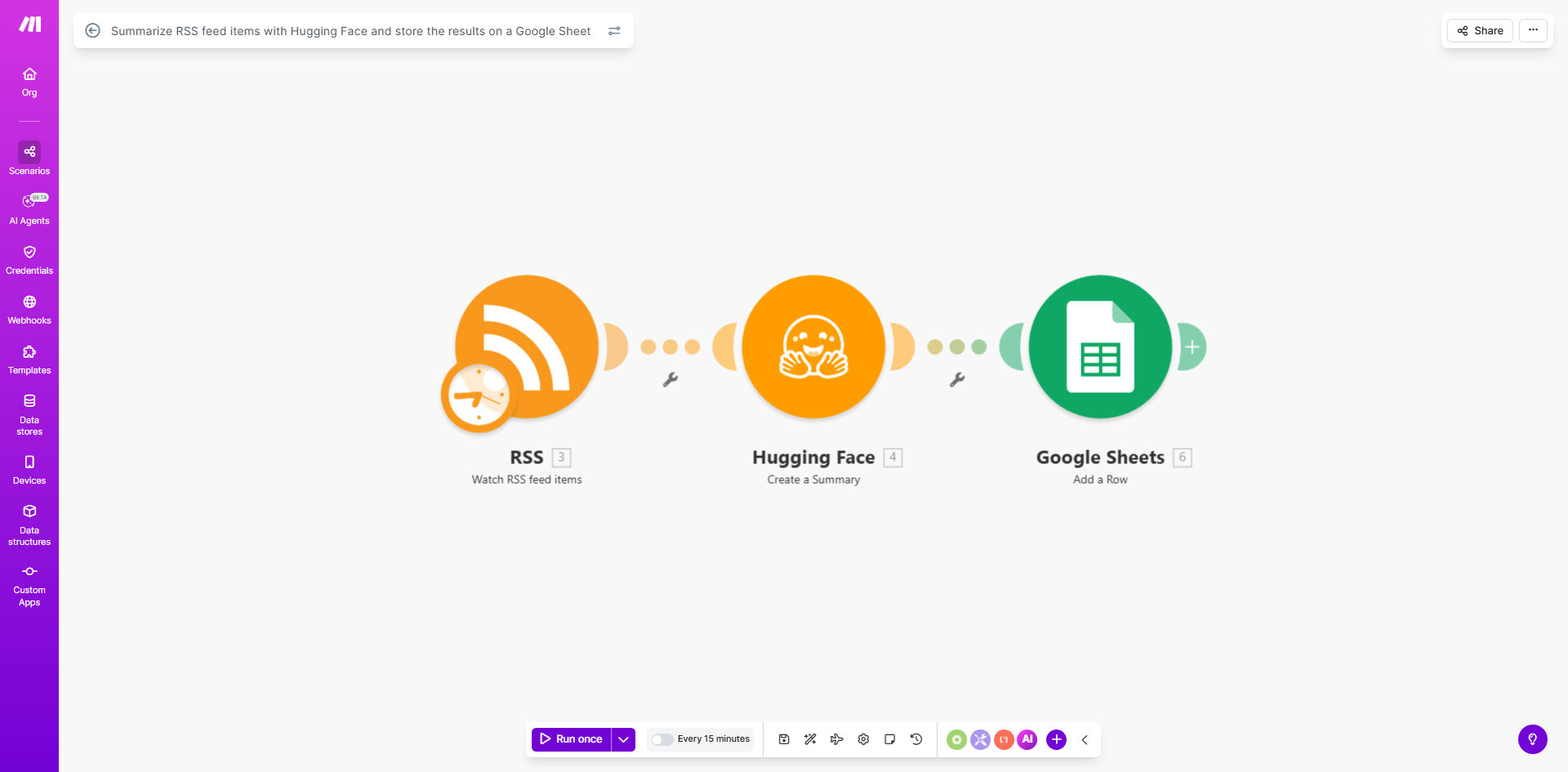
Make.com workflow diagram showing RSS feed summarization process

What This Workflow Does

This automation solves the time-consuming challenge of manually reading and summarizing multiple RSS feeds. Content teams, researchers, and competitive intelligence professionals often spend 5-10 hours per week just keeping up with industry news sources. The workflow automatically fetches new articles, uses Hugging Face's AI models to generate concise summaries, and stores them in an organized Google Sheet.

Beyond basic summarization, the system creates a searchable knowledge base of industry developments. Unlike human readers who might miss key points or introduce bias, the AI provides consistent, objective summaries that capture essential information from each source. Historical data remains accessible for trend analysis and reporting.

How It Works

1. RSS Feed Monitoring

The workflow checks your configured RSS feeds at scheduled intervals (typically 1-4 times daily). It identifies new articles that haven't been processed previously.

2. Content Extraction

For each new article, the system extracts the full text content, removing ads, navigation elements, and other non-article components to focus on the core information.

3. AI Summarization

The extracted content is sent to Hugging Face's summarization models, which analyze the text and generate a concise summary highlighting key points, statistics, and conclusions.

4. Google Sheets Integration

Summaries are automatically appended to your designated Google Sheet with metadata including source URL, publication date, and summary timestamp. The sheet can include multiple tabs for different topics or sources.

Who This Is For

This workflow delivers the most value for:

  • Market research teams tracking industry developments
  • Content agencies managing multiple client newsletters
  • Competitive intelligence professionals monitoring competitors
  • Knowledge workers who need to stay current across 5+ publications
  • Academic researchers following developments in their field

What You'll Need

  1. A Make.com account (free tier sufficient for basic usage)
  2. Hugging Face API access (free tier available)
  3. Google Sheets with edit permissions
  4. RSS feed URLs you want to monitor

Quick Setup Guide

  1. Duplicate the template scenario in your Make.com account
  2. Connect your Hugging Face account and obtain an API key
  3. Add your RSS feed URLs to the configuration module
  4. Create or identify your Google Sheet and connect it
  5. Set your preferred schedule for feed checks
  6. Run a test with 2-3 articles to verify formatting

Pro tip: Create separate Google Sheet tabs for different topic categories or priority levels. Use filters and conditional formatting to highlight important updates.

Key Benefits

Save 5-10 hours per week by eliminating manual reading and note-taking. What previously required dedicated research time now happens automatically in the background.

Never miss important updates with consistent monitoring. The system checks feeds more reliably than human team members who might get distracted or overloaded.

Build institutional knowledge with searchable, permanent records of summaries. Unlike individual notes that might get lost, everything remains accessible in your Google Sheet.

Scale your monitoring capacity from 5 to 50+ feeds without additional time investment. The system handles volume increases effortlessly.

Frequently Asked Questions

Common questions about RSS feed automation and AI summarization

Automating RSS feed summarization saves 5-10 hours per week for content teams by eliminating manual reading and note-taking. AI summarization provides consistent, objective summaries while capturing key points from multiple sources in a standardized format.

For example, a marketing agency tracking 15 industry blogs reduced their weekly research time from 8 hours to 30 minutes while actually increasing the comprehensiveness of their coverage.

Market research firms, content agencies, competitive intelligence teams, and knowledge workers who monitor industry news benefit most. Any business tracking 5+ RSS feeds will see immediate time savings from automation.

The workflow is particularly valuable for distributed teams where multiple people need access to the same research findings without duplicating effort.

  • Ideal for industries with rapid information turnover
  • Reduces redundant research across departments
  • Creates audit trails for compliance-sensitive fields

Modern NLP models like those from Hugging Face achieve 85-92% accuracy for factual summarization when properly configured. The workflow allows reviewing summaries before they reach your spreadsheet.

Inaccuracy typically occurs with highly technical content or opinion pieces. You can adjust the summary length parameter to balance brevity against completeness based on your needs.

Yes. The workflow can be modified to extract specific entities (names, dates, stats), apply sentiment analysis, or focus on particular sections of articles based on your needs.

Advanced configurations might highlight competitor mentions, product launches, or regulatory changes. The Google Sheets output format is completely customizable to match your reporting requirements.

Most businesses run summaries 1-4 times daily. The workflow can trigger on schedule or when feeds update. High-volume feeds (>20 articles/day) benefit from more frequent processing.

Consider aligning checks with your team's workflow - morning summaries for daily standups, or end-of-day summaries for next-day planning. The system prevents notification overload while ensuring timely information.

Google Sheets enables easy sharing, historical tracking, and integration with other tools like Data Studio for visualization. Summaries become searchable company knowledge rather than individual notes.

Teams can add columns for categorization, priority flags, or action items. The structured format supports bulk analysis that wouldn't be possible with scattered email summaries or chat messages.

Absolutely. GrowwStacks specializes in tailored RSS monitoring systems with custom summarization rules, multi-user access controls, and integration with your existing knowledge management tools.

Our automation engineers can build solutions that match your specific research workflows, including approval processes, alert thresholds, and integration with CRM or project management systems.

  • Industry-specific summarization templates
  • Team collaboration features
  • Advanced analytics dashboards

Need a Custom RSS Automation?

This free template is a starting point. Our team builds fully tailored automation systems for your specific business needs.