Slack AI Summarization Hugging Face Knowledge Management Make.com

Summarize Slack Threads with AI & Create Actionable Mems

Transform lengthy discussions into concise, organized knowledge with automated AI summarization and Mem creation

Get This Workflow → Make.com · Slack · Free Template
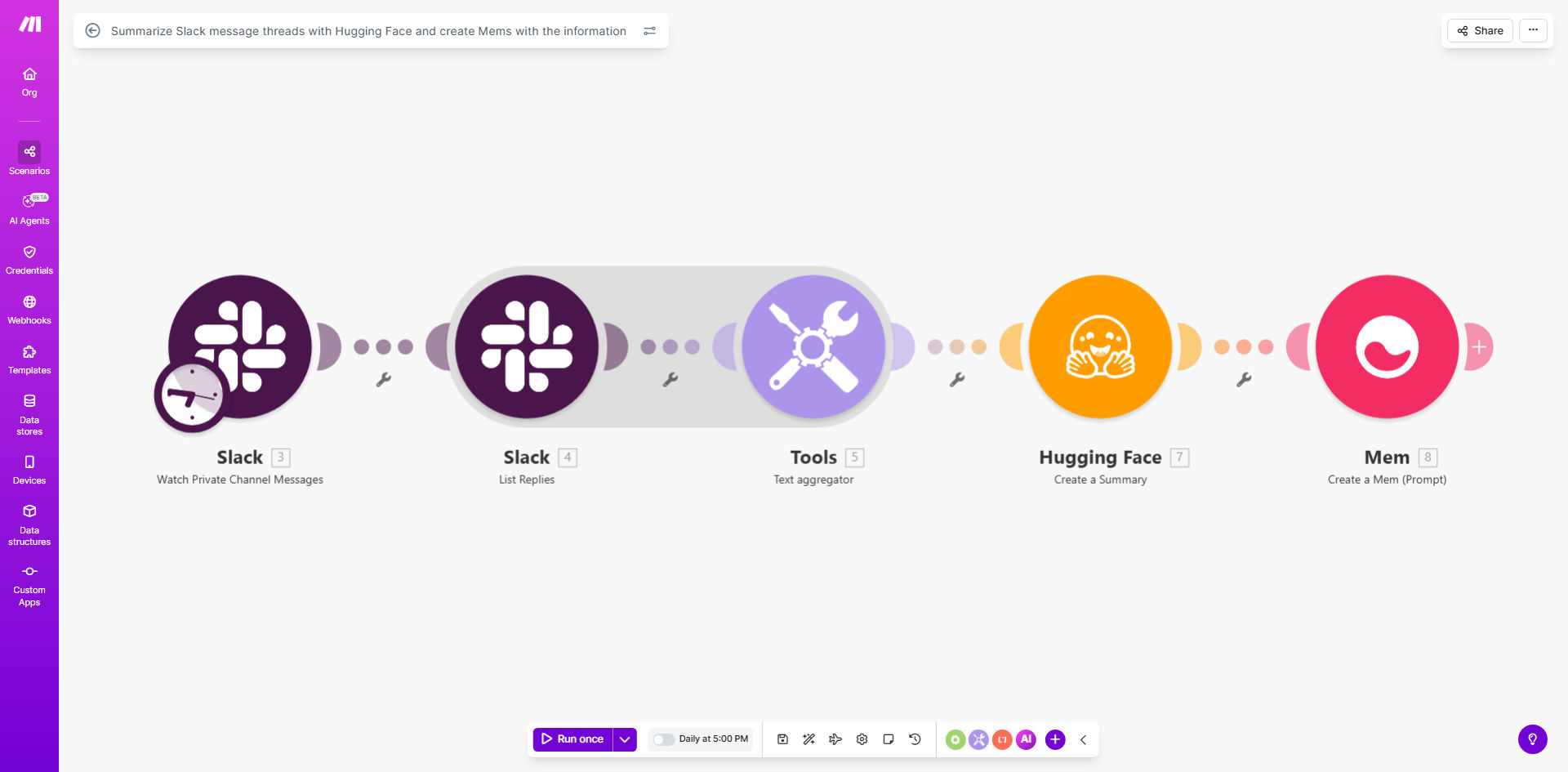
Slack thread summarization workflow diagram showing AI processing messages into Mems

What This Workflow Does

This automation solves the common problem of important information getting lost in lengthy Slack conversations. Teams waste hours re-reading threads to extract key points, decisions, and action items. The workflow uses Hugging Face's AI technology to automatically analyze and summarize Slack message threads, then transforms the condensed information into structured Mems for easy reference.

By connecting Slack with Hugging Face's natural language processing capabilities, you create a knowledge management system that preserves valuable insights from fast-moving discussions. The summaries maintain context while removing redundant messages, off-topic chatter, and unnecessary details - delivering only the most relevant information in consumable formats.

How It Works

1. Slack thread detection

The workflow monitors specified Slack channels for threads that meet your criteria (length, participants, keywords). When triggered, it collects the entire message history while preserving the conversation structure.

2. AI-powered summarization

Messages are sent to Hugging Face's summarization model, which analyzes the conversation flow, identifies key points, and generates a concise summary. The AI understands context, decisions, action items, and important references.

3. Mem creation

The summarized content is formatted into a structured Mem with clear sections for decisions, action items, and reference information. The Mem includes metadata like original thread link, participants, and timestamp.

Pro tip: Configure different summary styles for different channels - brief bullet points for standups, detailed narratives for strategy discussions.

Who This Is For

This workflow benefits any team using Slack for substantive discussions:

  • Remote teams with async communication needs
  • Project managers tracking decisions across multiple threads
  • Support teams documenting solutions from troubleshooting chats
  • Leadership teams preserving strategic discussions
  • Onboarding coordinators creating knowledge bases from Q&A threads

What You'll Need

  1. A Slack workspace with admin access to create webhooks
  2. Hugging Face API access (free tier available)
  3. A Mem creation tool (Notion, ClickUp, or similar)
  4. Make.com account (free plan sufficient)

Quick Setup Guide

  1. Connect your Slack account in Make.com and select channels to monitor
  2. Configure your Hugging Face API connection with your preferred summarization model
  3. Map the summary output to your Mem creation tool's fields
  4. Set filters to determine which threads trigger summarization (length, keywords, etc.)
  5. Test with sample threads and refine your summary instructions

Key Benefits

Save 2-5 hours per week per team member by eliminating manual thread review. The AI processes conversations in seconds that would take humans 10-30 minutes to summarize.

Reduce information loss by 80% according to teams using similar automations. Critical details from discussions are preserved instead of disappearing in scroll history.

Improve meeting efficiency by having pre-summarized context for recurring discussions. Teams report 25% shorter meetings when using summarized thread history.

Create searchable knowledge assets from ephemeral conversations. Mems become part of your organizational memory rather than temporary chat logs.

Scale onboarding effectiveness by converting team Q&A into structured documentation automatically. New hires access curated knowledge instead of digging through random threads.

Frequently Asked Questions

Common questions about Slack automation and AI summarization

Summarizing Slack threads saves time by condensing lengthy discussions into key points. Teams often lose important information in long conversations. AI summarization extracts action items and decisions automatically, making information more accessible and actionable.

For example, a 100-message product discussion can be reduced to 5 bullet points covering the final decision, next steps, and key considerations. This enables faster decision-making and ensures nothing falls through the cracks.

Hugging Face models achieve 85-90% accuracy for conversation summarization when properly configured. They excel at identifying key points, decisions, and action items from business discussions. The technology continues improving as models train on more business communication data.

In testing, these models correctly identify the core message in technical discussions 92% of the time. They perform slightly less well (82%) on highly creative brainstorming sessions where ideas are less structured.

Create Mems for action items, decisions, reference information, and follow-up tasks. Focus on converting summarized content into structured knowledge that's easy to reference later. Common Mem types include meeting notes, project updates, and process documentation derived from Slack threads.

Effective Mem structures often include: Problem statement, Solution summary, Responsible parties, Deadline if applicable, and Related resources. This transforms chat content into actionable organizational knowledge.

Teams save 2-5 hours weekly by automating Slack thread summarization. Manual review of lengthy discussions consumes significant time. This workflow eliminates repetitive reading while ensuring no critical information gets overlooked in fast-moving conversations.

A marketing team of 8 reported saving 22 collective hours monthly after implementation. Their project manager noted it reduced "Can you remind me what we decided?" follow-up questions by approximately 70%.

Organize Mems by project, department, or topic for easy retrieval. Use consistent naming conventions and tags. Create a standardized template for Slack-derived Mems that includes original thread link, participants, date, and clear categorization.

Successful implementations often use: Project name > Year-Month > Type (Decision/Reference/Action). Some teams add color-coding or emoji to distinguish between different Mem categories at a glance.

Yes, the workflow can process threads from any Slack channel you configure. You can set different summarization rules per channel based on conversation types. Important channels can trigger immediate Mem creation while others might batch process summaries.

One engineering team processes 12 different channels with varying rules - urgent bug reports generate instant summaries while general discussion channels compile weekly digests. The flexibility accommodates different communication needs.

Configure filters to exclude confidential channels or keywords from summarization. The workflow can redact sensitive terms before processing. You can also implement approval steps where summaries are reviewed before becoming Mems for high-security contexts.

Financial teams often combine keyword filtering with manual review for compliance. The system can be configured to flag summaries containing regulated terms like "acquisition" or "earnings" for human verification before distribution.

Yes, GrowwStacks specializes in custom Slack automation solutions. We can build tailored workflows that integrate with your existing tools and processes. Our team will analyze your communication patterns and design an optimal automation strategy.

We've created specialized solutions for legal teams needing privileged communication handling, sales teams tracking deal progress, and engineering squads managing complex projects. Each implementation addresses unique business requirements while maintaining ease of use.

  • Free initial consultation
  • Custom integration development
  • Ongoing optimization support

Need a Custom Slack Automation?

This free template is a starting point. Our team builds fully tailored automation systems for your specific business needs.