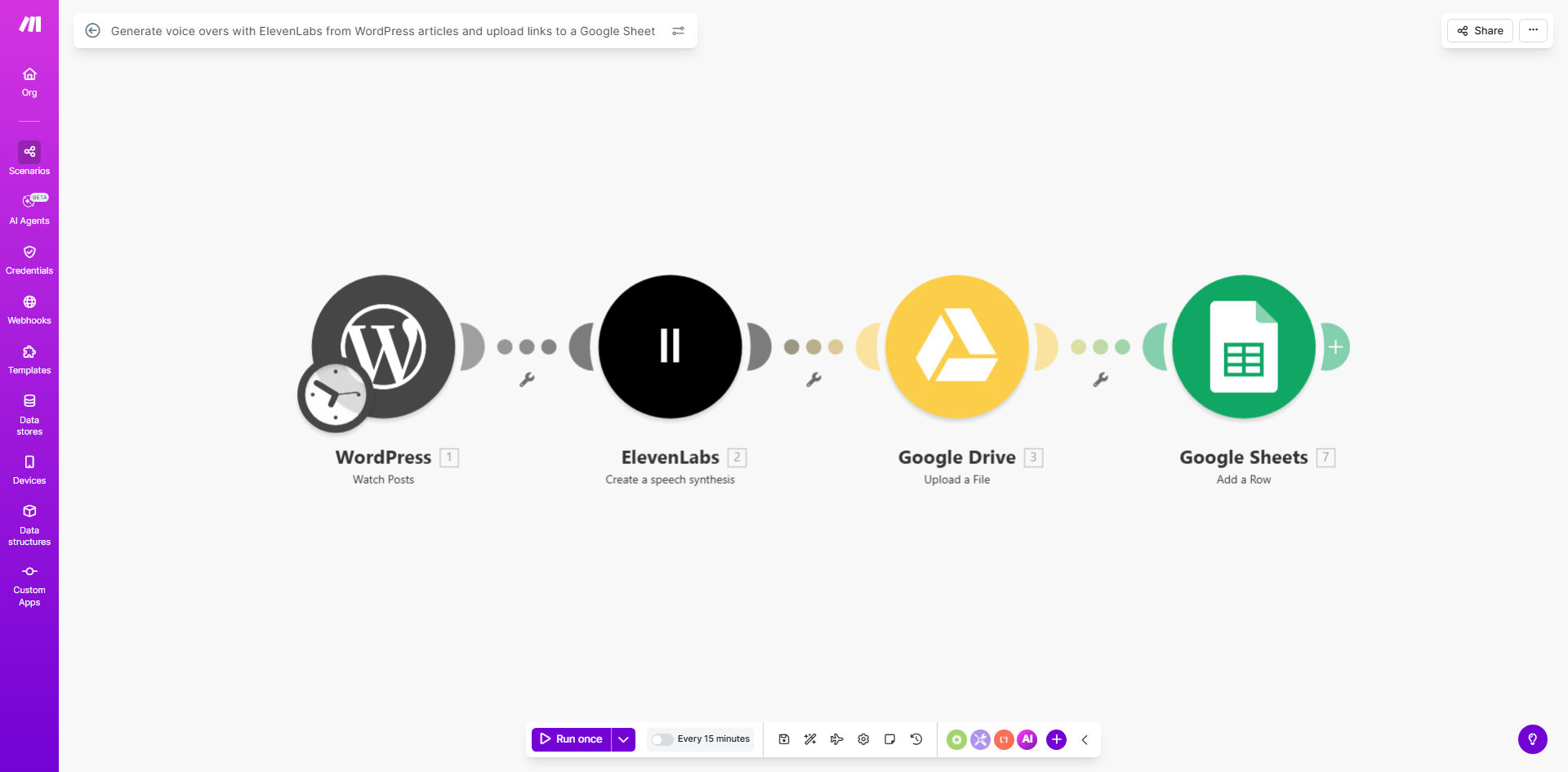
What This Workflow Does
This automation solution transforms written WordPress content into professional-quality voice overs using ElevenLabs' advanced text-to-speech technology. It eliminates the need for manual recording sessions while maintaining high audio quality. The generated voice files are automatically organized in Google Sheets for easy access and management.
The workflow solves several pain points for content creators: it reduces production time from hours to minutes, ensures consistent voice quality across all content, and provides centralized tracking of all audio assets. Businesses can repurpose written content into podcasts, audio articles, or multilingual versions without additional production costs.
How It Works
1. WordPress Article Detection
The workflow monitors your WordPress site for new or updated articles. It can be configured to process specific categories or tags, giving you control over which content gets converted to audio.
2. Content Preparation
The system extracts and cleans the article text, removing any HTML tags or elements that shouldn't be read aloud. It can handle complex formatting while preserving the article's structure and meaning.
3. ElevenLabs Voice Generation
The prepared text is sent to ElevenLabs' API, which converts it to natural-sounding speech. You can specify voice characteristics like tone, speed, and style to match your brand identity.
4. Google Sheets Integration
Each generated voice over is uploaded to your preferred storage solution, with all details automatically recorded in Google Sheets. The sheet includes article titles, voice parameters, audio lengths, and direct access links.
Who This Is For
This workflow benefits content teams that need to scale audio production without increasing staff. Podcast networks can use it to create episode previews or full audio versions of blog content. E-learning platforms can generate consistent voice overs for course materials.
Marketing agencies will appreciate the ability to quickly produce voice overs for ads and promotional content. Publishers creating accessible content can automate audio versions of articles for visually impaired readers.
What You'll Need
- A WordPress website with API access
- An ElevenLabs account with API credentials
- A Google account with Sheets access
- A Make.com account to run the automation
Quick Setup Guide
- Connect your WordPress site to the workflow using REST API
- Configure your preferred ElevenLabs voice settings
- Set up the Google Sheets template for voice over tracking
- Test with sample articles to verify output quality
- Schedule the workflow to run automatically for new content
Key Benefits
80% faster production: What took hours of recording and editing now happens automatically in minutes.
Consistent brand voice: Maintain the same vocal characteristics across all your audio content without relying on human variability.
Centralized management: All voice overs are tracked in Google Sheets with direct access links, making asset management simple.
Scalable content creation: Produce unlimited voice overs without additional production costs or scheduling constraints.
Multilingual potential: Easily create versions in different languages by combining with translation workflows.