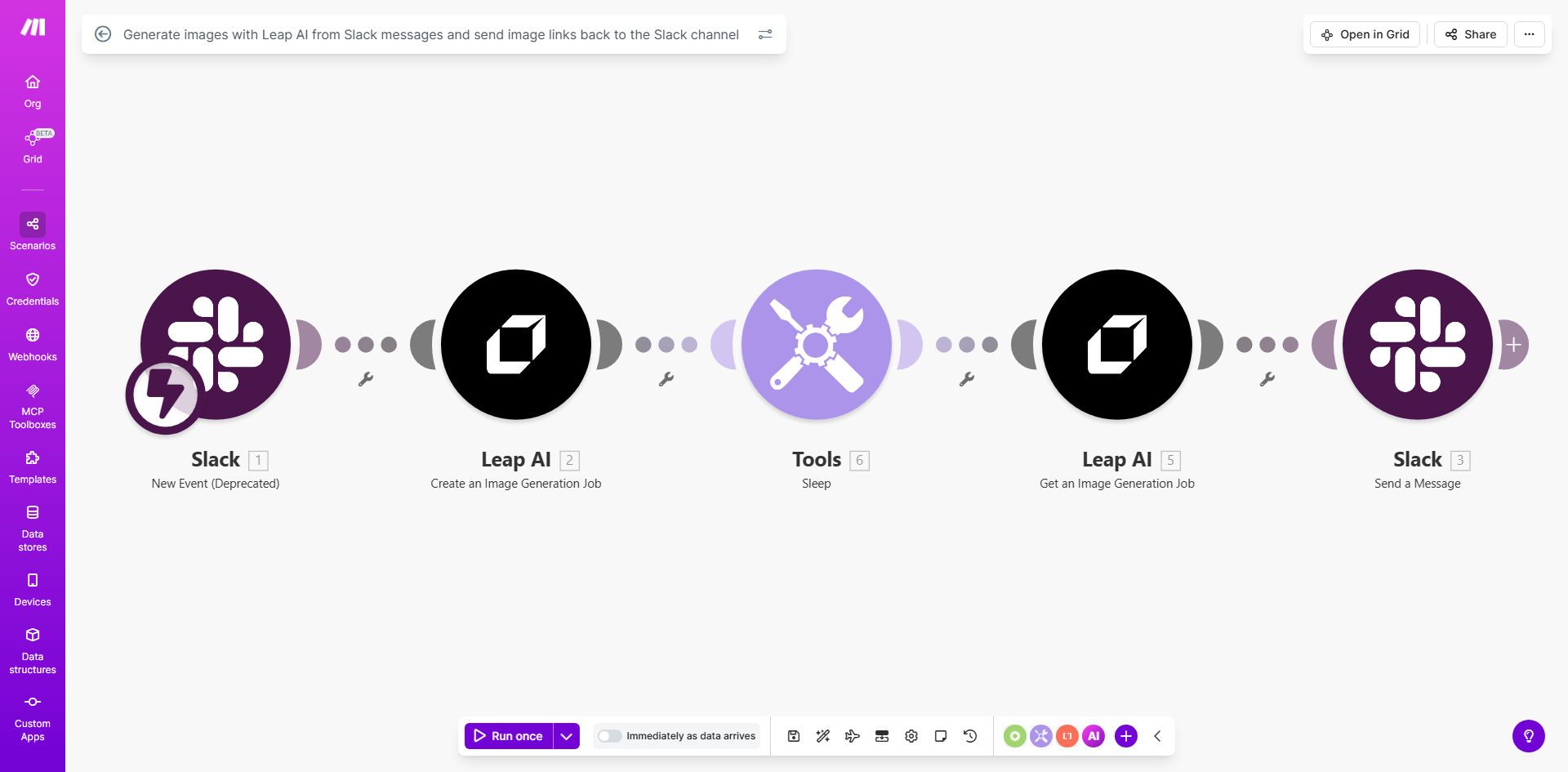
What This Workflow Does
This automation bridges the gap between textual ideas and visual content by instantly transforming Slack messages into AI-generated images. When team members describe concepts, products, or creative ideas in Slack, the workflow automatically converts these text descriptions into professional visuals using Leap AI's powerful image generation capabilities.
The generated images are then posted back to the originating Slack channel or direct message thread, creating a seamless visual feedback loop. This eliminates the need for manual image creation, file uploads, or switching between multiple applications, keeping all creative collaboration within your team's existing communication platform.
How It Works
1. Slack Message Trigger
The workflow monitors specified Slack channels for messages containing image generation triggers (like hashtags or specific keywords). When detected, the message content is extracted as the image prompt.
2. AI Image Generation
The text prompt is sent to Leap AI's image generation API, which interprets the description and creates high-quality visuals matching the requested concept, style, and composition.
3. Image Processing
The generated image is optimized for web viewing, with optional resizing, formatting, or watermarking based on your configuration settings.
4. Slack Delivery
The final image is uploaded to Slack and posted as a reply in the original conversation thread, maintaining context and making the visual instantly available to all participants.
Pro tip: Configure different Slack channels to trigger specific image styles (e.g., #marketing generates social media graphics while #product creates UI mockups).
Who This Is For
This workflow is ideal for creative teams, marketing departments, product developers, and any collaborative group that frequently needs to visualize concepts during discussions. Particularly valuable for:
- Marketing teams creating social media content
- Product teams brainstorming feature designs
- Creative agencies developing visual concepts
- Remote teams collaborating on visual projects
- Educators creating instructional materials
What You'll Need
- A Make.com account (formerly Integromat)
- Slack workspace with admin permissions to create apps
- Leap AI API key (free tier available)
- Designated Slack channel(s) for image generation
Quick Setup Guide
- Install the template in your Make.com account
- Connect your Slack workspace via OAuth
- Add your Leap AI API credentials
- Specify which Slack channels should trigger generation
- Configure any style presets in Leap AI
- Test with sample messages in your Slack channel
Key Benefits
Accelerate creative workflows by reducing the time between idea conception and visual representation from hours to seconds.
Maintain conversation context with images automatically posted where the discussion is happening, eliminating disjointed file sharing.
Democratize visual creation allowing team members without design skills to quickly generate professional images.
Reduce software costs by minimizing the need for multiple team members to have expensive design software licenses.
Improve remote collaboration with instant visual aids that help clarify complex ideas across distributed teams.