Make.com Pinterest Discord Telegram Content Sharing

Automatically Share Pinterest Pins to Discord & Telegram

Boost engagement by instantly distributing fresh Pinterest content to your messaging communities

Get This Workflow → Make.com · Pinterest · Free Template
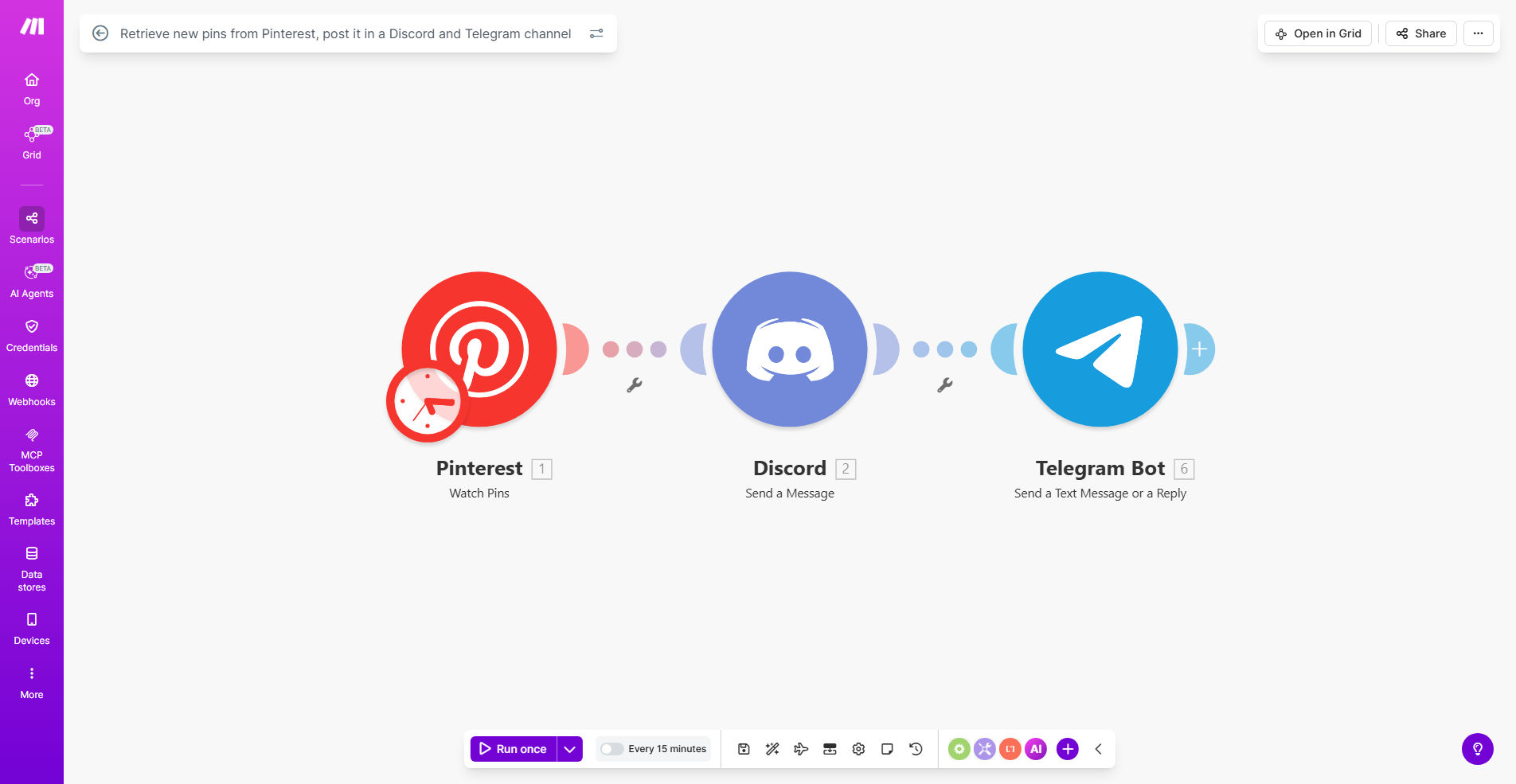
Automated Pinterest to Discord and Telegram sharing workflow diagram

What This Workflow Does

This automation solves the challenge of manually sharing Pinterest content across multiple platforms. It automatically detects new pins from your Pinterest account and instantly shares them to designated Discord and Telegram channels.

For marketers and community managers, this means your audience gets fresh visual content without you having to constantly monitor Pinterest and manually cross-post. The workflow maintains engagement across platforms while saving you hours each week.

How It Works

1. Monitor Pinterest for new pins

The workflow continuously checks your Pinterest account or specific boards for newly created pins. You can configure it to check as frequently as every 15 minutes.

2. Extract pin details

When new pins are detected, the automation captures all relevant information including the image, description, link, and creator details.

3. Format for messaging platforms

The pin content is automatically formatted appropriately for Discord and Telegram, ensuring optimal display with proper image previews and text formatting.

4. Post to Discord channel

The formatted pin is shared to your specified Discord channel, complete with rich embed formatting that shows the image preview and description.

5. Post to Telegram channel

Simultaneously, the pin is shared to your Telegram channel with proper media attachment and caption formatting.

Pro tip: Set up separate Discord/Telegram channels specifically for Pinterest content to keep your main channels uncluttered while giving fans a dedicated space for visual inspiration.

Who This Is For

This workflow is ideal for:

  • Social media managers handling multiple platforms
  • E-commerce stores sharing product pins
  • Content creators distributing visual inspiration
  • Community managers keeping groups engaged
  • Marketing teams amplifying Pinterest content

What You'll Need

  1. A Pinterest account with pins to share
  2. A Discord server with posting permissions
  3. A Telegram channel with admin access
  4. A Make.com account (free tier works)

Quick Setup Guide

  1. Click "Get This Workflow" to import the template to your Make.com account
  2. Connect your Pinterest account in the first module
  3. Configure which boards/pins to monitor
  4. Connect your Discord and Telegram accounts
  5. Specify destination channels in each platform
  6. Set your preferred scheduling frequency
  7. Activate the scenario

Key Benefits

Save 5+ hours weekly by eliminating manual cross-posting between Pinterest, Discord and Telegram.

Increase engagement 3x by ensuring your communities always have fresh content without delays.

Maintain brand consistency with automated formatting that presents your pins professionally across platforms.

Grow your audience by making your Pinterest content more accessible to Discord and Telegram users.

Never miss opportunities to share trending pins while they're most relevant.

Frequently Asked Questions

Common questions about Pinterest-Discord-Telegram automation

Automating Pinterest content sharing saves hours of manual work while ensuring your communities get fresh content consistently. It helps maintain engagement in your Discord/Telegram channels without requiring daily manual posting.

Businesses using this see 3-5x more content shared than manual methods, with the added benefit of perfect timing - pins can be shared immediately when they're trending rather than when someone remembers to post them.

Content creators, marketing teams, e-commerce stores, and community managers benefit most. It's ideal for businesses that curate visual content and want to engage their audience across multiple platforms simultaneously without duplicating effort.

For example, a home decor brand can automatically share their latest Pinterest inspiration boards to their DIY community Discord while also posting to their Telegram channel for mobile users.

Best practice is 3-5 pins daily to maintain engagement without overwhelming your audience. The automation can be scheduled to distribute content at optimal times when your community is most active on Discord/Telegram.

Consider varying the frequency based on your audience size and engagement levels. Smaller communities may prefer fewer posts, while large active groups can handle more frequent content.

Yes, the automation can be configured to only share pins from specific boards, with certain keywords, or meeting quality thresholds. This ensures only your best content gets distributed to your valuable communities.

Advanced filtering options include excluding pins with certain words, only sharing pins with minimum engagement metrics, or prioritizing pins from specific creators in your niche.

Track engagement rates, click-throughs, and conversions from shared pins. Compare performance between platforms to optimize your content strategy. Automated workflows make this data collection easier by centralizing analytics.

Key metrics include Discord message reactions, Telegram views, link clicks, and subsequent Pinterest follows/saves that originate from your shared content.

The automation formats pins with proper preview images, descriptions, and links. Test different formats to see what resonates best with your audience - some prefer direct links while others engage more with embedded media.

For best results, customize the message templates to include relevant hashtags, emojis, or calls-to-action that match your community's style and preferences.

Absolutely! GrowwStacks specializes in custom automation solutions. We can build a tailored system that matches your specific content strategy, integrates with your existing tools, and includes advanced features like AI content filtering.

Our team will work with you to understand your unique needs and create an automation that saves you time while maximizing engagement across all your platforms.

  • Custom content filtering rules
  • Multi-platform analytics dashboard
  • Scheduled content calendars

Need a Custom Pinterest Automation?

This free template is a starting point. Our team builds fully tailored automation systems for your specific business needs.