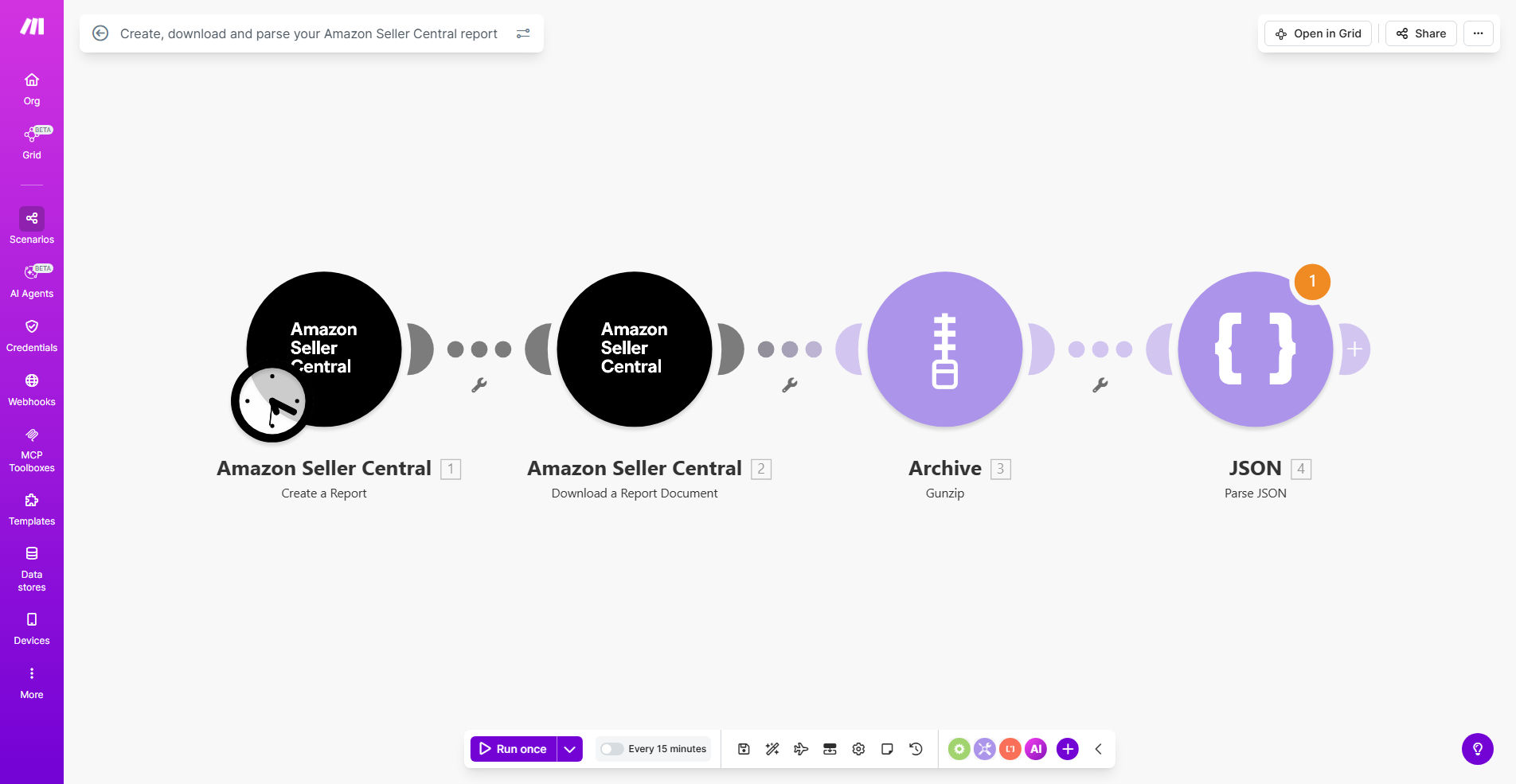
What This Workflow Does
This automation eliminates the tedious manual process of generating reports from Amazon Seller Central, downloading them, and extracting key data points. Instead, it automatically requests specific reports from Amazon's API, downloads them when ready, parses the data into structured formats, and prepares it for analysis in your preferred business intelligence tools.
The workflow solves three major pain points for Amazon sellers: 1) Wasting hours each week manually running reports, 2) Dealing with inconsistent data formats that require cleaning, and 3) Missing important insights because data isn't analyzed regularly. By automating this process, you gain consistent, timely access to your Amazon business metrics without the administrative overhead.
How It Works
1. Trigger report generation
The workflow begins by authenticating with Amazon's MWS API and requesting the specific report type you need (sales, inventory, etc.) on your configured schedule. It handles all the API authentication and request formatting automatically.
2. Monitor report processing
Amazon typically takes 15-60 minutes to generate reports. The workflow checks periodically until your report is ready, then automatically downloads it the moment processing completes - no manual checking required.
3. Parse and transform data
The raw report data (usually in TSV or CSV format) is parsed into structured JSON. The workflow extracts only the columns you need, applies any calculations or transformations, and formats the output for your destination system.
4. Deliver to your tools
Finally, the cleaned data is sent to your preferred destination - whether that's Google Sheets, a database, BI tools like Power BI, or your internal systems via webhook. You can configure multiple output destinations.
Pro tip: Combine this with our Amazon to Google Sheets template to automatically build visual dashboards that update daily with your latest Amazon performance metrics.
Who This Is For
This automation is ideal for:
- Amazon FBA sellers who spend hours weekly running manual reports
- Brands selling on Amazon who need to track sales trends and inventory levels
- Agencies managing multiple seller accounts that require consolidated reporting
- Businesses that want to combine Amazon data with other sales channels in their BI tools
- Sellers who need historical data for tax preparation or financial reporting
What You'll Need
- An active Amazon Seller Central Professional account
- MWS API credentials (Seller ID, Auth Token, and Secret Key)
- A Make.com account (formerly Integromat)
- Destination for parsed data (Google Sheets, database, etc.)
- Basic understanding of Amazon report types you need
Quick Setup Guide
- Get your MWS credentials from Seller Central under "Integration" settings
- Clone the template in your Make.com account
- Configure the Amazon MWS connection module with your credentials
- Select your desired report type and schedule frequency
- Map the data fields you want to extract from each report
- Connect your output destination (Google Sheets, webhook, etc.)
- Test with a manual run before enabling scheduling
Key Benefits
Save 5-10 hours per week by eliminating manual report generation and data extraction. The automation handles everything from requesting reports to delivering parsed data to your systems.
Get fresher data for decisions with daily automated reports instead of sporadic manual checks. Never miss important sales trends or inventory shortages because you forgot to run reports.
Reduce human errors in data collection and formatting. The workflow applies consistent parsing rules every time, eliminating copy-paste mistakes and formula errors in spreadsheets.
Build custom dashboards with the exact metrics you care about, not Amazon's default report formats. Automatically combine data from multiple report types into unified views.
Scale reporting across accounts easily. The same workflow can be duplicated for additional seller accounts or marketplaces with minimal configuration changes.