Make.com Airtable Google Calendar Automation Scheduling

Create Google Calendar events from Airtable records

Automate scheduling with a custom integration that syncs Airtable records to Google Calendar for better organization and productivity.

Get This Workflow Make.com · Scheduling · Free Template
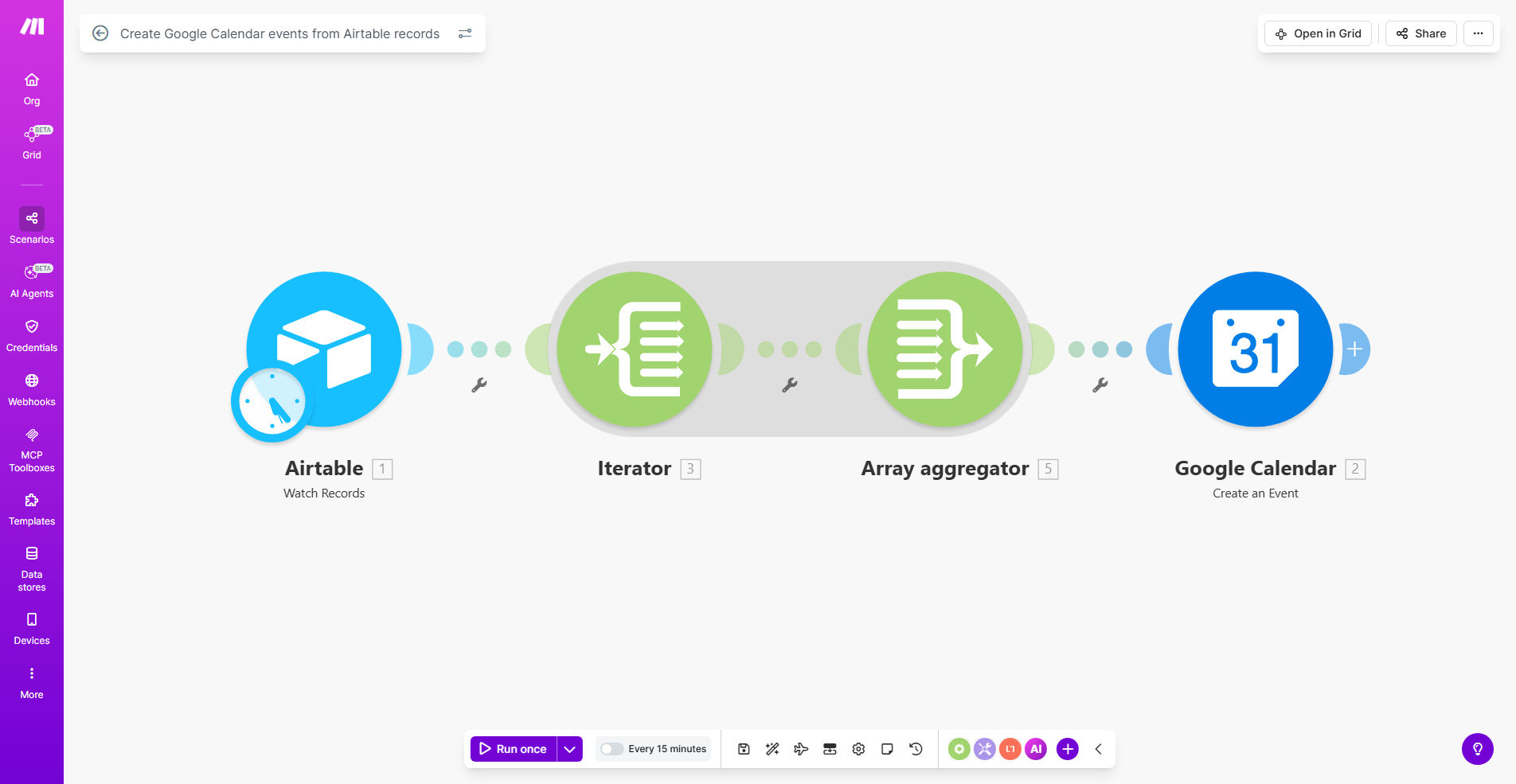
Visualization of Airtable records syncing to Google Calendar events

What This Workflow Does

This automation bridges the gap between your Airtable database and Google Calendar, transforming records into scheduled events automatically. It solves the common problem of manually transferring appointment details, meeting schedules, or project deadlines between these platforms - a time-consuming process prone to human error.

The workflow watches for new or updated records in your specified Airtable base, extracts relevant event details like titles, dates, times, and descriptions, then creates corresponding events in your Google Calendar. This ensures your team's schedule always reflects the most current information from your database.

How It Works

1. Airtable Trigger

The workflow monitors your specified Airtable base for new records or changes to existing records in your designated table. You can configure it to watch for specific types of changes or trigger on all modifications.

2. Data Extraction

When a change is detected, the workflow extracts relevant event fields from the Airtable record. This typically includes event title, description, start/end times, location, and attendee emails.

3. Google Calendar Event Creation

The workflow authenticates with your Google account and creates a new calendar event using the extracted Airtable data. It can assign the event to a specific calendar in your Google account.

4. Status Updates

Optionally, the workflow can update the original Airtable record with the Google Calendar event ID or status confirmation, creating a two-way reference between the systems.

Pro tip: Add a "Calendar Event ID" field in your Airtable to track which records have been synced and enable updates to existing calendar events.

Who This Is For

This automation is ideal for:

  • Consulting firms managing client appointments
  • Event planners coordinating multiple schedules
  • Project managers tracking deadlines and milestones
  • Sales teams scheduling customer meetings
  • Educational institutions managing class schedules
  • Any team using Airtable as their source of truth for time-based activities

What You'll Need

  1. An Airtable account with a base containing your event data
  2. A Google account with Calendar access
  3. A Make.com account (free tier available)
  4. Basic understanding of Airtable field structure
  5. Clear mapping of which Airtable fields correspond to calendar event properties

Quick Setup Guide

  1. Copy the template to your Make.com account
  2. Connect your Airtable account and select your base/table
  3. Connect your Google account and choose the target calendar
  4. Map Airtable fields to Google Calendar event properties
  5. Test with sample records to verify the event creation
  6. Activate the scenario to begin automatic syncing

Key Benefits

Eliminate double data entry by automatically creating calendar events from your Airtable records, saving 5-10 minutes per event that would otherwise be spent copying information between systems.

Reduce scheduling errors by removing manual transcription mistakes that often occur when transferring dates, times, and details between platforms.

Keep teams aligned by ensuring everyone sees the same schedule information in Google Calendar that's maintained in your central Airtable database.

Scale your scheduling to handle hundreds of events without additional administrative work, perfect for businesses experiencing growth.

Maintain data integrity by using Airtable as your single source of truth while still leveraging Google Calendar's superior scheduling interface.

Frequently Asked Questions

Common questions about Airtable to Google Calendar automation and integration

Syncing Airtable with Google Calendar eliminates manual data entry, reduces scheduling errors, and ensures your team always has up-to-date event information. This integration is particularly valuable for businesses managing multiple appointments, client meetings, or project deadlines across different platforms.

For example, a real estate agency can automatically create showing appointments in their agents' calendars directly from their Airtable CRM, ensuring no double-booking occurs and all team members see the latest schedule changes instantly.

You can create any calendar event type supported by Google Calendar, including meetings, appointments, reminders, and all-day events. The workflow maps Airtable fields like event title, description, start/end times, attendees, and location directly to corresponding Google Calendar event fields.

Advanced configurations can even handle recurring events by interpreting recurrence patterns stored in Airtable fields and translating them to Google Calendar's recurrence syntax.

The sync frequency depends on your workflow configuration. You can set it to trigger instantly when records change in Airtable, or run on a schedule (hourly, daily, etc.). Real-time syncing is ideal for frequently updated calendars, while scheduled syncs work well for less time-sensitive events.

For most business applications, instant syncing provides the best user experience, ensuring calendar updates appear within seconds of Airtable record changes.

Yes, advanced configurations can update existing calendar events when their corresponding Airtable records are modified, or delete events when records are removed. This requires additional workflow logic to track event IDs and handle different change scenarios.

To implement this, you'll need to store the Google Calendar event ID in your Airtable record when the event is first created, then reference this ID for subsequent updates or deletions.

  • Store Google Event IDs in a dedicated Airtable field
  • Create separate workflow paths for new vs. updated records
  • Implement error handling for deleted/moved events

The workflow processes changes sequentially, so the most recent update will determine the calendar event state. For critical applications, consider implementing record locking in Airtable or adding conflict resolution logic to your automation workflow.

In high-collaboration environments, you might add a "Last Updated By" field in Airtable and configure the workflow to notify team members when important scheduling changes occur.

Absolutely. You can configure separate workflows for different Airtable bases or tables, each mapping to specific Google Calendars. This is useful for departments or teams that need to maintain separate calendars while using a shared Airtable workspace.

For instance, a marketing team might sync their campaign timeline table to a marketing calendar, while the sales team syncs their meeting records to a sales calendar - all from the same Airtable workspace but with different destination calendars.

Yes, GrowwStacks specializes in building tailored automation solutions. Our team can create a custom workflow that matches your specific Airtable structure, calendar requirements, and business processes, including advanced features like attendee management, recurring events, and conflict detection.

We've helped numerous clients implement sophisticated calendar integrations that handle complex scenarios like resource booking, multi-timezone scheduling, and conditional event creation based on business rules.

  • Custom field mapping for your unique Airtable structure
  • Advanced error handling and notifications
  • Integration with additional apps like Slack or email

Need a Custom Airtable to Google Calendar Automation?

This free template is a starting point. Our team builds fully tailored automation systems for your specific business needs.