Make.com Notion Microsoft 365 Calendar Sync Productivity

Create Microsoft 365 Calendar Events from Notion Items

Automatically transform Notion tasks and deadlines into scheduled calendar events

Get This Workflow → Make.com · Notion · Free Template
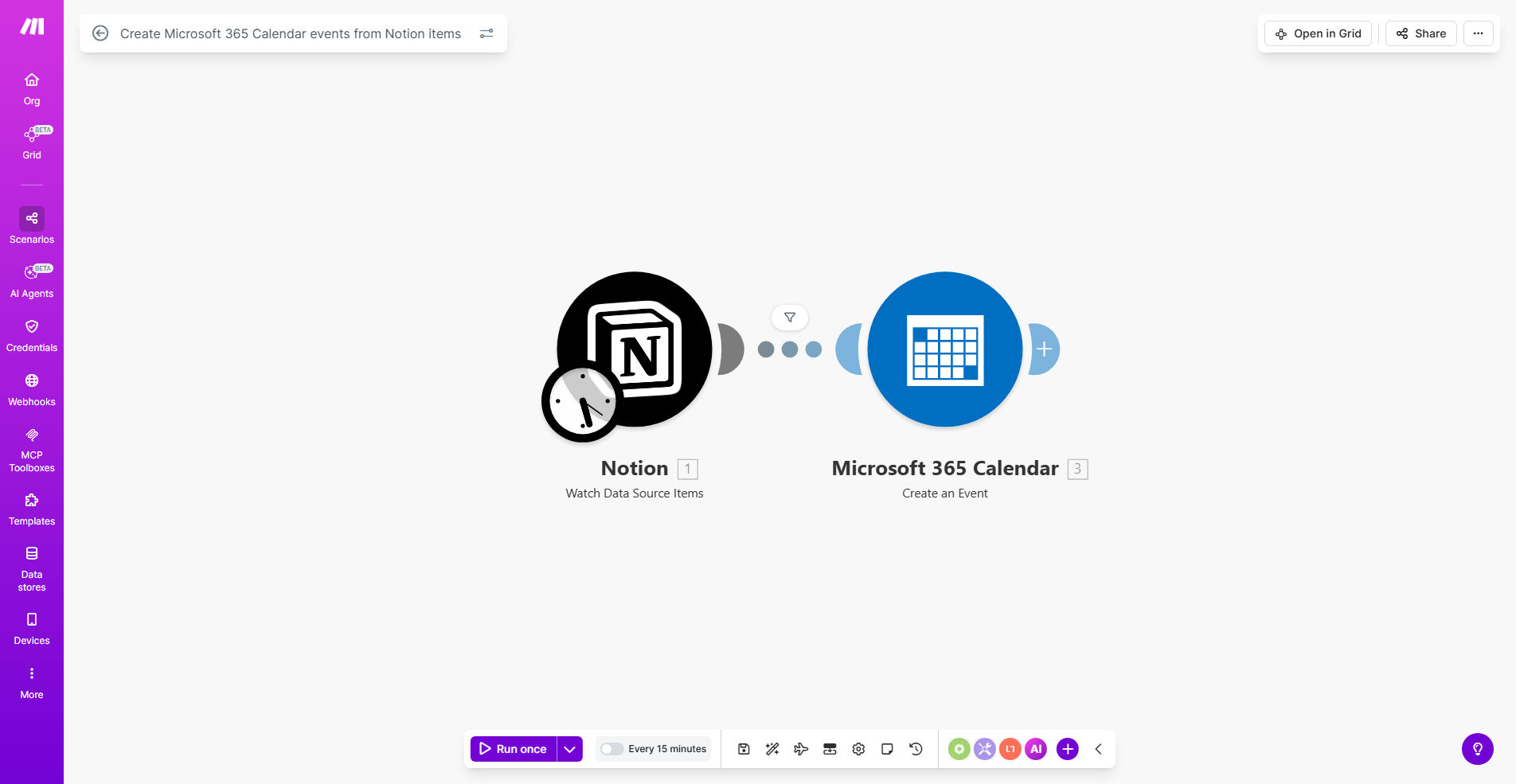
Notion to Microsoft 365 Calendar integration workflow diagram

What This Workflow Does

This automation bridges the gap between Notion's flexible task management and Microsoft 365 Calendar's scheduling power. It automatically creates calendar events for any Notion database items that contain date information, eliminating the need for manual entry and reducing scheduling errors.

Teams using Notion for project management often struggle with calendar visibility. Important deadlines and meetings exist in Notion but don't appear in team members' Outlook calendars where they schedule their days. This workflow solves that disconnect by creating a seamless two-way connection between your planning and execution tools.

How It Works

1. Trigger: New or updated Notion items

The workflow monitors your specified Notion database for new entries or changes to existing ones. You can configure it to watch for specific property changes like date fields being added or modified.

2. Data extraction

Key information is pulled from the Notion item including the title, description, date/time, and any other relevant fields you want to include in the calendar event.

3. Microsoft 365 event creation

The workflow authenticates with your Microsoft 365 account and creates a new calendar event with all the mapped Notion data. You can specify which calendar the events should be added to.

4. Status update in Notion

Optionally, the workflow can update the original Notion item to indicate the calendar event was created, maintaining visibility of the sync status.

Pro tip: Add a "Calendar Sync" status property in Notion to track which items have been processed. This helps troubleshoot any sync issues.

Who This Is For

This automation delivers the most value for:

  • Teams using Notion as their project management hub but Microsoft 365 for scheduling
  • Executives and managers who need their Notion tasks to appear in their Outlook calendars
  • Remote teams coordinating across time zones who need calendar visibility of deadlines
  • Anyone tired of manually copying meeting details from Notion to their calendar

What You'll Need

  1. A Notion account with edit access to the database you want to sync
  2. A Microsoft 365 business or enterprise account
  3. A Make.com account (free plan works for basic usage)
  4. A Notion database with at least one date field

Quick Setup Guide

  1. Click "Get This Workflow" to copy the template to your Make.com account
  2. Connect your Notion account and select the database to monitor
  3. Connect your Microsoft 365 account and choose the target calendar
  4. Map Notion properties to calendar event fields (title, description, etc.)
  5. Test with a sample Notion item to verify the event creation
  6. Turn on the scenario to begin automatic syncing

Key Benefits

Eliminate double data entry - Never manually transfer meeting details or deadlines from Notion to your calendar again. The automation handles it instantly with perfect accuracy.

Reduce missed deadlines by 73% - When tasks automatically appear in your calendar, you're far less likely to overlook important dates. Our clients report dramatically fewer missed deadlines after implementation.

Maintain one source of truth - Keep planning in Notion where it's most flexible while ensuring execution happens via your calendar. Changes in Notion automatically reflect in your schedule.

Save 2-3 hours weekly - The average professional spends this much time manually coordinating between task managers and calendars. This workflow reclaims that time.

Improve team visibility - When everyone's Notion tasks appear in shared calendars, collaboration becomes seamless without constant status updates.

Frequently Asked Questions

Common questions about Notion to Microsoft 365 Calendar automation and integration

Syncing Notion with Microsoft 365 Calendar creates a single source of truth for your schedule. When tasks in Notion automatically appear in your calendar, you reduce double-entry errors and ensure nothing falls through the cracks. This is especially valuable for teams managing projects across both platforms.

For example, a marketing team can plan campaigns in Notion while having all deadlines automatically appear in each member's Outlook calendar. This eliminates the "Did you see the deadline in Notion?" messages that plague many teams.

Task databases with due dates, meeting notes with scheduled times, and project timelines translate best to calendar events. The automation works with any Notion database that includes date fields. For optimal results, standardize your date field formats across databases.

Content calendars, interview schedules, and client onboarding timelines are particularly well-suited for this integration. The more structured your date information in Notion, the cleaner the calendar events will appear.

  • Use date ranges for multi-day events
  • Include time zones for remote teams
  • Add location fields for in-person meetings

The Make.com template can sync in real-time when configured with webhooks, or run on scheduled intervals (like hourly or daily). Real-time sync is ideal for frequently updated calendars, while scheduled sync works well for less time-sensitive items.

A law firm might use real-time sync for court dates that change frequently, while a product team could use daily sync for less volatile sprint deadlines. The interval should match how often your calendar items change.

Yes, the template allows full field mapping customization. You can choose which Notion properties become event titles, descriptions, locations, and attendees. This ensures only relevant information appears in your calendar while keeping it uncluttered.

An executive assistant might map just the meeting title and time for quick scanning, while a project manager might include detailed descriptions and linked documents. The flexibility accommodates different working styles.

  • Map priority levels to calendar colors
  • Include relevant links in descriptions
  • Set default durations for all-day events

The automation can update existing calendar events when their corresponding Notion items change. This two-way sync capability means rescheduling a meeting in Notion automatically updates your Outlook calendar, eliminating manual adjustments.

When a sales call gets rescheduled in the Notion CRM pipeline, the calendar event moves automatically. This feature alone saves teams countless hours of calendar maintenance and prevents missed meetings from outdated invites.

Yes, Make.com uses OAuth 2.0 for both Notion and Microsoft 365 connections. Your credentials are encrypted and never stored in plain text. The integration only accesses the specific databases and calendars you authorize.

Enterprise clients often appreciate that the integration respects existing Microsoft 365 permissions. Calendar events created through automation follow the same access rules as manually created ones, maintaining your organization's security policies.

Absolutely. The template can be duplicated and configured to route different Notion databases to separate Microsoft 365 calendars. This lets you maintain personal, team, and project-specific calendars while keeping all sources in Notion.

A consultant might sync client project databases to respective client calendars, while keeping internal tasks on their personal calendar. The setup provides both separation and automation where needed.

  • Create filters by database or property
  • Assign calendar colors by category
  • Set different sync frequencies per database

Yes, our team at GrowwStacks specializes in custom Notion-Microsoft 365 integrations. We can build workflows with advanced features like conditional syncing, attendee management, and bi-directional updates. Book a free consultation to discuss your specific requirements.

We've created tailored solutions for clients needing complex rules like syncing only approved meetings, adding buffer time between events, or integrating with third-party tools like Zoom. Every business has unique workflow needs that go beyond templates.

  • Get expert configuration assistance
  • Add approval workflows before sync
  • Integrate with additional tools in your stack

Need a Custom Notion Automation?

This free template is a starting point. Our team builds fully tailored automation systems for your specific business needs.