Make.com Email Automation ChatGPT Google Sheets AI Assistant

Automate Email Responses with ChatGPT & Google Sheets

Transform your email workflow with AI-powered draft responses that save time while maintaining personalization

Get This Workflow → Make.com · Email Automation · Free Template
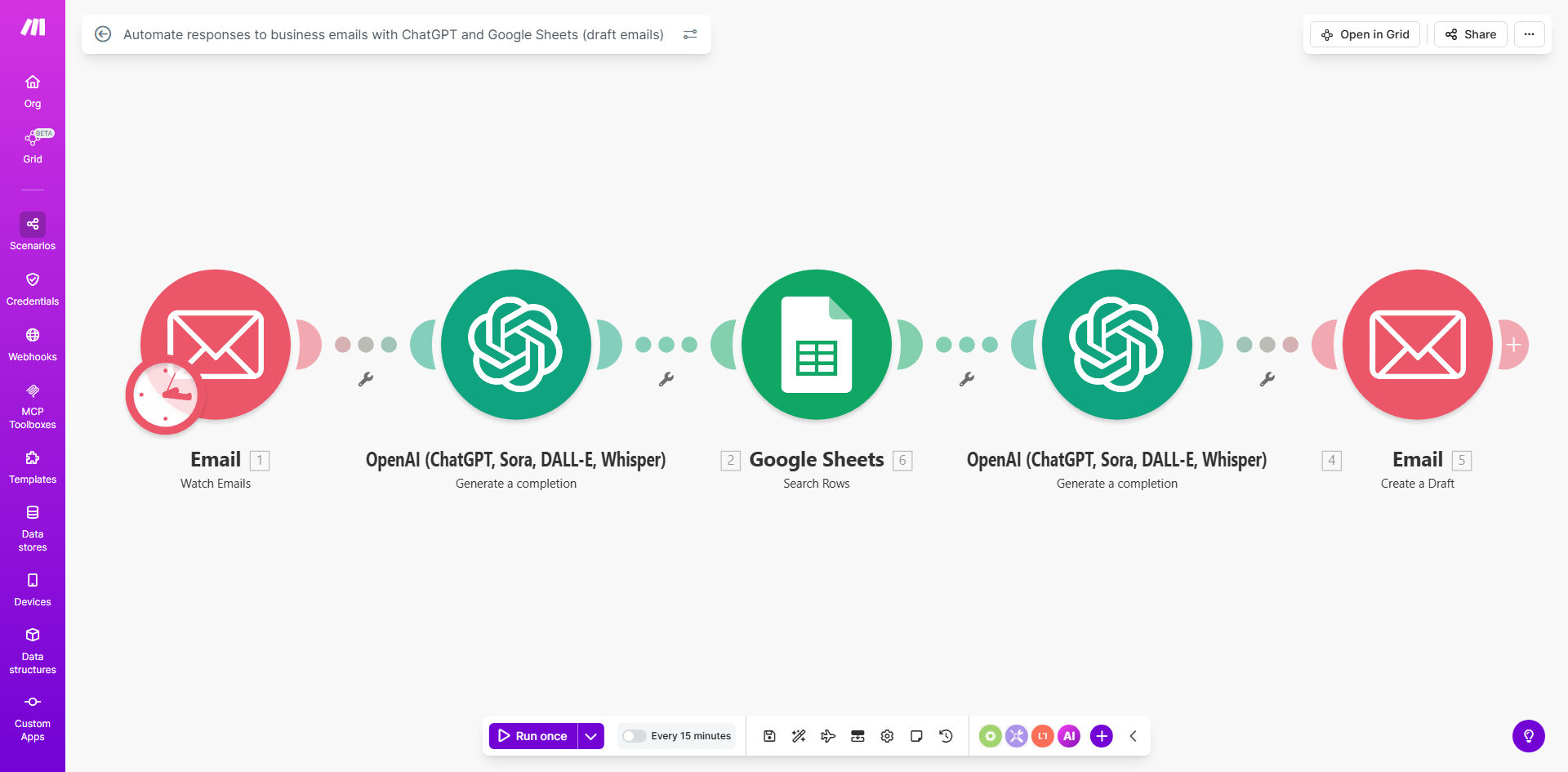
Diagram showing email automation workflow between Gmail, ChatGPT and Google Sheets

What This Workflow Does

This automation transforms how your business handles incoming emails by combining the power of ChatGPT with Google Sheets. The system automatically analyzes incoming messages, generates thoughtful draft responses using AI, and organizes them in a spreadsheet for review or direct sending.

For businesses receiving dozens or hundreds of similar inquiries daily, this workflow eliminates the repetitive task of crafting individual responses while maintaining personalization. Customer service teams, sales departments, and executive assistants can all benefit from having AI-powered draft replies ready in seconds rather than spending hours composing emails.

How It Works

1. Email Trigger

The workflow starts when a new email arrives in your designated inbox. Make.com monitors your Gmail account for new messages matching your criteria (specific senders, subjects, or keywords).

2. Content Analysis

The email content is extracted and prepared for ChatGPT. Important details like the sender's name, email subject, and key message points are identified to provide context for the AI.

3. AI Response Generation

ChatGPT processes the email content using your predefined instructions and templates. The AI considers your brand voice, common response patterns, and the specific inquiry to generate a professional draft reply.

4. Spreadsheet Organization

The generated response along with original email details are logged in Google Sheets. This creates a searchable record of all automated interactions and allows for easy review before sending.

5. Optional Approval Flow

Depending on your configuration, responses can be automatically sent or flagged for human review. The spreadsheet interface makes it easy to approve, edit, or reject AI-generated drafts.

Who This Is For

This workflow is ideal for:

  • Customer support teams handling high volumes of similar inquiries
  • Sales professionals managing lead follow-ups and information requests
  • Small business owners wearing multiple hats who need email assistance
  • Executive assistants managing busy inboxes for multiple stakeholders
  • Any team that spends more than 2 hours daily on email responses

What You'll Need

  1. A Make.com account (free tier available)
  2. Google Workspace account with Gmail and Sheets access
  3. OpenAI API access for ChatGPT integration
  4. List of common email scenarios you want to automate
  5. Sample responses for training the AI (optional but recommended)

Quick Setup Guide

  1. Connect your Gmail account to Make.com with appropriate permissions
  2. Set up your OpenAI API connection in Make.com
  3. Create a Google Sheet with columns for: Original Email, Generated Response, Status
  4. Configure your ChatGPT prompts with sample responses and tone guidelines
  5. Test with sample emails and refine your prompts based on results
  6. Set up filters to determine which emails should trigger automation
  7. Decide whether to implement manual review or direct sending

Pro tip: Start by automating responses to your 3-5 most common email types before expanding. This lets you refine the system with focused feedback.

Key Benefits

Reduce email response time from hours to minutes by having AI draft replies instantly while maintaining your brand voice and personalization.

Cut email handling costs by 40-60% as your team spends less time on routine responses and more on high-value interactions.

Improve response consistency across your organization with AI-generated drafts that follow your best practices and templates.

Create searchable records of all customer interactions in Google Sheets for easy reference and analytics.

Scale your team's capacity without adding headcount by automating the repetitive parts of email communication.

Frequently Asked Questions

Common questions about email automation and AI integration

AI-powered email automation can reduce response times from hours to minutes by instantly generating draft replies based on incoming messages. ChatGPT analyzes email content and context to create professional, personalized responses that maintain your brand voice while saving your team valuable time.

For example, a customer service team handling 100+ daily inquiries can cut average first response time from 4 hours to 15 minutes while maintaining quality. The AI drafts replies instantly, allowing agents to focus on reviewing rather than composing each message from scratch.

Common inquiries, support requests, and frequently asked questions are ideal for AI automation. The system works particularly well for standardized responses where personalization is still important, such as pricing inquiries, appointment scheduling, or basic customer service queries.

Complex or emotionally charged communications may still require human handling, but even these can benefit from AI-generated draft responses that include key information points while leaving the final tone and details to your team.

Modern AI like ChatGPT achieves 85-90% accuracy for common business email scenarios when properly configured. The system improves with feedback and can be trained on your specific response templates and brand guidelines for even better results.

We recommend starting with a review process where humans approve all AI-generated responses before sending. As you refine your prompts and the system learns from your edits, you can gradually increase automation levels based on proven accuracy in your specific use cases.

Yes, most AI email automation systems can connect with popular CRMs through APIs or services like Make.com. This allows the system to access customer history and context while logging all automated interactions in your existing customer records.

For example, when responding to a support ticket, the AI can reference past interactions from your CRM to provide more informed responses. All new communications are automatically logged against the correct customer profile for complete visibility.

Businesses typically save 5-7 hours per employee per week by automating routine email responses. For teams handling high volumes of similar inquiries, the time savings can be even more significant while maintaining response quality.

A real estate agency we worked with reduced email handling time by 65% after implementing AI automation for property inquiries. Their agents went from spending 3 hours daily on emails to under 1 hour, with better response consistency across the team.

Provide ChatGPT with your brand guidelines, tone examples, and approved response templates. The system can then generate drafts that match your style. All automated responses should still be reviewed before sending until you're confident in the results.

We recommend creating a "brand voice guide" document that includes sample communications, preferred phrasing, and any terminology to avoid. Feed this into your AI configuration along with examples of your best past email responses for optimal alignment.

Absolutely. GrowwStacks specializes in building tailored email automation systems that integrate with your specific tools and workflows. We'll configure ChatGPT prompts based on your most common email scenarios and train the system on your actual communications.

Our team handles everything from initial setup to ongoing optimization, ensuring the automation delivers maximum value for your unique business needs. We can integrate with your CRM, help desk software, or any other systems you use to manage customer communications.

  • Custom-trained AI models for your industry
  • Seamless integration with your existing tech stack
  • Ongoing performance monitoring and refinement

Need a Custom Email Automation?

This free template is a starting point. Our team builds fully tailored automation systems for your specific business needs.