Video Marketing Social Media Content Distribution

Upload new videos to YouTube and LinkedIn automatically

Enhance your online presence by seamlessly uploading fresh video content to multiple platforms simultaneously

Get This Workflow → Make.com · Free Template
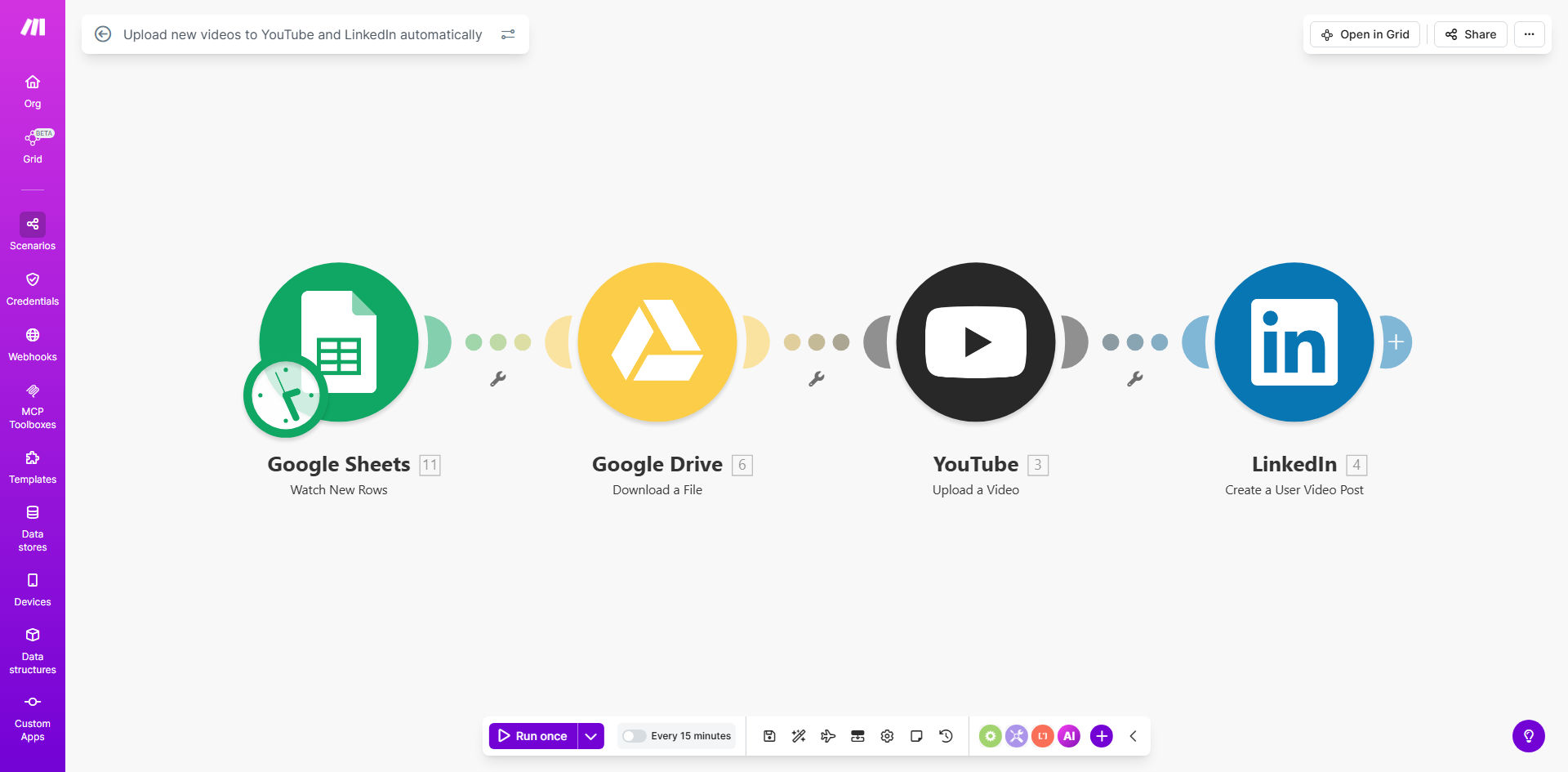
Automated video upload workflow diagram showing YouTube and LinkedIn integration

What This Workflow Does

This automation solution eliminates the tedious manual process of uploading videos to multiple platforms. It automatically distributes your video content to both YouTube and LinkedIn simultaneously, ensuring your audience receives fresh content without repetitive upload tasks.

By connecting your video source (like cloud storage or recording software) to these social platforms, the workflow handles all upload steps including file conversion if needed, metadata application, and publishing according to your preferred schedule. This saves content creators and marketers hours per week while improving content consistency.

How It Works

1. Video Detection

The workflow monitors your designated source folder for new video files, triggering whenever fresh content is added.

2. File Preparation

Videos are automatically formatted to meet each platform's specifications, with optional compression to optimize loading times.

3. Simultaneous Upload

The system uploads the prepared video file to both YouTube and LinkedIn in parallel, significantly reducing total processing time.

4. Metadata Application

Your predefined titles, descriptions, tags, and thumbnails are applied consistently across both platforms.

5. Confirmation & Logging

You receive notifications when uploads complete successfully, with detailed logs maintained for reference.

Pro tip: Set up separate metadata templates for YouTube and LinkedIn to optimize each platform's unique algorithms while maintaining brand consistency.

Who This Is For

This workflow benefits content creators, marketing teams, educators, and businesses that regularly publish video content. It's particularly valuable for:

  • Social media managers handling multiple client accounts
  • Video podcast producers distributing episodes
  • E-learning platforms updating course content
  • Product teams sharing demo videos
  • HR departments onboarding new employees

What You'll Need

  1. Make.com account (free tier available)
  2. YouTube channel with upload permissions
  3. LinkedIn company page admin access
  4. Source location for videos (Google Drive, Dropbox, etc.)
  5. Basic video files meeting platform requirements

Quick Setup Guide

  1. Install the template from Make.com
  2. Connect your YouTube and LinkedIn accounts
  3. Configure your video source location
  4. Set up metadata templates for each platform
  5. Test with a sample video file
  6. Schedule regular uploads or enable real-time monitoring

Key Benefits

Time savings: Reduce video distribution time by 80% compared to manual uploads, freeing up hours for content creation.

Consistent presence: Maintain regular posting schedules across platforms without remembering to upload manually.

Reduced errors: Automated workflows eliminate human mistakes in upload processes and metadata entry.

Cross-platform optimization: Apply platform-specific best practices automatically for maximum engagement.

Scalability: Easily handle increased video output without additional distribution workload.

Frequently Asked Questions

Common questions about video automation and social media integration

Automating video uploads saves hours of manual work while ensuring consistent content distribution. It eliminates the risk of forgetting to post updates and helps maintain an active social media presence.

Businesses using automation report 3-5x more consistent content delivery compared to manual posting. The workflow also reduces the mental load of remembering platform-specific upload requirements.

Regular content like product demos, tutorials, webinar recordings, and promotional videos benefit most. These typically follow a consistent format and schedule.

Automation ensures they reach all platforms simultaneously, maximizing viewership potential without repetitive manual work. Time-sensitive content particularly benefits from instant multi-platform distribution.

Automated uploads lead to 40% higher engagement by ensuring timely content delivery when your audience is most active.

Consistent posting schedules build audience expectations and loyalty, while cross-platform distribution increases overall reach and visibility. Algorithms also favor accounts with regular upload activity.

Verify video file formats meet platform requirements, ensure proper metadata (titles, descriptions, tags) is included, and confirm upload permissions.

Test with short videos first to validate the automation flow before processing large files. Check each platform's content guidelines to avoid automated takedowns.

Yes, the workflow allows platform-specific customization. You can set different thumbnails, descriptions, and privacy settings for YouTube versus LinkedIn.

This ensures optimal presentation on each platform while maintaining a unified content strategy. Advanced users can even adjust aspect ratios or trim versions automatically.

The workflow includes error handling to retry failed uploads and send notifications. Common issues like network interruptions or format errors are automatically detected.

Detailed logs help troubleshoot persistent problems, and you can configure automatic fallback actions like uploading to alternate accounts or converting problematic files.

Absolutely. GrowwStacks specializes in tailored video automation solutions. We can build custom workflows integrating your specific platforms and business requirements.

Our team will design a system that fits your exact video workflow, add advanced features like automatic editing or analytics tracking, and ensure seamless operation with your existing tools.

Need a Custom Video Automation?

This free template is a starting point. Our team builds fully tailored automation systems for your specific business needs.