YouTube Analytics Google Sheets Content Tracking

Organize Your YouTube Video Database with Google Sheets

Automatically track and analyze your YouTube content in a searchable spreadsheet

Get This Workflow → Make.com · Free Template
YouTube video analytics dashboard in Google Sheets

What This Workflow Does

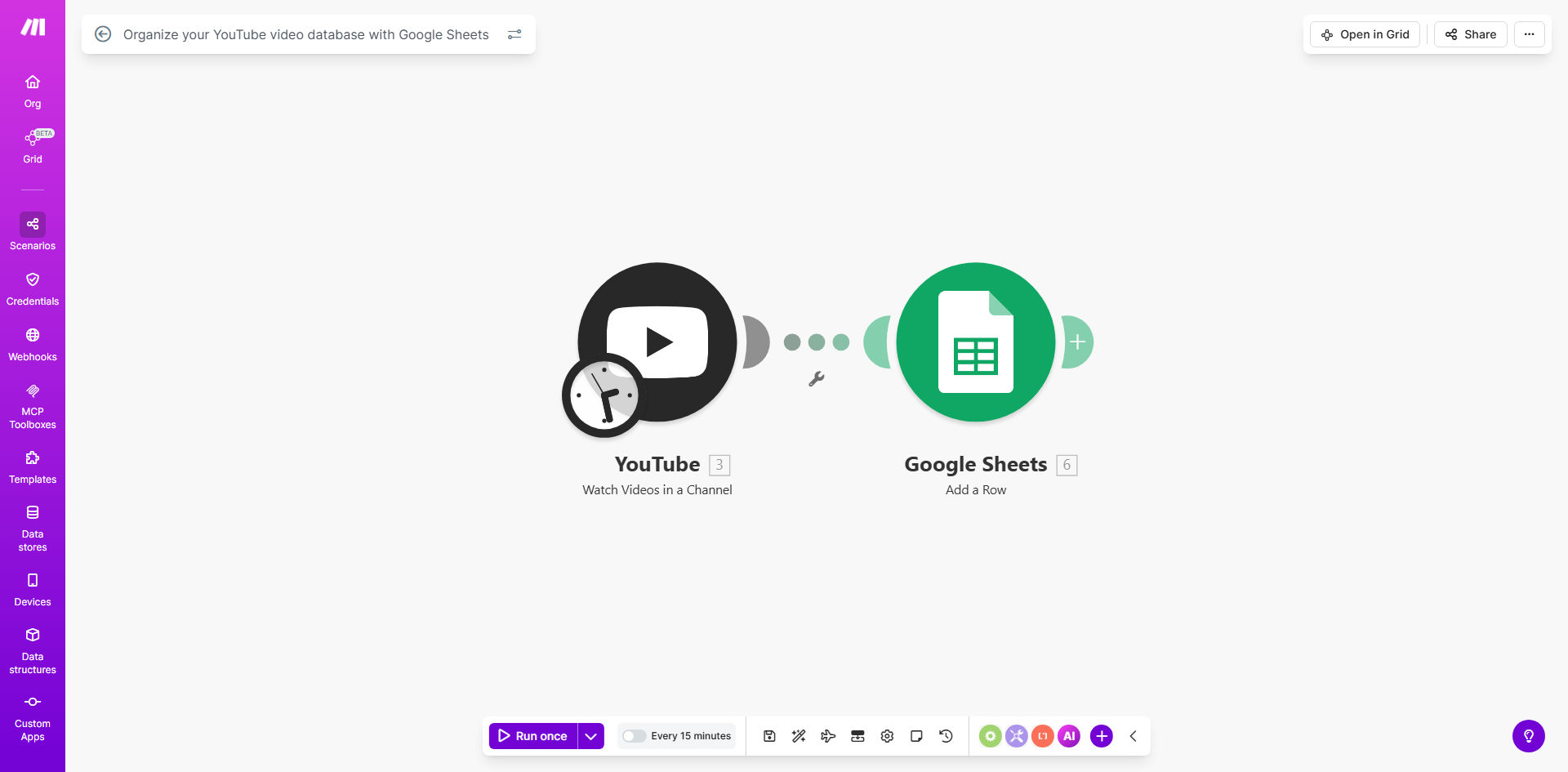
This automation creates a centralized database of your YouTube videos in Google Sheets, automatically updating with the latest metrics. Instead of manually checking YouTube Studio or exporting CSV files, you'll have all your video data organized in a searchable, filterable spreadsheet that updates itself.

The template captures key metrics like views, watch time, engagement rates, and subscriber changes over time. Content creators and marketers use this to identify trends, compare video performance, and make data-driven decisions about future content.

How It Works

1. Connects to YouTube API

The workflow authenticates with your YouTube account to access your channel's video data through the official API.

2. Extracts Video Metrics

For each video, it pulls the title, description, publish date, thumbnail URL, and performance metrics like views, likes, and comments.

3. Organizes in Google Sheets

The data gets structured into logical columns with timestamps, allowing you to sort, filter, and create pivot tables.

4. Scheduled Updates

The automation runs on a schedule (daily by default) to keep your database current without manual effort.

Who This Is For

This solution benefits YouTube creators, video marketers, and agencies who need better visibility into their content performance. It's especially valuable for:

  • Creators with 50+ videos who struggle to track performance trends
  • Marketing teams managing multiple YouTube channels
  • Agencies reporting on client video performance
  • Content strategists planning future videos based on data

What You'll Need

  1. A YouTube channel with uploaded videos
  2. A Google account (for Sheets)
  3. A Make.com account (free tier available)
  4. 10 minutes to set up the template

Pro tip: Add a "Content Type" column to categorize videos (tutorial, review, vlog etc.) for more insightful analysis.

Key Benefits

Save 5+ hours monthly by eliminating manual data entry and exports from YouTube Studio.

Spot content trends faster with all your video data in one searchable location instead of scattered across YouTube's interface.

Improve decision making by comparing performance across different video types, lengths, or publishing times.

Create custom reports using Sheets' built-in charts and formulas without coding.

Frequently Asked Questions

Common questions about YouTube analytics automation

Google Sheets provides a flexible, searchable database for your YouTube content that's easier to analyze than YouTube Studio. You can track metrics over time, categorize videos, and create custom reports without coding.

Many creators use this to identify top-performing content and plan future videos based on data. Unlike YouTube's interface, Sheets lets you add custom columns for notes, tags, or business-specific categorization.

The template captures standard metrics like views, watch time, likes/dislikes, comments, and subscriber changes. It also records publication dates, durations, and thumbnails for visual reference.

Advanced users can extend it to track audience retention, traffic sources, or revenue data by connecting additional YouTube API endpoints through Make.com's visual builder.

The template updates your spreadsheet daily by default, which balances freshness with YouTube API quota limits. You can adjust the schedule to weekly for smaller channels or more frequently for active creators.

Real-time updates are possible but may require managing API quotas carefully. Most creators find daily updates provide sufficient data granularity for analysis.

Yes, Google Sheets enables secure collaboration with customizable permissions. You can grant view-only access to stakeholders or edit rights to team members who need to add notes or categorization.

This is particularly valuable for agencies managing client channels or creators working with editors, as everyone references the same updated data.

The template can be modified to aggregate data from multiple YouTube channels into separate tabs or a master view. Each channel requires its own API authentication but can feed into the same spreadsheet.

This setup helps multi-channel networks and agencies compare performance across different brands or clients while maintaining organized, channel-specific data.

Google Sheets uses enterprise-grade security including encryption in transit and at rest. The YouTube API connection employs OAuth 2.0 authentication without storing passwords.

For sensitive data, we recommend enabling two-factor authentication on your Google account and carefully managing sheet sharing permissions. The automation only requests necessary read-only access to your YouTube analytics.

Absolutely. Our team specializes in custom YouTube analytics solutions that go beyond this template. We can build dashboards with competitor comparisons, content planning features, or advanced metrics tailored to your specific needs.

Book a free consultation to discuss adding custom calculations, automated reports, or integration with other business systems like CRM or email marketing platforms.

Need Custom YouTube Analytics?

This free template is a starting point. Our team builds fully tailored automation systems for your specific business needs.