Make.com Nonprofit Tech Gmail Integration CRM Automation Email Management

Log emails to Access Charity CRM from new emails in Gmail

Automatically transfer donor communications from Gmail to your charity CRM with all attachments

Get This Workflow → Make.com · Nonprofit · Free Template
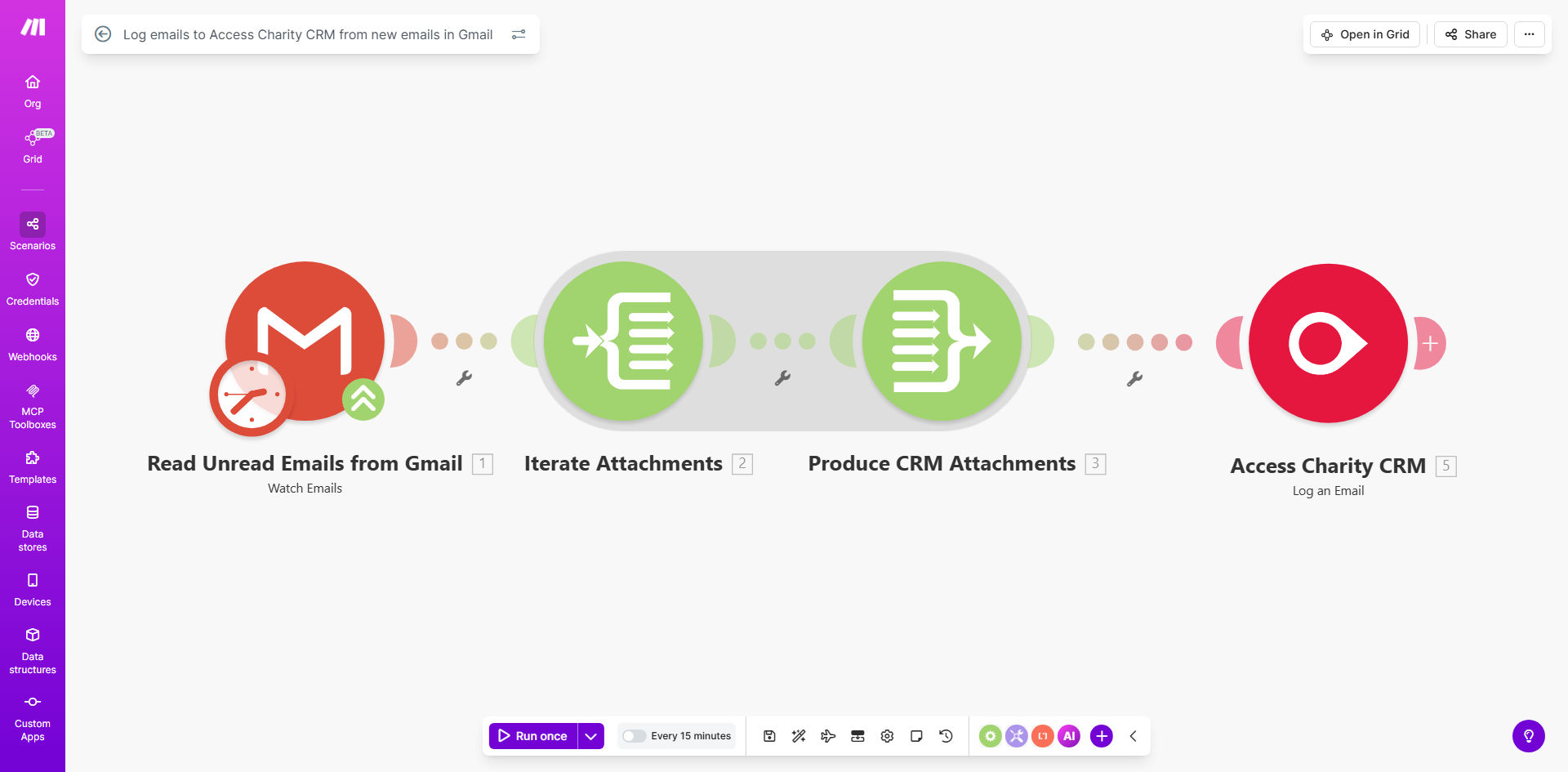
Workflow diagram showing Gmail emails being logged to Access Charity CRM

What This Workflow Does

This automation solves a critical challenge for nonprofit organizations - efficiently capturing donor communications in their CRM system. Many charities rely on Gmail for daily correspondence but need these interactions properly logged in Access Charity CRM for donor management, reporting, and compliance.

The workflow automatically checks for new Gmail messages at regular intervals (default every 15 minutes), extracts all relevant information including attachments, and creates corresponding records in Access Charity CRM. This eliminates manual data entry while ensuring no important donor communication falls through the cracks.

How It Works

1. Scheduled email checking

The workflow begins by checking your Gmail account for new messages based on your specified schedule. You can adjust the frequency from real-time to daily checks depending on your volume.

2. Email content extraction

For each new email, the system retrieves the sender details, subject line, body content, timestamps, and any attachments. This data is structured for CRM import.

3. CRM record creation

The workflow then creates a new record in Access Charity CRM, mapping all email fields to the appropriate CRM fields. Attachments are uploaded and linked to the contact record.

Pro tip: Add a filtering step to only process emails from known donor domains or with specific subject keywords to avoid cluttering your CRM with irrelevant messages.

Who This Is For

This automation is ideal for nonprofit organizations using Access Charity CRM that:

  • Receive high volumes of donor emails that need tracking
  • Struggle with manual data entry backlogs
  • Need to maintain complete communication histories for major donors
  • Require attachment storage with donor records
  • Have compliance needs for communication tracking

What You'll Need

  1. A Gmail account with emails you want to log
  2. Access Charity CRM account with API access
  3. Make.com account (free tier available)
  4. Basic understanding of your CRM's contact record structure

Quick Setup Guide

  1. Copy the template to your Make.com account
  2. Connect your Gmail account in the first module
  3. Configure your Access Charity CRM API connection
  4. Map email fields to your CRM contact record fields
  5. Test with sample emails to verify the data flow
  6. Adjust the schedule frequency as needed

Key Benefits

Save 5-10 hours weekly by eliminating manual email logging. Staff can focus on donor relationships instead of data entry.

Never miss a donor communication with automated capture of all emails and attachments, creating complete interaction histories.

Improve data accuracy by removing human error from manual transcription of email details.

Enhance compliance with automatic documentation of all donor communications for auditing purposes.

Enable better reporting with standardized email data in your CRM for analyzing donor engagement.

Frequently Asked Questions

Common questions about charity CRM email automation

Automating email logging saves significant staff time while ensuring no donor communications are missed. Manual entry is error-prone and time-consuming, especially when handling attachments. Automation creates consistent records with all relevant details captured automatically.

For example, a mid-sized charity processing 200 donor emails weekly could save 15-20 hours of staff time monthly while improving data quality. The system also works after hours, capturing time-sensitive communications immediately.

The default 15-minute sync interval balances responsiveness with system load. For high-volume email accounts, consider hourly syncs. Critical donor communications may warrant real-time triggers through Gmail filters labeling important messages.

Factors to consider when setting frequency include email volume, donor expectations, and staff capacity to follow up. More frequent syncs provide quicker visibility but increase API calls.

The workflow captures sender details, subject line, body content, timestamps, and all attachments. You can customize which fields map to your CRM contact records. Attachments are particularly valuable for storing donation confirmations or grant applications.

Typical mapping includes sender email to contact record, subject to communication type, and body to notes. The system preserves the original email structure while fitting your CRM's data model.

Yes, you can add filtering logic to only process emails matching specific criteria like sender domains, subject keywords, or labels. This prevents cluttering your CRM with irrelevant messages while ensuring important communications are captured.

Common filters include whitelisting donor email domains, excluding automated receipts, or flagging emails containing donation-related terms. The workflow can apply multiple conditions to precisely target relevant messages.

Centralizing email communications creates complete donor histories, enabling better relationship management. Fundraising teams can track all interactions, reference past conversations, and maintain continuity even when staff changes occur. Automated logging also supports compliance with data retention policies.

When all communications are automatically recorded, donor officers have full context for each interaction. This leads to more personalized engagement and prevents duplicate or conflicting communications from different team members.

The workflow can include data transformation steps like extracting key details from email bodies, normalizing formats, or enriching contact information. Common modifications include parsing donation amounts from emails or tagging communications by campaign.

For instance, you could automatically extract pledge amounts from email signatures or apply campaign codes based on subject line patterns. These transformations happen before the data reaches your CRM.

  • Parse donation amounts from email text
  • Normalize phone number formats
  • Tag communications by fundraising campaign

Absolutely. GrowwStacks specializes in tailored nonprofit automation solutions. We can build workflows matching your specific CRM fields, approval processes, and reporting needs while integrating with your existing donor management systems.

Our team will analyze your current processes, identify automation opportunities, and implement solutions that save time while improving data quality. We handle everything from initial consultation to ongoing support.

  • Custom field mapping for your CRM
  • Advanced filtering logic
  • Donor segmentation automation

Need a Custom Charity Email Automation?

This free template is a starting point. Our team builds fully tailored automation systems for your specific business needs.