Access Control SaaS Security Webhooks Make.com

Access Control to an Add-on App

Automate permission validation for apps and add-ons with secure webhook triggers

Get This Workflow → Make.com · Free Template
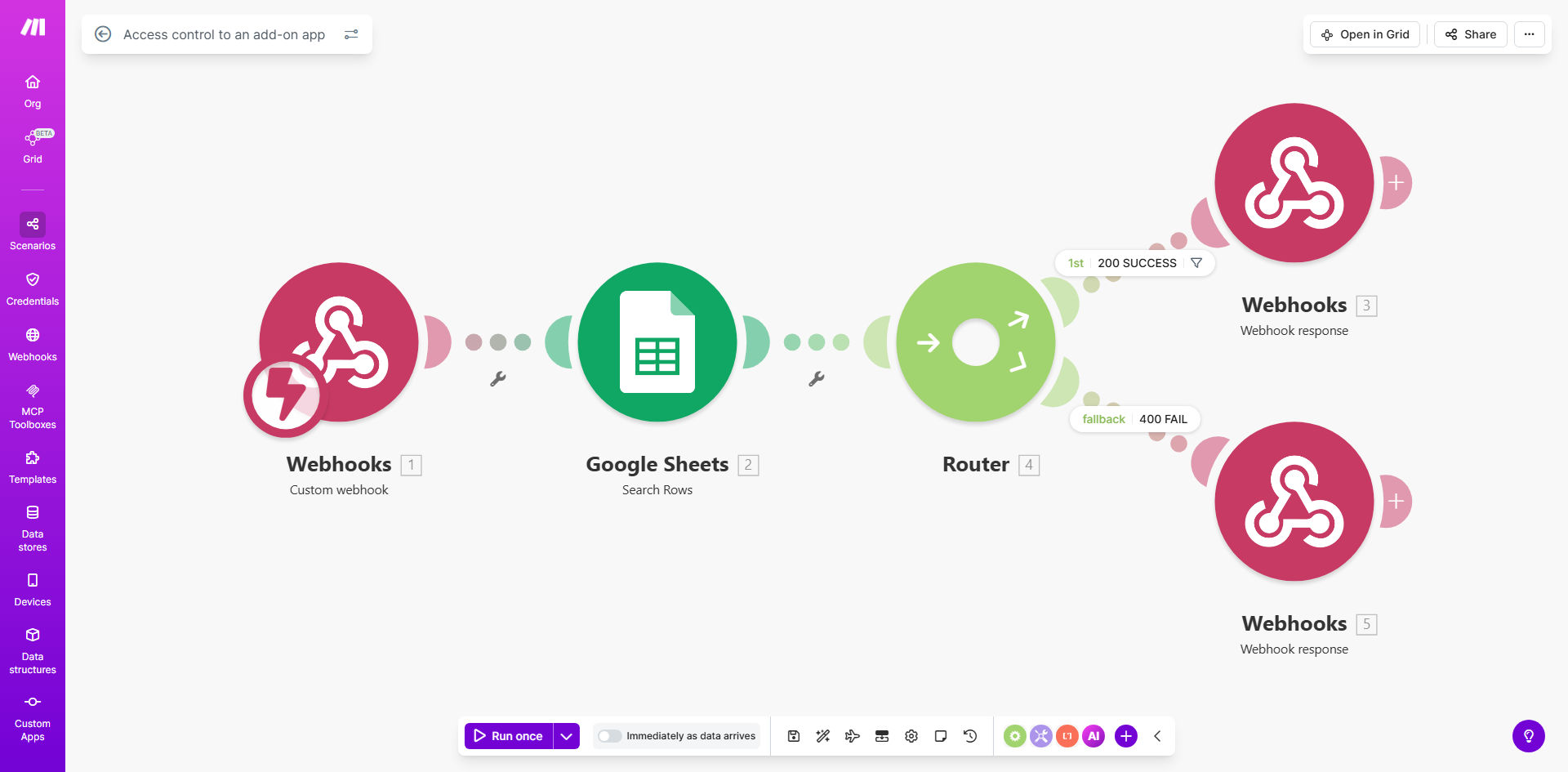
Make.com workflow diagram showing access control validation process

What This Workflow Does

This automation solution provides instant access control validation for your SaaS applications and add-ons. When users attempt to access premium features or restricted content, the system automatically verifies their permissions through secure webhook triggers.

The workflow eliminates manual permission checks while maintaining strict security standards. It returns real-time access decisions that integrate seamlessly with your application's user interface, creating a frictionless experience for legitimate users while blocking unauthorized access attempts.

How It Works

1. Access Attempt Trigger

Your application sends a webhook request containing user credentials when access to a protected resource is attempted.

2. Permission Validation

The workflow checks the user's credentials against your permission database or directory service.

3. Access Decision

The system returns an immediate response indicating whether access should be granted or denied.

4. Action Execution

Your application processes the response - either granting access, showing an error, or redirecting as configured.

Pro tip: Combine this with user activity logging to create comprehensive audit trails for compliance requirements.

Who This Is For

This solution benefits SaaS companies, app developers, and digital product teams who need to:

  • Manage tiered access to premium features
  • Control add-on module permissions
  • Enforce role-based access controls
  • Maintain compliance with security standards
  • Reduce manual permission management overhead

What You'll Need

  1. A Make.com account (free or paid)
  2. Your application capable of sending webhook requests
  3. User directory or permission database (Active Directory, custom DB, etc.)
  4. HTTPS endpoint for receiving access decisions

Key Benefits

Enhanced Security: Automated checks eliminate human error in permission assignments and provide instant revocation capabilities.

Reduced IT Workload: Cuts permission management time by 60-80% compared to manual systems.

Seamless User Experience: Legitimate users access features instantly without additional authentication steps.

Compliance Ready: Built-in logging creates audit trails for security standards like SOC 2 or ISO 27001.

Flexible Integration: Works with existing identity providers and custom permission structures.

Frequently Asked Questions

Common questions about access control automation

Access control ensures only authorized users can access specific app features or data. Without proper controls, businesses risk data breaches, compliance violations, and unauthorized usage.

Automated access validation helps maintain security while reducing manual permission management overhead. For example, a healthcare app might use this to ensure only licensed practitioners can access patient records.

Webhooks trigger instant permission checks when users attempt actions. The system validates credentials against your user database and returns access decisions in real-time.

This creates seamless security without requiring users to manually authenticate for every action. The entire process typically completes in under 500ms, making it invisible to legitimate users.

Automated access control reduces IT workload by 60-80% compared to manual systems. It eliminates human error in permission assignments while providing comprehensive audit capabilities.

One client reduced permission-related support tickets by 90% after implementation. The system also enables instant permission revocation when employees change roles or leave the company.

Yes, the workflow can connect to Active Directory, Okta, or custom user databases. The template includes configuration options to map your existing permission structures.

We've implemented solutions integrating with everything from enterprise LDAP systems to simple spreadsheet-based user lists. The key is establishing clear mapping between your directory attributes and the required access levels.

The system uses encrypted HTTPS connections for all webhook communications. You can implement additional security layers like IP whitelisting, API keys, or OAuth tokens.

For high-security environments, we recommend combining this with request signing and short-lived tokens. All access attempts are logged for security auditing regardless of the outcome.

The workflow can trigger custom responses like error messages, redirects to upgrade pages, or notifications to admins. You configure the denial behavior based on your requirements.

Common approaches include showing a "Please contact your administrator" message for employees, or presenting upgrade options for customers trying to access premium features.

Absolutely. Our team specializes in building tailored permission systems that match your exact security requirements, user roles, and integration needs.

We'll design a solution that works with your existing tech stack while meeting compliance standards. Typical implementations take 2-4 weeks depending on complexity, with most clients seeing ROI within 90 days.

Need a Custom Access Control Automation?

This free template is a starting point. Our team builds fully tailored permission systems for your specific business needs.