Make.com Nonprofit Tech Event Automation CRM Integration Data Sync

Sync Eventbrite Events with Access Charity CRM

Automatically transfer event data from Eventbrite to your Access Charity CRM to streamline nonprofit event management

Get This Workflow → Make.com · Nonprofit · Free Template
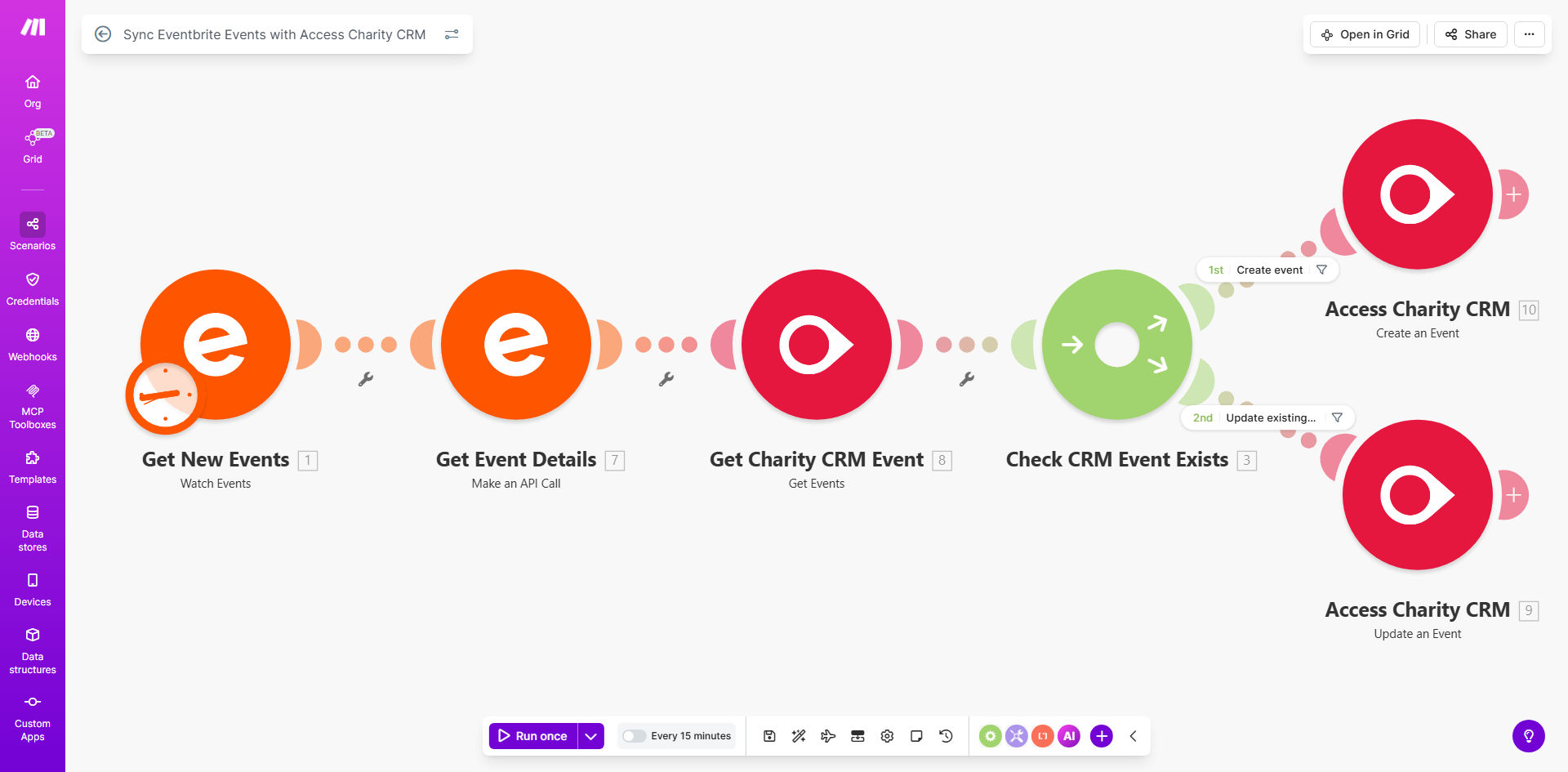
Eventbrite and Access Charity CRM integration workflow diagram

What This Workflow Does

This automation solves a critical challenge for nonprofits and charities that use Eventbrite for event management and Access Charity CRM for donor relationships. Manually transferring event data between these systems is time-consuming and prone to errors, leading to incomplete donor records and missed engagement opportunities.

The workflow automatically synchronizes new Eventbrite events and attendee data with your Access Charity CRM on a scheduled basis (default every 15 minutes). It ensures your donor database always reflects current event participation, enabling better relationship management and more accurate reporting on donor engagement.

How It Works

1. Scheduled Event Check

The workflow runs at your chosen interval (default 15 minutes) to check Eventbrite for new or updated events.

2. Data Extraction

For each event found, the system retrieves key details like event name, date/time, location, description, and ticket information.

3. Attendee Data Collection

The workflow gathers attendee information including names, contact details, ticket types, and any custom questions answered during registration.

4. CRM Record Creation

Event and attendee data is formatted to match your Access Charity CRM structure and creates or updates records accordingly.

5. Change Detection

If an event is modified in Eventbrite after initial sync, the workflow detects changes and updates the corresponding CRM records.

Pro tip: Configure custom field mappings during setup to ensure event data populates the most useful fields in your CRM for reporting and segmentation.

Who This Is For

This automation is ideal for:

  • Nonprofits running frequent fundraising or community events
  • Charities that need to track donor engagement through event attendance
  • Organizations using Access Charity CRM for donor management
  • Teams spending hours manually transferring event data between systems
  • Program managers who need accurate event participation reporting

What You'll Need

  1. An active Eventbrite organizer account with events created
  2. Access Charity CRM login credentials with appropriate permissions
  3. A Make.com account (free plan available)
  4. Basic understanding of your CRM's data structure
  5. Approximately 15 minutes for initial setup

Quick Setup Guide

  1. Click "Get This Workflow" to copy the template to your Make.com account
  2. Connect your Eventbrite account in the first module
  3. Configure which events to sync (all, specific organizers, or by tag)
  4. Connect your Access Charity CRM and map event fields to CRM fields
  5. Set your preferred sync frequency (default is every 15 minutes)
  6. Run a test sync with a recent event to verify data flows correctly
  7. Activate the scenario to begin automatic synchronization

Key Benefits

Save 5-10 hours per month by eliminating manual data entry between Eventbrite and your CRM. Staff can focus on donor engagement rather than administrative tasks.

Improve data accuracy with automated transfers that reduce human error in recording event attendance and donor participation.

Enhance donor relationships by having complete event participation history automatically available in your CRM for personalized follow-ups.

Gain better insights through accurate reporting on which donors attend which events, helping measure engagement impact.

Scale your events without proportional increases in administrative work as attendance grows.

Frequently Asked Questions

Common questions about Eventbrite and CRM integration for nonprofits

Automating event data sync saves staff hours of manual data entry, reduces human error, and ensures your donor database stays current with event attendance and engagement data. This helps with better donor relationship management and reporting.

For example, a mid-sized charity running monthly fundraising events typically spends 2-3 hours per event copying attendee lists and updating donor records. Automation eliminates this repetitive work while improving data completeness.

  • Reduces administrative workload by 80-90%
  • Ensures no attendees are missed in CRM updates
  • Enables timely post-event follow-ups

You can sync event details like name, date, time, location, description, ticket types, prices, attendee names, contact info, attendance status, and custom questions answered during registration.

The specific fields available depend on your Eventbrite event setup and your CRM's data structure. Common useful mappings include linking ticket purchases to donation records or tracking which sessions attendees participated in at multi-track events.

For most nonprofits, syncing every 15-60 minutes provides near real-time data without overloading either system. High-volume events may need more frequent syncs during peak registration periods.

Consider your event volume and staff workflows when setting the schedule. Daily syncs might suffice for small organizations with few events, while large fundraising campaigns benefit from more frequent updates to enable timely donor communications.

Yes, this automation template allows full customization of field mappings to match your CRM's data structure and your organization's specific reporting needs.

During setup, you'll define how Eventbrite fields correspond to CRM fields. For instance, you might map "Ticket Type" to a custom "Event Participation Type" field in Access Charity CRM if that better fits your reporting requirements.

The automation can detect changes and update the corresponding records in your CRM, ensuring data consistency across both platforms.

When event details change (like date, venue, or description) or new attendees register, these updates flow to your CRM on the next sync cycle. This prevents situations where staff have outdated information when communicating with attendees.

By having event attendance data automatically in your CRM, you can trigger personalized follow-ups, segment donors by event participation, and measure engagement impact more effectively.

For example, you could automatically send thank-you emails to event attendees, identify frequent participants for special recognition, or analyze whether event attendance correlates with increased donation amounts over time.

Yes, GrowwStacks specializes in building tailored automation solutions for nonprofits. We can create custom workflows that integrate Eventbrite with your specific CRM and include unique business logic for your organization's needs.

Our team has helped charities implement automations that go beyond basic data sync to include features like automated post-event surveys, attendance-based donor segmentation, and integration with other systems like email platforms or accounting software.

  • Custom field mappings for your CRM structure
  • Advanced filtering and data transformations
  • Multi-system integration capabilities

Need a Custom Event-CRM Automation?

This free template is a starting point. Our team builds fully tailored automation systems for your specific business needs.