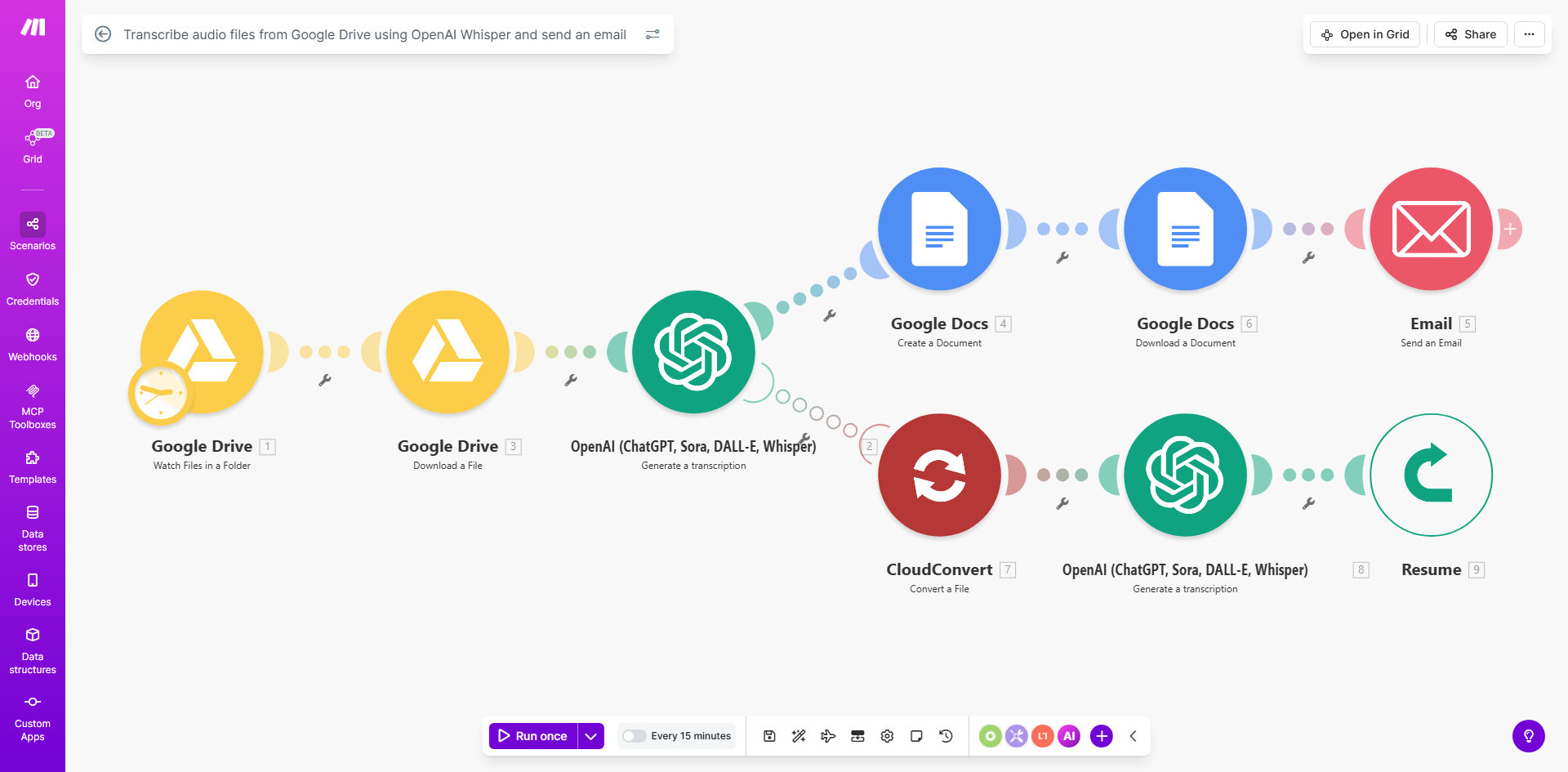
What This Workflow Does
This automation solves the time-consuming process of manually transcribing audio files by creating a fully automated pipeline. Whenever new audio files are added to a specific Google Drive folder, the workflow automatically converts them to text using OpenAI's Whisper speech recognition, saves the transcript to Google Docs, and emails it to designated recipients.
The system handles technical challenges like file size limitations (Whisper's 25MB cap) by automatically converting larger files to optimized MP3 format using CloudConvert. This end-to-end solution eliminates hours of manual transcription work while ensuring consistent formatting and timely delivery of text versions for meetings, interviews, or voice memos.
How It Works
1. File Detection in Google Drive
The workflow monitors a designated Google Drive folder for new audio file uploads. Supported formats include MP3, WAV, M4A, and other common audio types. Each new file triggers the automation sequence.
2. File Size Check and Conversion
Before processing, the system checks if the file exceeds Whisper's 25MB limit. Larger files are automatically sent to CloudConvert for compression to optimized MP3 format while preserving audio quality.
3. OpenAI Whisper Transcription
The audio file is sent to OpenAI's Whisper API, which converts speech to text with human-level accuracy. The system handles multiple languages automatically and can be configured for specific language requirements.
4. Google Docs Creation
The transcribed text is formatted and saved as a new Google Doc in a specified folder. The document includes metadata like original filename, transcription date, and optional custom headers/footers.
5. Email Notification
The completed transcript is automatically emailed to predefined recipients with the Google Doc link attached. The email template can be customized with your branding and additional instructions.
Who This Is For
This automation is ideal for professionals and businesses that regularly work with audio recordings:
- Legal teams documenting client meetings or depositions
- Journalists and researchers transcribing interviews
- Medical practices recording patient notes
- Podcasters creating show notes and transcripts
- Customer support teams analyzing call recordings
- Executives converting voice memos to actionable tasks
What You'll Need
- A Make.com account (free or paid)
- Google Drive with audio files to transcribe
- OpenAI API key (Whisper access)
- CloudConvert API key (for files over 25MB)
- Email service (Gmail, SMTP, or other Make-compatible service)
Quick Setup Guide
- Copy the template from Make.com to your account
- Connect your Google Drive account and specify the folder to monitor
- Add your OpenAI API key in the Whisper module settings
- Configure CloudConvert API for large file handling if needed
- Set up your email service and customize the notification template
- Test with sample audio files and adjust formatting as needed
- Activate the scenario and start processing files automatically
Key Benefits
Save 4-8 hours per week by eliminating manual transcription work. The average hour-long meeting takes just minutes to process automatically.
Improve accuracy and consistency with AI-powered transcription that learns from corrections and maintains uniform formatting across all documents.
Instant availability of text versions means no waiting for human transcription. Critical information from meetings or interviews is accessible immediately.
Scalable solution that handles increasing volumes without additional staff. Process hundreds of files simultaneously with no extra effort.
Centralized knowledge base with all transcripts automatically organized in Google Drive, searchable and shareable across your organization.