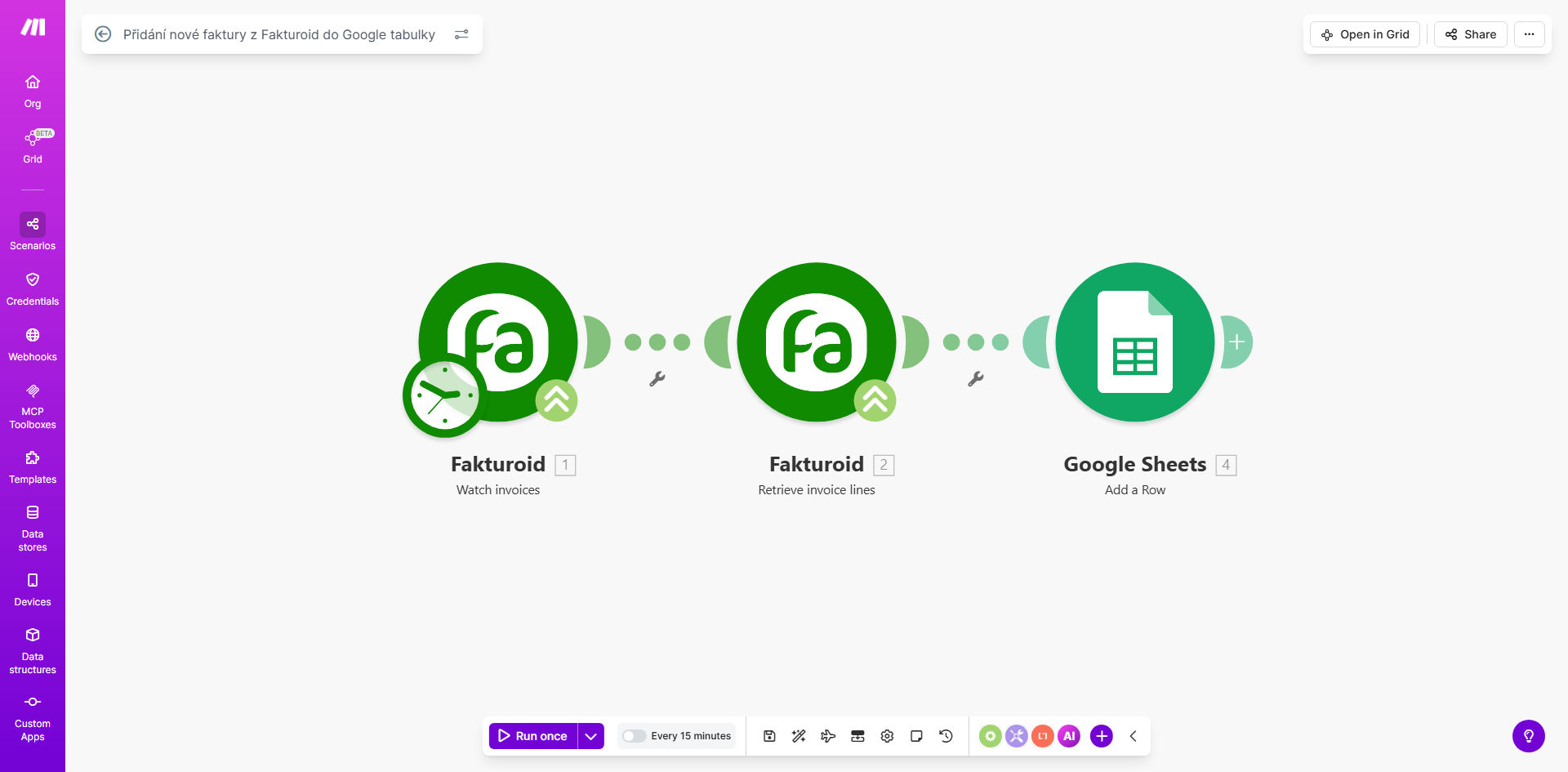
What This Workflow Does
This automation solves the tedious manual process of copying invoice data between Fakturoid and accounting spreadsheets. Every time a new invoice is created in Fakturoid, the workflow automatically captures all relevant details and adds them as a new row in your designated Google Sheets spreadsheet.
The template handles all field mappings between systems, including invoice numbers, dates, client information, line items, taxes, and payment status. This creates a perfect audit trail while eliminating human errors from manual data entry. Finance teams gain real-time visibility into receivables without spreadsheet maintenance work.
How It Works
1. Invoice Trigger
The workflow monitors your Fakturoid account for new invoice events through instant webhook notifications or periodic checks.
2. Data Extraction
All invoice fields are captured including custom fields you've configured in Fakturoid. The system handles PDF attachments and line item details.
3. Spreadsheet Update
Make.com adds a new row to your Google Sheet with columns mapped to corresponding Fakturoid fields. Date formatting and currency conversions are applied automatically.
4. Error Handling
If the update fails, the system retries automatically and notifies you if persistent issues occur. Success confirmations verify each record creation.
Pro tip: Add a timestamp column in Sheets to track when records were added. This helps verify automation performance during audits.
Who This Is For
This workflow delivers the most value for:
- Freelancers who need simple invoice tracking for tax purposes
- Agencies reconciling client billing across multiple projects
- Ecommerce businesses tracking high volumes of customer invoices
- Accounting teams maintaining audit-ready financial records
- Consultants who bill hourly and need accurate time-to-payment metrics
What You'll Need
- An active Fakturoid account with admin access
- Google Sheets edit permissions for the target spreadsheet
- A Make.com account (free tier available)
- 5 minutes to configure the template connections
Quick Setup Guide
- Duplicate the provided Google Sheets template or adapt your existing sheet
- Connect your Fakturoid account in Make.com
- Map the invoice fields to your spreadsheet columns
- Test with sample invoices to verify field mappings
- Activate the workflow and monitor initial transfers
Key Benefits
Eliminate manual errors that occur when copying invoice data between systems. The automated transfer ensures 100% accuracy for financial records.
Save 2-3 hours weekly that would normally be spent on spreadsheet updates and reconciliation work.
Improve cash flow visibility with real-time invoice tracking that's always synchronized with your accounting system.
Create audit-ready records with timestamps showing exactly when each invoice was logged in your system.
Scale effortlessly as your invoice volume grows - the automation handles 10 or 10,000 invoices with equal reliability.