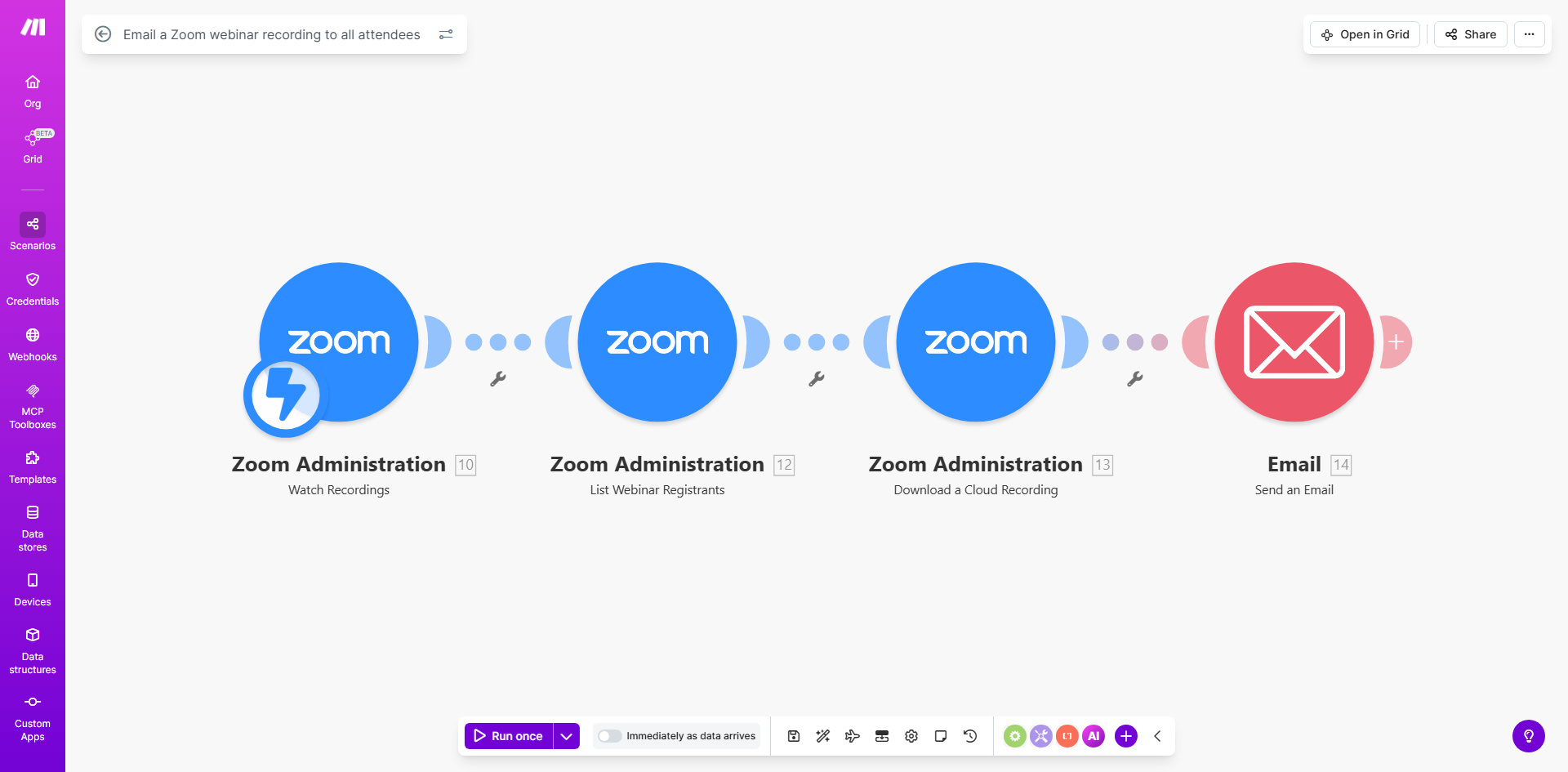
What This Workflow Does
This automation solves the tedious manual process of sharing webinar recordings with attendees. After your Zoom webinar concludes, the system automatically detects when the recording becomes available, compiles all attendee emails, and sends personalized messages with the recording link - all without any manual intervention.
For businesses running regular webinars, this eliminates hours of administrative work while ensuring 100% of attendees receive the valuable content. The template includes customizable email templates that maintain your brand voice and can include additional resources like slides, surveys, or related offers to maximize engagement.
How It Works
1. Zoom Webinar Completion Trigger
The workflow activates when your Zoom webinar ends and the recording processing begins. Make.com monitors your Zoom account for this status change.
2. Recording Availability Check
The system polls Zoom's API until the recording is fully processed and the shareable link becomes available, typically within 1-2 hours post-webinar.
3. Attendee List Compilation
The workflow retrieves the complete list of webinar attendees from Zoom, including their names and email addresses for personalization.
4. Personalized Email Generation
For each attendee, the system generates an email using your branded template, inserting their name, webinar title, and the recording link.
5. Automated Email Dispatch
Emails are sent through your connected email service (Gmail, Outlook, Mailchimp, etc.) with tracking enabled for engagement monitoring.
Pro tip: Add a 30-minute delay before sending to include a "Thank you for attending" message that references specific Q&A or moments from the live session.
Who This Is For
This automation is ideal for:
- Marketing teams running lead generation webinars
- Training departments delivering educational sessions
- Customer success teams hosting product workshops
- Consultants and coaches offering paid masterclasses
- Event managers handling virtual conference sessions
What You'll Need
- A Zoom Pro account with webinar recording enabled
- A Make.com account (free tier available)
- An email service connected (Gmail, Outlook, Mailchimp, etc.)
- Your branded email template (HTML or plain text)
Quick Setup Guide
- Click "Get This Workflow" to copy the template to your Make.com account
- Connect your Zoom account in the Make.com settings
- Connect your preferred email service (Gmail, Outlook, etc.)
- Customize the email template with your branding and messaging
- Test with a small webinar before full deployment
Key Benefits
Save 3-5 hours per webinar by eliminating manual recording distribution and follow-up emails. What used to take an afternoon now happens automatically.
Increase content engagement by 40-60% according to industry benchmarks by delivering recordings while the webinar is still fresh in attendees' minds.
Reduce human error to zero with guaranteed delivery to every attendee, unlike manual processes that often miss people or send duplicate emails.
Professionalize your follow-ups with consistent, branded communications that reinforce your expertise and attention to detail.
Gather engagement metrics automatically by tracking opens and clicks to identify your most interested prospects for sales follow-up.