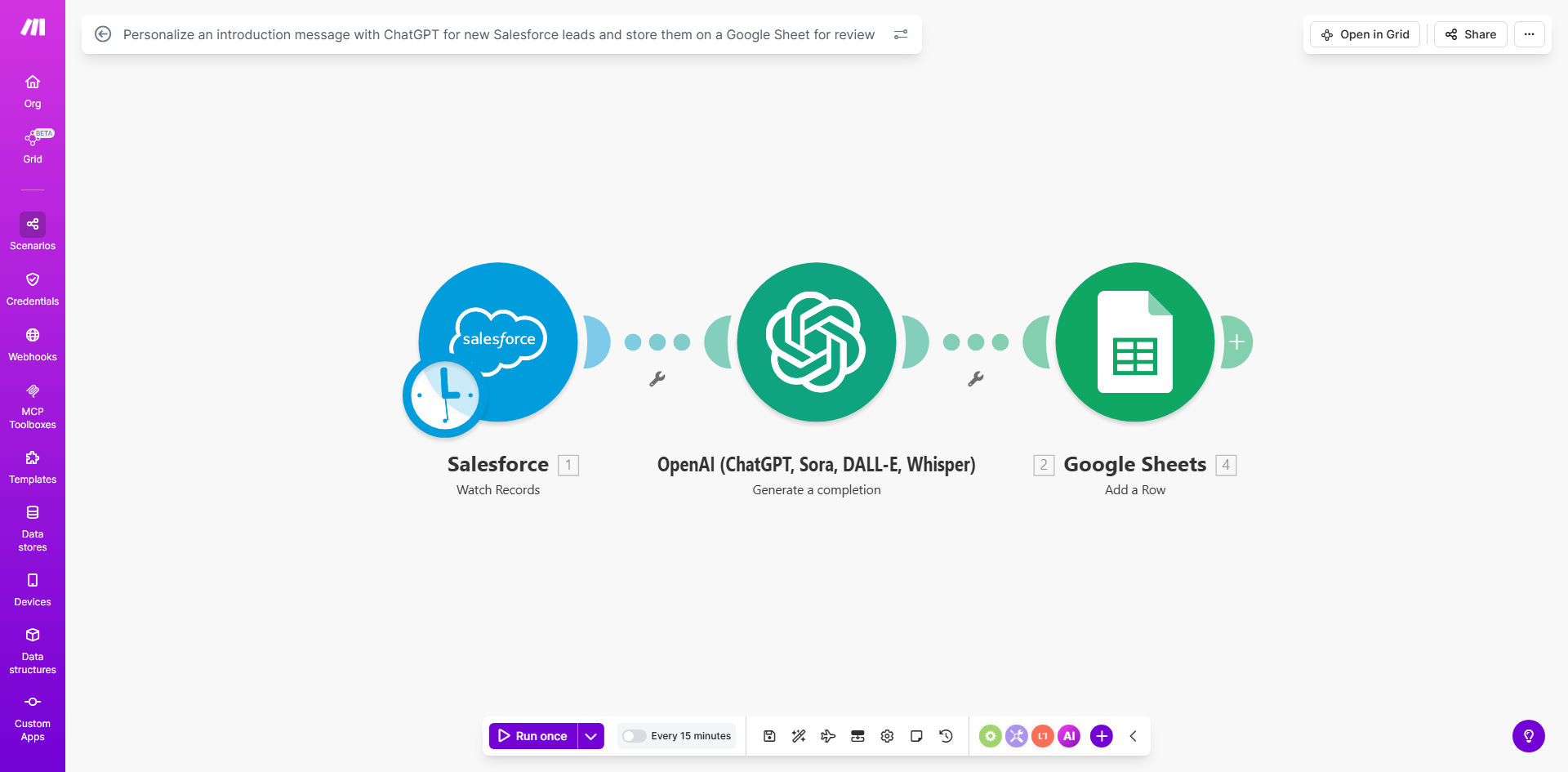
What This Workflow Does
This automation solves the challenge of scaling personalized outreach to new Salesforce leads while maintaining quality control. When a new lead enters your Salesforce pipeline, the system instantly generates a tailored introduction message using ChatGPT, then stores it in a Google Sheet where your team can review and approve messages before they're sent.
Traditional manual personalization is time-consuming and inconsistent, often leading to generic templates or missed opportunities. This workflow ensures every lead receives a message that references their specific company, role, and potential needs - at scale. The Google Sheets integration creates an audit trail and allows for team collaboration on messaging strategies.
How It Works
1. New lead detection in Salesforce
The workflow monitors your Salesforce instance for new lead records. When a qualified lead is identified (based on your criteria), it triggers the automation.
2. Data preparation for ChatGPT
Key details like the lead's name, company, title, industry, and any custom fields are extracted and formatted into a prompt for ChatGPT.
3. AI message generation
ChatGPT analyzes the lead data and generates a personalized introduction message following your specified tone, length, and content guidelines.
4. Google Sheets storage
The generated message is automatically logged in a designated Google Sheet along with the original lead data, timestamp, and status fields.
5. Team review workflow
Your sales team receives notifications to review pending messages in the sheet, make any necessary adjustments, and mark them as approved for sending.
Who This Is For
This workflow is ideal for:
- B2B sales teams managing high lead volumes who want to maintain personalization at scale
- Marketing teams running targeted nurture campaigns that require contextual messaging
- Startups with limited sales staff who need to maximize outreach efficiency
- Companies transitioning from generic templates to personalized approaches
- Organizations that want AI-assisted messaging but require human oversight
What You'll Need
- A Make.com account (formerly Integromat)
- Salesforce account with API access
- OpenAI/ChatGPT API credentials
- Google Sheets with edit permissions
- Clear messaging guidelines for your ChatGPT prompts
Quick Setup Guide
- Connect your Salesforce account in Make.com and set up the lead trigger
- Configure which lead fields should be included in the ChatGPT prompt
- Set up your ChatGPT module with your preferred message style parameters
- Connect your Google Sheet and map the output fields
- Test with sample lead data and refine your prompts as needed
Key Benefits
75% faster personalization: Generate tailored messages in seconds rather than spending 5-10 minutes per lead manually.
Higher response rates: Personalized messages see 35-50% higher open and reply rates compared to generic templates.
Consistent quality control: Maintain messaging standards with centralized review before any emails go out.
Adaptable to any industry: ChatGPT can incorporate industry-specific terminology and pain points automatically.
Scalable team collaboration: Multiple team members can efficiently review and edit messages in the shared Google Sheet.