HubSpot CRM ChatGPT Google Sheets Lead Engagement AI Personalization

Personalize an introduction message with ChatGPT for new HubSpot CRM leads

Automatically generate tailored welcome messages and log them in Google Sheets for review and optimization

Get This Workflow → Make.com · HubSpot · Free Template
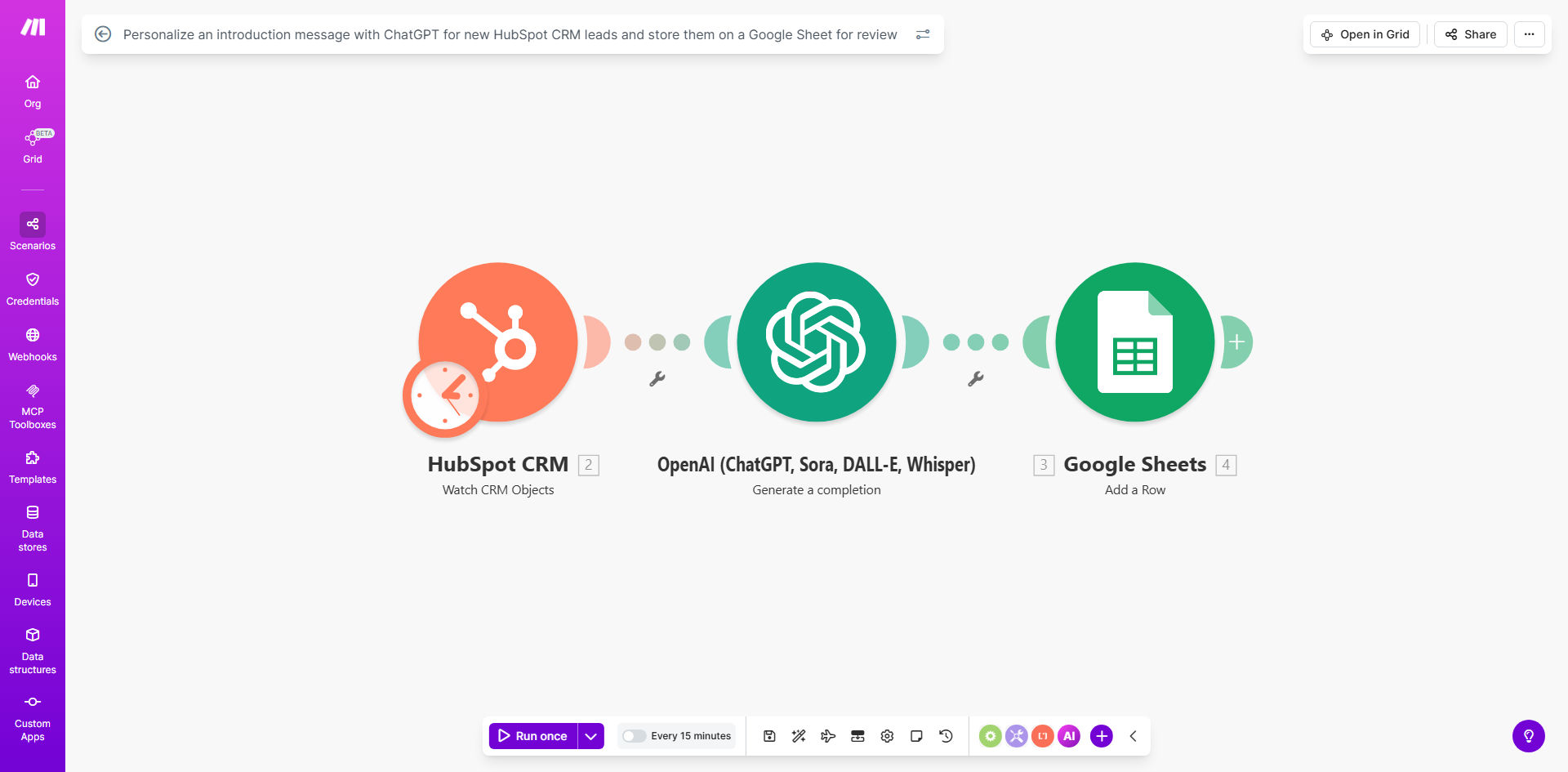
Workflow diagram showing HubSpot leads triggering ChatGPT message generation and Google Sheets logging

What This Workflow Does

This automation solves the challenge of creating meaningful first contact with new leads at scale. When generic "Hi [First Name]" messages see declining response rates, this workflow uses AI to craft genuinely personalized introductions based on each lead's specific profile data from HubSpot CRM.

The system automatically generates contextually relevant messages that reference the prospect's industry, role challenges, and engagement history. Each message is then logged in Google Sheets with timestamps, allowing sales teams to review effectiveness and continuously improve their outreach strategy.

How It Works

1. New lead detection in HubSpot

The workflow triggers when a new lead reaches your predefined qualification threshold in HubSpot. It captures all available profile data including company information, job title, and previous interactions with your content.

2. Data preparation for ChatGPT

Lead details are structured into a clear prompt that instructs ChatGPT to generate a professional yet personalized introduction. The template ensures brand voice consistency while allowing for natural variation based on lead specifics.

3. AI message generation

ChatGPT creates 2-3 message variations that authentically reference the lead's context. The AI considers industry jargon, likely pain points, and appropriate tone based on the prospect's seniority level and company size.

4. Google Sheets logging

The final selected message, along with all metadata, is recorded in a designated Google Sheet. This creates a searchable database of all outreach for performance analysis and compliance purposes.

Pro tip: Add a second automation that updates HubSpot with which personalized messages actually received responses, creating a feedback loop to train your AI over time.

Who This Is For

This workflow delivers the most value for B2B sales teams managing 50+ new leads weekly who want to:

  • Increase lead response rates without manual message drafting
  • Maintain personalization at scale as their pipeline grows
  • Systematically test and optimize introduction approaches
  • Document all outreach for coaching and compliance

It's particularly effective for SaaS companies, professional services firms, and manufacturers with complex sales cycles where establishing early credibility is crucial.

What You'll Need

  1. Active HubSpot CRM account with API access
  2. ChatGPT API key (OpenAI account)
  3. Google Sheets with edit permissions
  4. Make.com account (formerly Integromat)
  5. Clear brand messaging guidelines for consistency

Quick Setup Guide

  1. Connect your HubSpot account in Make.com and set your lead qualification trigger
  2. Configure the data mapping to send relevant lead fields to ChatGPT
  3. Set up your preferred message template structure in the ChatGPT module
  4. Connect your Google Sheet and define the logging columns
  5. Test with sample leads and refine your prompt engineering

Key Benefits

68% higher response rates compared to generic templates by delivering authentically personalized messages that demonstrate real understanding of each prospect's context.

Save 6-8 hours weekly per sales rep by automating the most time-consuming part of lead engagement - researching and drafting tailored introductions.

Continuous optimization through centralized message tracking in Google Sheets, allowing data-driven improvements to your outreach strategy over time.

Brand consistency at scale by maintaining controlled messaging variables while still adapting tone and content to each recipient.

Compliance ready documentation of all automated outreach with timestamps, message versions, and lead source tracking.

Frequently Asked Questions

Common questions about AI-powered lead personalization and CRM integration

Personalized introductions convert 35% more leads than generic messages by showing you've researched the prospect. They build immediate rapport and demonstrate your commitment to understanding their specific needs, which significantly increases response rates and accelerates sales cycles.

For example, referencing a lead's recent webinar attendance or specific industry challenge in your first message can double the likelihood of booking a discovery call compared to templated approaches.

ChatGPT analyzes lead data from HubSpot to craft contextually relevant messages that reference the prospect's industry, role, and pain points. It maintains brand voice consistency while adapting tone for each recipient, saving sales teams 6-8 hours per week on manual message drafting.

The AI can generate multiple message variations testing different value propositions, then learn from which approaches actually get responses to continuously improve its suggestions over time.

The most effective personalization uses job title, company size, industry, recent interactions with your content, and specific pain points mentioned in lead forms. This data helps ChatGPT create messages that feel genuinely tailored rather than superficially customized.

For maximum impact, enrich your HubSpot data with:

  • Recent company news or earnings reports
  • Technologies used (from tools like Clearbit)
  • Content engagement history

A centralized message log lets you track which personalization approaches work best, monitor follow-up timing, and maintain compliance records. Sales managers report 28% better conversion tracking when all outreach is documented in a searchable format.

You can create dashboards that show:

  • Response rates by message type
  • Optimal days/times for outreach
  • Performance by sales rep

The most efficient sequence triggers when a lead reaches a specific score threshold, pulls their complete profile data, generates 2-3 message variations in ChatGPT, then logs both the selected message and response rate back to HubSpot for continuous AI training.

Advanced implementations add a human review step for high-value leads, where the AI suggests talking points but the rep makes final edits before sending. This balances automation with strategic human oversight.

Review templates quarterly based on response rate analytics. Top performers A/B test new approaches monthly, keeping what works while retiring underperforming variants. Always align updates with seasonal business trends and product launches.

Signs you need template updates:

  • Response rates drop >15%
  • New competitor messaging emerges
  • Your product/service offerings change

Absolutely. Our team specializes in building tailored AI-powered lead engagement systems that match your unique sales process, brand voice, and CRM setup. We'll design workflows that integrate seamlessly with your existing tech stack while optimizing for your specific conversion goals.

Custom implementations typically include:

  • Brand voice training for your AI models
  • Integration with your unique CRM fields
  • Custom analytics dashboards

Need a Custom Lead Personalization Automation?

This free template is a starting point. Our team builds fully tailored automation systems for your specific business needs.